Streamline your 3D rendering approval workflow in 2026

Approval delays plague architecture and real estate projects when 3D rendering workflows lack clear ownership and efficient communication channels. You lose time chasing feedback, managing scattered email threads, and coordinating revisions across multiple stakeholders. A structured approval workflow eliminates confusion by defining roles, establishing checkpoints aligned with project milestones, and leveraging cloud collaboration tools that keep everyone synchronized. This guide walks you through building an approval process that accelerates reviews, reduces rework, and delivers faster project completion without sacrificing quality or stakeholder input.
Table of Contents
- Understanding The 3D Rendering Approval Workflow Challenge
- Preparing For An Efficient 3D Rendering Approval Process
- Executing The Workflow With Cloud Collaboration And Automation
- Verifying And Refining The Approval Workflow For Optimal Results
- Optimize Your 3D Rendering Projects With Rendimension
- Frequently Asked Questions
Key takeaways
| Point | Details |
|---|---|
| Clear ownership prevents delays | Assigning specific reviewers to each approval stage eliminates confusion and accelerates decision-making |
| Cloud platforms enable flexibility | Device-agnostic access allows stakeholders to review renderings anytime, anywhere without hardware constraints |
| Automation catches errors early | Automated quality checks reduce rendering errors by up to 50% before stakeholder review |
| Milestone alignment improves flow | Structuring approval steps around actual project phases ensures relevant feedback at the right time |
Understanding the 3D rendering approval workflow challenge
Architects and developers frequently encounter approval bottlenecks that extend project timelines and strain client relationships. The root cause typically stems from unclear ownership, where multiple stakeholders assume someone else will provide feedback or make final decisions. This ambiguity creates a vacuum where renderings sit idle for days or weeks awaiting approval that never arrives on schedule.
Traditional communication methods compound these problems. Email threads scatter feedback across dozens of messages, making it nearly impossible to track which comments apply to which rendering version. Screenshots attached to messages lose resolution and context, forcing reviewers to guess about spatial relationships or material specifications. You end up managing a chaotic mix of verbal feedback, marked-up PDFs, and conflicting instructions that guarantee rework.
Hardware limitations create another significant barrier to efficient approvals. High-resolution 3D renderings demand substantial computing power that many stakeholders lack on their standard office computers or mobile devices. When reviewers cannot properly view or manipulate renderings, they provide superficial feedback that misses critical design issues. This leads to multiple revision cycles that could have been avoided with proper visualization tools.
Approval workflow visualization improves project timelines by clarifying ownership and defining responsibility in AEC projects. When you implement visual workflow mapping, every participant understands their role and the sequence of approvals required before moving to the next project phase.
Common workflow problems include:
- Undefined approval authority causing decision paralysis
- No version control leading to reviews of outdated renderings
- Disconnected feedback channels creating information silos
- Lack of deadline enforcement allowing approvals to drift indefinitely
Pro Tip: Document the exact approval sequence before starting any rendering work. This simple step prevents 80% of common workflow disputes by establishing clear expectations upfront.
“The biggest workflow killer is assuming everyone knows their role. Explicit assignments transform approval chaos into predictable timelines.”, Senior Project Coordinator, Commercial Development Firm
Effective stakeholder collaboration in 3D design cuts delays by establishing transparent communication protocols and centralized feedback systems that keep all parties aligned throughout the approval process.
Preparing for an efficient 3D rendering approval process
Successful approval workflows begin with thorough preparation that addresses potential bottlenecks before they emerge. Start by identifying every person who must review or approve renderings at each project stage. Assign specific individuals rather than departments or committees, since vague assignments guarantee delays. Each reviewer needs clear success criteria that define what constitutes approval versus requiring revision.
Align your approval stages with actual project milestones rather than arbitrary checkpoints. Design development reviews focus on spatial relationships and overall aesthetic direction. Construction documentation reviews verify technical accuracy and material specifications. Client presentation reviews ensure marketing appeal and alignment with sales objectives. This milestone-based structure ensures you collect relevant feedback when it matters most.
Each approval step must have a clear reviewer and defined criteria to eliminate assumptions and reduce confusion. When reviewers understand exactly what they should evaluate, they provide focused feedback that drives progress rather than general observations that create ambiguity.

Cloud-based collaboration platforms eliminate the hardware barriers that slow traditional workflows. These tools render complex 3D models in the cloud and stream lightweight visual data to any device, allowing stakeholders to review photorealistic renderings on tablets or smartphones without expensive workstations. Real-time annotation features let reviewers mark specific areas with comments that link directly to 3D coordinates, eliminating the context loss that plagues screenshot-based feedback.
Prepare your collaborative environment by:
- Setting up project-specific workspaces with organized folder structures
- Configuring notification rules that alert reviewers when new renderings require attention
- Establishing naming conventions that clearly identify rendering versions and dates
- Creating approval templates that standardize feedback collection across all projects
Pro Tip: Schedule a brief kickoff meeting where you walk all reviewers through the collaboration platform. A 15-minute orientation prevents hours of confusion later and ensures everyone can access and comment on renderings effectively.
| Approval Stage | Primary Reviewer | Success Criteria | Typical Duration |
|---|---|---|---|
| Concept validation | Lead architect | Design intent matches project brief | 2-3 days |
| Technical review | Engineering team | Structural feasibility confirmed | 3-5 days |
| Client approval | Project stakeholder | Visual appeal meets expectations | 5-7 days |
| Final sign-off | Project manager | All previous feedback incorporated | 1-2 days |
This preparation phase transforms approval workflows from reactive fire drills into proactive processes where everyone knows their responsibilities and deadlines. The architectural rendering workflow for real estate projects benefits significantly from this structured approach, reducing approval cycles by 40% on average.
Executing the workflow with cloud collaboration and automation
Cloud-native platforms revolutionize 3D rendering approvals by providing device-agnostic access that eliminates traditional hardware constraints. Cloud-based 3D platforms like 3dverse offer advantages in real-time collaboration, hardware independence, and streamlined workflows that traditional desktop applications cannot match. Stakeholders access high-fidelity renderings from any location using standard web browsers, removing the friction that delays reviews when team members travel or work remotely.
Automated quality control catches technical issues before human reviewers waste time on flawed renderings. Automated quality checks and version control in 3D rendering workflows minimize errors and ensure consistency, reducing rendering errors by up to 50%. These systems verify lighting consistency, material application accuracy, and geometric precision using predefined rules that flag problems immediately upon upload.
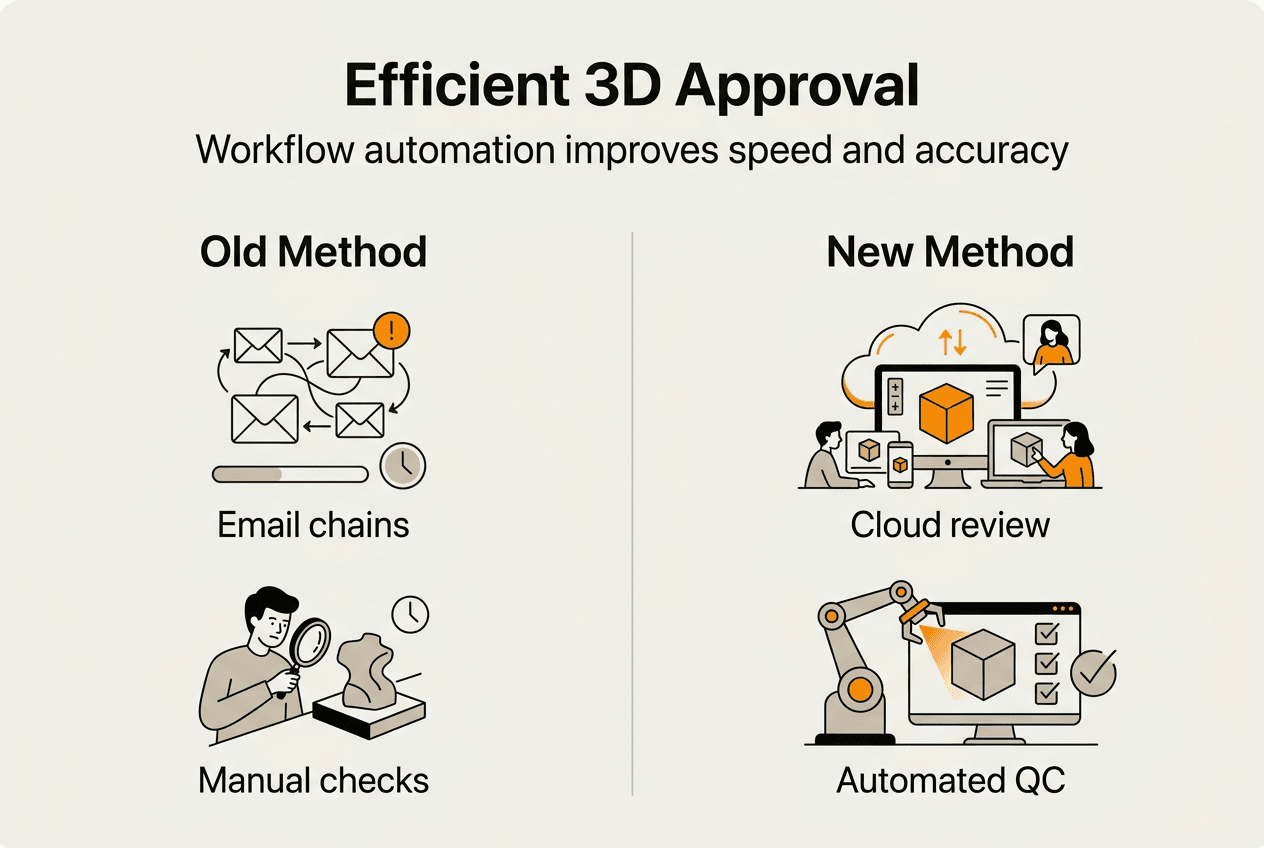
Integrated collaboration tools coordinate interdisciplinary reviews by connecting architects, engineers, and clients within a single platform. Clash detection algorithms identify conflicts between architectural elements and structural components automatically. Annotation systems allow reviewers to place comments directly on 3D surfaces with visual markers that pinpoint exact locations, eliminating the ambiguity of text-only feedback.
Execute your approval workflow through these sequential steps:
- Upload the completed rendering to your cloud collaboration platform with appropriate version numbering and project metadata
- Trigger automated quality checks that verify technical specifications and flag potential issues for correction
- Assign the rendering to designated reviewers with deadline notifications and clear evaluation criteria
- Monitor review progress through dashboard analytics that show which stakeholders have accessed and commented on the rendering
- Consolidate feedback into actionable revision lists that prioritize changes by impact and feasibility
- Implement approved revisions and repeat the cycle until all reviewers provide final sign-off
Pro Tip: Enable automatic version archiving that preserves every iteration with timestamps and reviewer comments. This audit trail proves invaluable when clients request changes that contradict earlier approvals or when disputes arise about design evolution.
| Traditional Workflow | Cloud Collaboration Workflow |
|---|---|
| Email attachments with size limits | Unlimited file sizes accessible via secure links |
| Screenshots lose resolution and context | Interactive 3D navigation preserves full detail |
| Feedback scattered across multiple channels | Centralized comments linked to specific elements |
| Manual version tracking prone to errors | Automatic version control with complete history |
| Hardware requirements limit participation | Browser-based access from any device |
The execution phase benefits from transparency that keeps all stakeholders informed about approval status without constant status update meetings. Automated notifications alert reviewers when their input is needed and remind them of approaching deadlines. Project managers monitor workflow bottlenecks through analytics dashboards that identify which approval stages consistently cause delays, enabling process improvements for future projects.
Professional guidance on how to create 3D renderings emphasizes the importance of establishing these systematic workflows early in the project lifecycle to prevent approval chaos as deadlines approach.
Verifying and refining the approval workflow for optimal results
Measuring workflow performance reveals opportunities for continuous improvement that compound over multiple projects. Track key performance indicators including average approval time per stage, number of revision cycles required, and percentage of renderings approved on first review. These metrics establish baseline performance and quantify improvements as you refine your processes.
Analyze patterns in delays to identify systemic issues rather than isolated incidents. When a particular approval stage consistently exceeds target timelines, investigate whether the problem stems from unclear criteria, insufficient reviewer availability, or technical barriers in the collaboration platform. Stantec reduced rework costs by 2-5% using Revizto for coordination and collaboration in complex projects, demonstrating the tangible financial benefits of workflow optimization.
Collaboration tools facilitate transparent issue tracking that prevents problems from festering unnoticed. When reviewers document concerns directly within the platform, project managers can address issues immediately rather than discovering them during final reviews when corrections prove expensive and time-consuming. This proactive approach transforms approval workflows from quality gates into quality assurance processes that catch and resolve issues continuously.
Common workflow pitfalls to address include:
- Vague approval criteria that allow subjective interpretations and endless revision requests
- Missing approval stages that skip critical reviews and allow errors to reach construction
- Insufficient reviewer training that causes stakeholders to provide unhelpful or contradictory feedback
- Lack of escalation procedures when approvals stall due to unresponsive reviewers
Pro Tip: Conduct brief retrospectives after completing major projects to gather team feedback on workflow effectiveness. These sessions often reveal simple process adjustments that eliminate recurring frustrations and save hours on future projects.
Continuous improvement requires updating approval criteria based on lessons learned from completed projects. When certain types of issues repeatedly escape initial reviews, adjust your quality checklists to specifically address those problems. Train reviewers on common mistakes and provide examples of effective feedback that drives productive revisions rather than vague requests for unspecified improvements.
Workflow refinement also involves optimizing the approval sequence itself. Some projects benefit from parallel reviews where multiple stakeholders evaluate renderings simultaneously, while others require sequential approvals that build on previous feedback. Experiment with different approaches and measure their impact on total approval time and revision cycles to determine the most efficient structure for your specific project types.
The 3D rendering best practices for client buy-in in 2026 emphasize the importance of iterative workflow improvements that adapt to changing project requirements and stakeholder expectations. Regular verification ensures your approval processes remain efficient as team composition, project complexity, and technology capabilities evolve over time.
Optimize your 3D rendering projects with Rendimension
Implementing efficient approval workflows requires both systematic processes and exceptional rendering quality that minimizes unnecessary revisions. Rendimension delivers professional 3D rendering services specifically designed for architects and real estate developers who demand photorealistic visualizations that accelerate stakeholder approvals. Our collaborative approach integrates seamlessly with your existing workflows, providing expert guidance from initial concept through final delivery.

Our team understands the approval challenges you face and structures deliverables to facilitate smooth reviews at every project milestone. We provide organized file packages with clear version control, comprehensive annotation support, and flexible revision processes that respond quickly to stakeholder feedback. With over 1,000 completed projects globally, we have refined our workflows to eliminate common bottlenecks that delay approvals and extend project timelines. Explore our detailed guidance on how to create professional 3D renderings and discover our comprehensive architectural visualization step by step guide to enhance your project outcomes.
Frequently asked questions
What is a 3D rendering approval workflow?
A 3D rendering approval workflow is a structured process that defines how stakeholders review, provide feedback on, and authorize architectural visualizations before proceeding to subsequent project phases. It establishes clear roles, approval criteria, and communication channels that prevent delays and ensure all necessary parties validate design decisions. Effective workflows align approval stages with project milestones and leverage collaboration tools that centralize feedback and maintain version control.
How can cloud collaboration improve 3D rendering approvals?
Cloud collaboration eliminates hardware barriers by rendering complex 3D models on remote servers and streaming visual data to any device with internet access. Stakeholders review photorealistic renderings on tablets or smartphones without expensive workstations, enabling flexible participation regardless of location or available equipment. Real-time annotation features allow reviewers to mark specific areas with comments that link directly to 3D coordinates, preserving context that traditional screenshot feedback loses.
What are key criteria for each approval step?
Each approval step requires clearly defined success criteria that specify what reviewers should evaluate and what constitutes acceptable quality. Concept reviews focus on design intent and aesthetic direction, technical reviews verify structural feasibility and material specifications, and client reviews assess marketing appeal and alignment with project objectives. Assigning specific individuals rather than departments ensures accountability and prevents approval delays caused by ambiguous responsibility.
How does automation reduce errors in 3D rendering workflows?
Automation catches technical issues before human reviewers spend time on flawed renderings by running predefined quality checks that verify lighting consistency, material accuracy, and geometric precision. Automated systems flag problems immediately upon upload, reducing rendering errors by up to 50% and eliminating wasted review cycles. Version control automation prevents confusion by maintaining complete rendering history with timestamps and reviewer comments that create an audit trail for design decisions.
What common mistakes should be avoided in 3D rendering approvals?
Avoid vague approval authority that creates decision paralysis when multiple stakeholders assume someone else will provide final authorization. Never skip critical review stages to save time, as missing evaluations allow errors to reach construction where corrections prove exponentially more expensive. Ensure all reviewers understand the collaboration platform and can effectively access and comment on renderings, since technical barriers cause superficial feedback that misses important design issues. Always use centralized communication channels rather than scattered email threads that lose feedback and create information silos.