Real estate visualization explained: 3D techniques 2026

Real estate visualization has evolved far beyond glossy brochures and static floor plans. Many architects and developers still treat visualization as a final deliverable, a polished image to show investors. That mindset leaves enormous value on the table. Modern 3D modeling for real estate now powers dynamic digital twins that integrate real-time data, adapt through project lifecycles, and transform how stakeholders engage with designs. This guide unpacks the fundamentals of photorealistic 3D rendering, explores advanced techniques like digital twins, and provides actionable strategies to elevate your project presentations and decision-making in 2026.
Table of Contents
- Understanding Real Estate Visualization And Digital Twins
- Common Pitfalls And Misconceptions In Real Estate Visualization
- Types Of Real Estate Visualization And Their Impact On Presentations
- Implementing Advanced Visualization To Enhance Project Communication
- Discover Expert 3D Visualization Services At Rendimension
- Frequently Asked Questions About Real Estate Visualization
Key takeaways
| Point | Details |
|---|---|
| Digital twins are dynamic systems | Unlike static images, digital twins integrate real-time data and evolve across the entire asset lifecycle. |
| Visualization is not one-and-done | Treating 3D models as static deliverables limits reuse, updates, and long-term project value. |
| Multiple formats serve different needs | Photorealistic renders, 3D walkthroughs, and virtual tours each offer unique strengths for stakeholder engagement. |
| Early integration maximizes ROI | Embedding visualization workflows from concept phase improves design iteration and approval speed. |
| Professional services accelerate results | Expert rendering teams deliver precision and efficiency that in-house efforts often cannot match. |
Understanding real estate visualization and digital twins
Photorealistic 3D rendering creates lifelike images of unbuilt spaces using advanced modeling software, lighting simulation, and texture mapping. These renders allow stakeholders to experience designs before construction begins. A digital twin takes this concept further: it is a dynamic, data-connected virtual representation of a physical asset, continuously updated with information about its condition, use, and performance.
Digital twins differ fundamentally from static visualizations. While a traditional render captures a moment in time, a digital twin evolves. It ingests sensor data, occupancy metrics, energy consumption figures, and maintenance records. This real-time integration enables predictive analytics, scenario testing, and lifecycle management that static images cannot provide.
The benefits for architects and developers are substantial. You can simulate how different materials age, test HVAC configurations under varying occupancy loads, or visualize renovation impacts without physical mockups. Stakeholders gain clarity on operational costs, sustainability performance, and design trade-offs through interactive exploration rather than passive viewing.
Modern visualization relies on several technological components. Building Information Modeling (BIM) software structures the geometric and semantic data. Rendering engines like Unreal Engine or V-Ray generate photorealistic outputs. IoT sensors feed live data into the digital twin platform. Cloud infrastructure enables collaboration across dispersed teams. Augmented reality (AR) and virtual reality (VR) interfaces let clients walk through spaces before groundbreaking.
Pro Tip: Treat your digital twin as an evolving asset from day one. Plan for data capture, update protocols, and reuse across design, construction, and facility management phases to maximize return on your visualization investment.
This layered approach transforms visualization from a marketing tool into a strategic asset. Architects can iterate designs based on simulated performance data. Developers can optimize leasing strategies by modeling tenant mix scenarios. Facility managers can predict maintenance needs and extend asset life. The shift from static to dynamic visualization fundamentally changes how real estate projects are conceived, communicated, and operated.
Common pitfalls and misconceptions in real estate visualization
Many teams undermine their visualization efforts by treating models as disposable deliverables. You commission a stunning render for a presentation, then archive the file and never touch it again. This approach wastes the embedded data, geometry, and effort. Most mistakes occur when teams forget that a digital twin is a living system capable of updates and reuse across the asset lifecycle, not just a one-time visualization.
The consequences ripple through project timelines and budgets. When designs change, you rebuild models from scratch instead of updating existing geometry. Stakeholders see disconnected snapshots rather than coherent narratives showing design evolution. Decision-makers lack confidence because visualizations don’t reflect current conditions or incorporate feedback loops.
Several specific mistakes plague real estate visualization projects:
- Ignoring data integration from the start, forcing manual updates that introduce errors and delays
- Failing to establish version control, leading to confusion about which model reflects approved designs
- Skipping interoperability planning, trapping data in proprietary formats that limit collaboration
- Underestimating storage and compute requirements, causing performance bottlenecks during presentations
- Neglecting stakeholder training, so clients cannot explore models independently or provide meaningful feedback
These pitfalls damage stakeholder engagement. Investors grow skeptical when visualizations feel disconnected from reality. Tenants struggle to envision spaces when tours lack interactivity. Regulatory reviewers reject submissions because static images fail to demonstrate compliance with complex codes.
Pro Tip: Embed update workflows into your project schedule from the concept phase. Assign clear ownership for model maintenance, define data refresh intervals, and budget for incremental visualization updates rather than treating each deliverable as a new project.
Collaborative software tools mitigate many of these issues. Cloud-based platforms like Autodesk Construction Cloud or Bentley iTwin enable real-time synchronization across teams. Change logs track design evolution automatically. Commenting features let stakeholders annotate models directly, reducing email chains and meeting time. By adopting architectural visualization best practices early, you transform visualization from a static artifact into a dynamic communication hub that adapts as your project evolves.
Types of real estate visualization and their impact on presentations
Real estate visualization encompasses several distinct formats, each optimized for specific communication goals and audience needs. Understanding these differences helps you select the right approach for each project phase and stakeholder group.
Photorealistic 3D renders are high-resolution still images that capture designs with lifelike lighting, materials, and detail. They excel at conveying aesthetic vision and spatial quality. Architects use them for design approvals and marketing collateral. Developers include them in investor decks and sales brochures. The technology requires powerful rendering engines, detailed texture libraries, and skilled artists to balance realism with production timelines.

3D walkthrough videos animate camera movements through spaces, showing circulation patterns and spatial relationships over time. These videos help stakeholders understand scale, transitions between areas, and experiential qualities that static images cannot convey. They work particularly well for complex projects with multiple zones or unique circulation strategies. Production demands scripting, animation, and post-processing, typically requiring several weeks from concept to final delivery.
360-degree virtual tours offer interactive exploration where viewers control navigation and viewpoint. Clients can revisit areas of interest, compare design options side by side, and share experiences with remote team members. Virtual tours bridge the gap between passive viewing and full VR immersion, working on standard devices without specialized hardware. Platforms like Matterport or custom WebGL applications host these experiences, enabling global access and analytics on viewer engagement.
Several factors influence which visualization type best serves your needs:
- Project phase: Early concepts benefit from quick renders; detailed design requires comprehensive walkthroughs
- Audience technical literacy: Investors may prefer polished videos; facility managers need interactive data-rich twins
- Budget constraints: Still renders cost less than animated walkthroughs or fully interactive VR experiences
- Timeline urgency: Rapid iterations favor simpler formats; major milestones justify elaborate productions
The following table compares key attributes:
| Visualization Type | Realism Level | Interactivity | Typical Cost | Primary Benefit |
|---|---|---|---|---|
| Photorealistic Render | Very High | None | Low to Medium | Marketing impact and aesthetic clarity |
| 3D Walkthrough Video | High | Limited | Medium to High | Spatial narrative and circulation understanding |
| 360 Virtual Tour | Medium to High | High | Medium | Self-guided exploration and remote access |
| Full VR Experience | Very High | Very High | High | Immersive presence and emotional engagement |
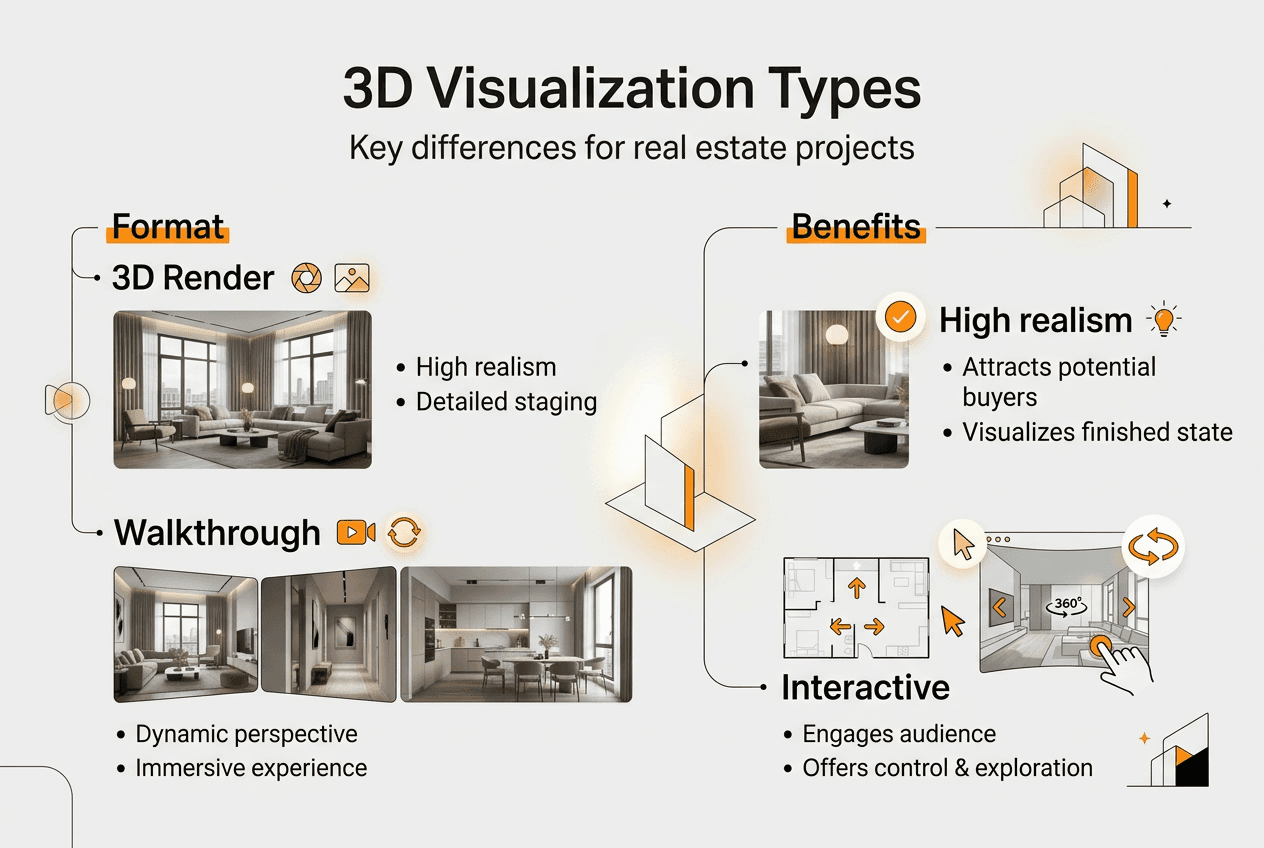
Each format impacts presentations differently. Static renders anchor pitch decks and print materials with visual punch. Walkthrough videos command attention in group presentations, guiding everyone through the same narrative. Virtual tour examples demonstrate how interactive formats empower stakeholders to explore at their own pace, reducing meeting time while increasing comprehension. Full VR experiences create memorable moments that differentiate your project in competitive markets, though they require hardware and setup that may limit accessibility.
Combining multiple formats often yields the best results. Use photorealistic renders for initial wow factor, 3D walkthrough services to explain design intent, and virtual tours for ongoing stakeholder access. This layered approach accommodates diverse learning styles and communication preferences while maximizing the value extracted from your underlying 3D models.
Implementing advanced visualization to enhance project communication
Integrating advanced 3D visualization into your project workflow requires deliberate planning and coordination across disciplines. The following steps establish a foundation for effective implementation:
-
Define visualization objectives early in the concept phase, identifying key stakeholders, decision points, and communication challenges the visualization must address.
-
Select software and platforms that align with your team’s expertise and project requirements, prioritizing interoperability with existing BIM and design tools.
-
Establish data standards and naming conventions to ensure consistency as models evolve and multiple contributors add content.
-
Create a visualization production schedule that aligns with design milestones, budgeting time for iteration and stakeholder feedback.
-
Assign clear roles for model maintenance, quality control, and stakeholder communication to prevent bottlenecks and version conflicts.
-
Develop presentation templates and viewer guidelines so stakeholders can navigate visualizations independently and provide structured feedback.
-
Implement feedback loops where visualization insights inform design decisions, creating a virtuous cycle of improvement.
Collaborating effectively with visualization experts amplifies these efforts. Professional rendering teams bring specialized skills in lighting, materials, and composition that elevate output quality. They understand technical constraints and can advise on feasible production timelines. When engaging external specialists, provide comprehensive design documentation, reference images, and clear communication about project goals. Schedule regular check-ins to review work in progress rather than waiting for final deliverables, reducing costly revisions.
Updating digital twin data through lifecycle phases requires systematic approaches. During design, link BIM geometry to the visualization platform so changes propagate automatically. In construction, integrate progress photos and reality capture scans to validate as-built conditions. Post-occupancy, connect building management systems to feed operational data into the twin. Cloud platforms facilitate these integrations, though they demand upfront configuration and ongoing data governance.
Pro Tip: Use visualization feedback loops to refine designs and communication strategies. When stakeholders highlight confusing areas or request additional views, treat these as valuable signals about design clarity and documentation needs, not just visualization tasks.
Software and tools that streamline workflows include Autodesk Revit and Rhino for modeling, Enscape and Lumion for real-time rendering, Unreal Engine for interactive experiences, and Unity for VR applications. Cloud platforms like Autodesk Construction Cloud, Bentley iTwin, and NVIDIA Omniverse enable collaboration and real-time updates. Creating professional 3D renderings demands mastery of these tools plus artistic sensibility to balance technical accuracy with compelling storytelling.
Successful implementation also requires stakeholder training. Clients and team members need guidance on navigating virtual tours, interpreting data overlays in digital twins, and providing actionable feedback. Short tutorial videos, annotated screenshots, and live demonstration sessions reduce friction and increase engagement. When stakeholders feel confident exploring visualizations independently, they contribute more meaningful input and make faster decisions.
Discover expert 3D visualization services at Rendimension
Elevating your real estate projects with advanced visualization demands specialized expertise and proven workflows. Rendimension specializes in photorealistic 3D rendering services that transform architectural concepts into compelling visual narratives. With over 1,000 projects completed globally, the team brings deep experience across residential, commercial, and mixed-use developments.

Rendimension’s capabilities extend beyond static images to comprehensive architectural visualization guide solutions including digital twins, immersive walkthroughs, and virtual reality experiences. The collaborative process ensures your vision translates accurately from concept through final delivery, with iterative feedback loops that refine every detail. Whether you need marketing materials for investor presentations or interactive tools for stakeholder engagement, professional 3D walkthrough services accelerate approvals and enhance communication. Explore how expert visualization services can differentiate your next project and deliver measurable impact on stakeholder confidence and decision-making speed.
Frequently asked questions about real estate visualization
What software is essential for digital twin creation?
Digital twin creation relies on BIM platforms like Autodesk Revit or Bentley MicroStation for geometric modeling, combined with integration platforms such as Bentley iTwin or NVIDIA Omniverse that connect real-time data streams. Rendering engines like Unreal Engine add photorealistic visualization, while IoT platforms feed sensor data into the system.
How do updates in a digital twin affect real estate development?
Updates enable continuous design optimization by revealing performance issues before construction, reducing costly field changes. During operations, updated twins predict maintenance needs and optimize energy use, extending asset life and improving tenant satisfaction. This ongoing refinement transforms development from a linear process into an adaptive cycle.
What is the ROI of investing in photorealistic renderings?
Photorealistic renderings accelerate sales cycles by helping buyers visualize finished spaces, often reducing time on market by 20 to 30 percent. They also minimize design changes during construction by surfacing stakeholder concerns early, cutting change order costs. Marketing materials featuring high-quality renders generate stronger engagement and command premium pricing.
Can virtual reality replace traditional walkthroughs?
VR offers unmatched immersion and spatial understanding but requires hardware and setup that limit accessibility for some stakeholders. Traditional walkthroughs remain valuable for quick reviews and presentations to large groups. The most effective approach combines both: VR for key decision-makers seeking deep engagement, traditional formats for broader communication.
How to start integrating 3D visualization in early project stages?
Begin by defining visualization goals and identifying critical decision points where visual clarity adds value. Select software that integrates with your existing design tools and train your team on basic rendering workflows. Start with simple still renders for concept validation, then expand to walkthroughs and interactive formats as designs mature. Following 3D visualization trends 2026 helps you adopt emerging techniques that keep your presentations competitive.
What are the main differences between 3D rendering and digital twin technology?
3D rendering produces static or animated visual representations of designs, focusing on aesthetic communication. Digital twins incorporate live data feeds, simulate operational performance, and evolve throughout the asset lifecycle. Rendering emphasizes visual fidelity for marketing and approvals, while digital twins prioritize functional accuracy for management and optimization.
Recommended
- 3D Visualization Trends 2026: Transforming Architecture And Marketing
- Enhance Property Sales With 3D Renders In Real Estate 2026
- 3D Modeling For Real Estate: Boosting Sales And Engagement
- Why Architectural Visualization Drives Real Estate Sales
More on this: architectural visualization services and the companies we rank in this category.