Studio Proven Source Files Handover for Design & Marketing (1,000+ Projects)

Studio Proven Source Files Handover for Design & Marketing (1,000+ Projects)
A proper source files handover includes the native scene file (.max, .rvt, or equivalent), universal geometry exports like FBX or OBJ, full texture and material sets, layered PSDs for marketing edits, BIM files when the project involves Revit, and a README explaining scale, units, and dependencies. Every one of those items needs to be named explicitly in your contract, with editable source rights spelled out separately from export-only rights. Rendimension has built this checklist across more than 1,000 completed projects, and the studios that skip it are the ones stuck re-requesting files six months later.
TL;DR:
- Clear contract details on all required source and export formats prevent delays and misunderstandings during handover.
- A comprehensive package should include native scene files, universal geometry exports, texture maps, layered PSDs, and documentation for seamless future edits or integration.
- Organized folder structures with consistent naming, scale, and relative paths ensure long-term project accessibility and reduce broken links.
- Immediate post-download validation of files in the specified software version helps catch issues like missing textures or corrupt geometry early.
- Maintaining source files for at least 90 days and defining licensing terms in writing reduces legal risks and supports ongoing project flexibility.
Table of Contents
- What Should Be In Your Contract Before Production Starts?
- What Files And Assets Should You Actually Receive?
- Packaging And Naming: The Folder Structure That Prevents Broken Imports
- How Do You Validate A Handover Right After Download?
- How Should Files Be Delivered And Stored Long-Term?
- Licensing And Versioning: Closing The Legal Gaps
- Rendimension’s Approach To Reliable Handovers
- Getting Production-Ready Files From Rendimension
- Sources
- FAQ
What Should Be In Your Contract Before Production Starts?
The handover fails or succeeds based on decisions made before a single frame gets rendered. Most disputes over missing files trace back to a brief that never named what “final delivery” actually meant.
Lock down these five items before signing off on a project:
- Format scope. Name every native format and every export format in-scope, not just “3D files.” If you need .max plus FBX plus layered PSDs, write out all three.
- Acceptance criteria. Define what counts as approved. Tie source-file release to a specific sign-off gate, not a vague “once the client is happy” clause. A structured project schedule that separates composition, look development, and polish into distinct approval stages prevents last-minute scope creep from delaying your handover.
- Software and version. State the exact application version, plus any plugins or renderer dependencies the scene relies on.
- Units and scale. Confirm whether the project uses imperial or metric units and note the scene’s real-world scale reference.
- Licensing terms. Separate editable source rights from export-only rights, and address third-party assets and fonts explicitly.
- Delivery and retention window. Agree on a delivery date, a retention period for the files after delivery, and how long you have to flag problems.
Vague briefs create vague handovers. If your contract only says “final files provided,” expect an argument later about whether that meant a rendered image or the working scene behind it.
What Files And Assets Should You Actually Receive?
A usable handover pack goes well beyond a folder of JPEGs. Here’s what belongs in it, and why each piece matters.
- Native scene file (.max, .rvt, or your studio’s working format): required if you plan to make future edits, swap materials, or hand the project to another vendor down the line.
- Universal geometry exports (.fbx and .obj, paired with .mtl material files): these open in nearly any 3D application, game engine, or CAD tool, making them essential even when you also get the native file.
- Texture and material maps: Albedo/Color, Normal, Roughness or Metallic, and Ambient Occlusion, delivered at 2K or 4K resolution with consistent naming so each map is traceable to its material.
- Layered PSDs: needed for marketing teams who want to swap skies, adjust lighting mood, or drop in signage without re-rendering.
- Render passes, HDRIs, and camera/light setups: these let a downstream artist reproduce or tweak the lighting scheme instead of starting from scratch.
- Low and high poly pairs or LODs: relevant for real-time and interactive applications like VR walkthroughs.
- BIM deliverables (RVT or IFC) and CAD exports (DWG/DXF): required for architecture and construction teams integrating the model into ongoing design work.
- Dimensioned PDFs: a quick-reference sheet non-technical stakeholders can review without opening 3D software.
A complete package pairs the geometry, the texture maps, and the native project file together, and skipping any one of the three tends to be exactly what causes friction later.
Packaging And Naming: The Folder Structure That Prevents Broken Imports
Even a complete file set becomes useless if the folder structure is a mess. Consistent naming and a predictable folder tree are what let a designer open your project two years later and immediately understand what they’re looking at.
Use a root naming pattern like ClientName_ProjectName_v1.0, then break it into standard subfolders:
/sourcefor native scene files/exportsfor FBX, OBJ, and other universal formats/texturesfor all image maps, organized by material/materialsfor shader or material definition files/docsfor the README and any specification sheets/previewsfor reference renders and thumbnails
Inside each folder, avoid spaces and special characters in filenames. Use underscores, and bake the scale, units, and version number directly into the name when it matters, something like Lobby_Materials_Metric_v2.pack textures with relative paths rather than absolute ones, since inconsistent folder structure and naming is the leading cause of broken texture links when files move between machines. If delivery is going into Unity or Unreal, include a short note on engine-specific material setup and collision meshes.
Pro Tip: Deliver two zips when the audience differs: a lean “Runtime” pack with optimized exports and textures for marketing teams, and a full “Source” pack with every native file for design and engineering teams. It saves the marketing side from downloading gigabytes of files they’ll never open.
How Do You Validate A Handover Right After Download?
Don’t wait a week to discover the scene file won’t open. Run this sequence the same day you receive the package:
- Open the native file in the exact software version specified in the brief. Check scale, confirm the origin point, and scan the layer hierarchy for anything mislabeled.
- Verify texture links. Every material preview should display correctly, with no missing or pink placeholder textures.
- Re-open the exported FBX or OBJ in a neutral viewer or your target engine to confirm geometry, UVs, and camera data survived the export.
- Read the README for plugin dependencies or special material notes, and screenshot any issue immediately rather than describing it from memory later.
- Sign off only when every acceptance criterion from the brief is actually met, not just “most of it looks right.”
Testing the package in a fresh directory before you accept it catches the most common failure mode: broken texture paths caused by absolute file references instead of relative ones. Studios that build this five-minute check into their receiving process see far fewer “it doesn’t open” tickets than those who accept files on sight and discover problems weeks later, when the original team has moved on to another project.
How Should Files Be Delivered And Stored Long-Term?
Secure delivery matters as much as the files themselves, especially for architectural work carrying real intellectual property.
- Use a branded or secure cloud delivery link with password protection and a set expiry date, and test the link yourself in an incognito browser before sending it to the client.
- Default to keeping source files accessible for at least 90 days after delivery, then archive to cold storage unless the contract specifies otherwise.
- For large packages, provide checksums or split the download into segments so a failed transfer doesn’t force a full restart.
- Set a clear download window with a follow-up reminder a few days before the link expires.
- Drop a short delivery note, essentially a README, in the root folder, and request a confirmation reply once the client has downloaded and opened everything.
Many agencies keep download links live for seven to thirty days before pulling them, so build your own review timeline around whatever window your vendor sets rather than assuming it stays open indefinitely.
Licensing And Versioning: Closing The Legal Gaps
The fastest way to end up in a dispute is a handover with no clarity on what you’re actually allowed to do with the files. Nail down these four points in writing:
- Editable rights vs. export-only rights. State plainly whether you can open and modify the native scene file in-house, or whether you’re only licensed to use the finished exports.
- Third-party asset proof. Request confirmation that any stock models, HDRIs, or bundled fonts are properly licensed, or get substitutes you can legally redistribute.
- Attribution and redistribution limits. Clarify whether the files can be shared with other vendors, used in a different project, or resold in any form.
- Versioning convention. Agree on how revisions get numbered and tracked, so “v2” means the same thing to both sides when a change request comes in six weeks later.
Skipping this section doesn’t just create legal risk. It creates the awkward conversation where a marketing team assumes they can hand your source file to a freelancer, only to find out the license never covered that.
Rendimension’s Approach To Reliable Handovers
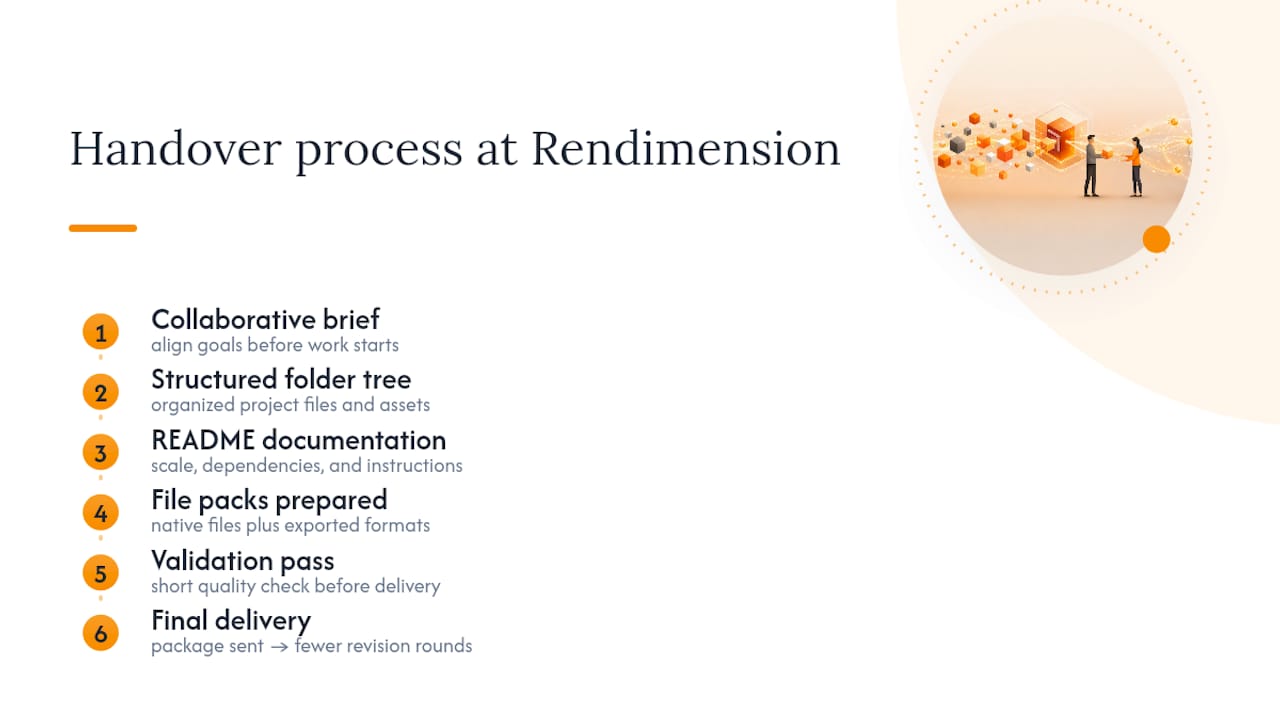
Rendimension has built its handover process around the same checklist outlined above, refined across more than 1,000 completed projects for architects, developers, and product manufacturers. Every engagement runs on a collaborative process from initial brief through final delivery, which is where most of the ambiguity in a typical handover gets resolved before it becomes a problem.
A typical package includes a structured folder tree, a README covering scale and dependencies, both native and export file packs, and a short validation pass before the files ever reach the client. Teams that follow this kind of structured checklist consistently report fewer rounds of revision requests after delivery, simply because the ambiguity that usually triggers those requests never made it into the brief in the first place.
, Rendimension
Getting Production-Ready Files From Rendimension
Rendimension delivers architectural visualization, 3D rendering, BIM and Revit modeling, and interactive walkthroughs, and every one of those services can include a full source files handover when it’s specified in the project scope. That means the editable native scene, clean texture sets, layered PSDs for your marketing team, and documentation covering scale, units, and material notes, rather than just a folder of finished images you can’t touch.

What you gain from working this way is control. Your design team can keep iterating on the model, your marketing team can swap out backgrounds without commissioning a new render, and your architecture partners can pull dimensioned exports straight into their own CAD tools. Rendimension builds a validation pass into every delivery, so the files you receive have already been opened, checked, and confirmed working before they land in your inbox. If you’re planning a project and want a package built around this exact checklist, request a quote for your next rendering project and ask for a sample handover structure up front.
Sources
- How to Package 3D Model Files for Download: A Creator’s Guide
- Client File Handoff Checklist for Agencies | BulkShare
FAQ
What files should be included in a source files handover?
At minimum, expect the native scene file, FBX or OBJ geometry exports, full texture and material maps, layered PSDs, a README, and BIM files (RVT/IFC) if the project involves architectural integration.
Do I need the native scene file, or are exports enough?
If you plan to make future edits, change materials, or hand the project to another vendor, you need the native file; if you only need to view or present the model, universal exports like FBX usually cover it.
How long should source files remain available for download?
A reasonable default is keeping files accessible for at least 90 days after delivery, with archiving to cold storage afterward unless your contract specifies a longer window.
What’s the first thing I should check after receiving a handover?
Open the native scene file in the specified software version and confirm scale, origin point, and that all texture links load correctly before signing off on acceptance.
Does Rendimension include source files with its 3D rendering projects?
Yes, Rendimension can include editable native files, universal exports, and full documentation as part of a project’s scope when it’s specified in the contract and brief.
What’s the difference between editable source rights and export-only rights?
Editable source rights let you open and modify the native scene file yourself, while export-only rights limit you to using the finished renders or exports without touching the underlying project file.