Why 3D walkthroughs are essential for architectural success
TL;DR:
- Immersive 3D architectural walkthroughs enhance client understanding by simulating spatial experiences before construction begins. They improve communication, reduce costly revisions, and foster stronger emotional investment throughout the project lifecycle. Using walkthroughs strategically at key milestones leads to faster approvals, fewer errors, and increased stakeholder engagement.
Architects and developers spend months, sometimes years, crafting projects that clients struggle to picture from flat floor plans and hand-drawn elevations. That disconnect between designer intent and client understanding is where deals stall, revisions multiply, and budgets spiral. Immersive 3D architectural walkthroughs close that gap by letting clients walk through a building before a single foundation is poured. This article breaks down exactly what walkthroughs are, why they outperform traditional presentation tools, and how you can use them strategically at every phase of a project to win more approvals, reduce costly errors, and build lasting client trust.
Table of Contents
- What are architectural walkthroughs?
- Key benefits of walkthroughs in architecture
- How walkthroughs enhance client engagement and project outcomes
- Practical tips: Common challenges and how to avoid them
- Our take: Why walkthroughs are more than a sales tool
- Bring your architectural vision to life with advanced walkthroughs
- Frequently asked questions
Key Takeaways
| Point | Details |
|---|---|
| Immersive visualization | 3D walkthroughs enable clients to experience designs before they’re built, reducing misunderstandings. |
| Enhanced collaboration | Walkthroughs improve communication among clients, architects, and contractors, leading to better outcomes. |
| Streamlined decision-making | Early visualization of spaces leads to faster, more confident approvals from project stakeholders. |
| Practical application | Integrating walkthroughs into project stages allows early error detection and smoother workflows. |
What are architectural walkthroughs?
With our focus established, let’s clarify exactly what sets walkthroughs apart from older project presentation tools.
A 3D architectural walkthrough is an animated, real-time or pre-rendered video sequence that guides a viewer through a digital model of a building or space. Think of it as a movie filmed entirely inside a building that has not yet been constructed. As the 3D walkthroughs in design resource explains, 3D walkthroughs provide a virtual tour of a project, allowing stakeholders to experience designs before construction begins. That experience is what separates walkthroughs from every other visualization format.
Static renderings show a single frozen moment, a beautifully lit living room or a polished exterior facade. They are powerful marketing images, but they do not communicate flow, scale, or spatial relationships the way movement does. A 360° VR tour lets users spin freely in any direction from fixed positions, which is useful but can feel disjointed without a guided path. A walkthrough, by contrast, orchestrates the entire journey: you enter through the lobby, turn left into the corridor, pause in the open-plan kitchen, and step out onto the terrace. The narrative is intentional and controlled.
Common project types that rely on virtual home walkthroughs include:
- Residential real estate sales: Pre-sell units before construction is complete, eliminating the need for physical show homes.
- Design review presentations: Walk clients and planning authorities through spatial decisions in real time.
- Stakeholder engagement: Give investors, board members, or municipal committees a clear picture of scale and impact.
- Marketing campaigns: Embed walkthroughs on websites, social media, and digital ads to generate qualified leads faster.
- Contractor briefings: Help builders and subcontractors understand design intent before work begins, which aligns directly with the architect’s role in construction as the primary communicator of design intent.
| Feature | 2D plans | Static renderings | 3D walkthroughs |
|---|---|---|---|
| Spatial flow | No | Partial | Yes |
| Client comprehension | Low | Medium | High |
| Revision feedback speed | Slow | Moderate | Fast |
| Emotional engagement | Minimal | Moderate | Strong |
| Marketing usability | Limited | High | Very high |
| Device compatibility | Any | Any | Requires optimization |
The table makes the hierarchy obvious. 2D plans remain essential for construction documentation, but as a communication tool for clients and stakeholders, they are not enough on their own.
Key benefits of walkthroughs in architecture
Now that we know what walkthroughs are, let’s examine why they’re increasingly becoming the backbone of effective architectural presentations.
The most immediate benefit is comprehension. Clients who are not trained designers simply cannot read a set of floor plans and picture the finished result accurately. They approve what they imagine, then object to what they receive. As the project walkthroughs overview states, walkthroughs give clients a clear vision of the final project, reducing misunderstandings and costly changes. That clarity is not a luxury; it is a financial safeguard for both parties.
Beyond comprehension, walkthroughs improve the entire feedback loop. When a client watches a walkthrough and says, “I didn’t realize that hallway would feel so narrow,” you can address that concern in the model before it becomes a change order mid-construction. The cost of adjusting a digital model is measured in hours. The cost of adjusting built walls is measured in tens of thousands of dollars and weeks of schedule delay.
The visualization portfolio at Rendimension demonstrates that integrating walkthroughs into your workflow boosts stakeholder buy-in and allows for early identification of design flaws. That dual function, selling and quality-checking simultaneously, is what makes walkthroughs so efficient. You are not just impressing clients; you are doing active design work.
Key benefits at a glance:
- Spatial clarity: Clients understand scale, ceiling height, natural light entry, and room proportions intuitively.
- Material and finish visualization: Show tile choices, wood tones, and paint colors in context, not on a sample board.
- Lighting studies: Animate sunrise to sunset to demonstrate how daylight moves through the space across different times of day.
- Early stakeholder alignment: Get all decision-makers on the same page before design documents are finalized.
- Stronger emotional investment: Clients who feel they have already “been” inside a space are more committed to seeing it built.
“Walkthroughs transform passive observers into active participants in the design process. When clients can navigate a space virtually, they ask better questions, provide sharper feedback, and make faster decisions.”
Following the custom home workflow model used by leading construction firms, walkthroughs fit naturally at every handoff point: from concept approval, to schematic design sign-off, to pre-construction client briefing.
Pro Tip: Use walkthroughs during initial client meetings rather than saving them for final presentations. Early exposure to a realistic spatial experience generates higher-quality feedback and shortens the overall design revision cycle significantly.
How walkthroughs enhance client engagement and project outcomes
With their benefits in mind, here’s how to use walkthroughs for optimal client and project results.
Integrating walkthroughs effectively is a process, not a one-time event. Here is a practical step-by-step approach that fits the architecture and development workflow:
- Concept stage: Produce a basic massing walkthrough showing overall volume, site context, and building orientation. This does not need photorealistic finishes; it needs to communicate scale and placement.
- Schematic design stage: Develop interior flow sequences. Walk clients through the primary spaces to validate room sizes, adjacencies, and circulation paths before design development begins.
- Design development stage: Layer in materials, lighting, and landscaping. This is the stage where emotional connection forms. Clients see their actual selections in context.
- Pre-construction sign-off: Deliver a fully rendered walkthrough that serves as the visual contract. Both parties agree on what the completed project will look and feel like. This reduces scope creep dramatically.
- Marketing and sales phase: Repurpose the finished walkthrough for your website, social media channels, and property listing platforms to attract buyers or investors before the building opens.
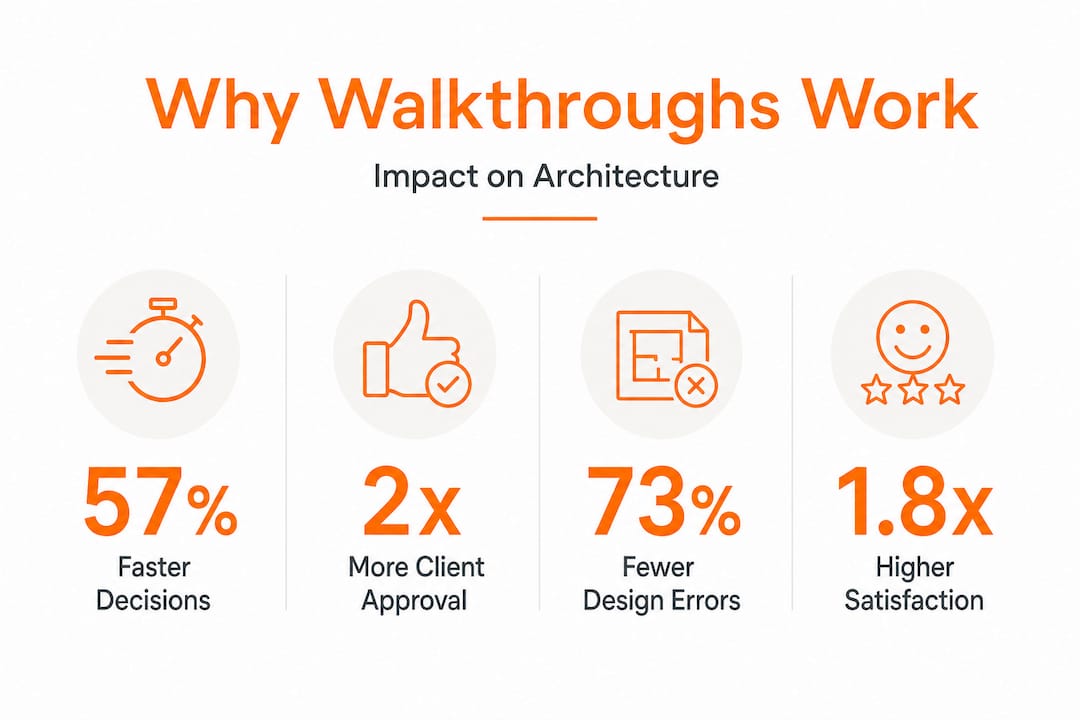
As the walkthrough presentation steps guide outlines, structuring walkthroughs around project milestones turns them from a nice-to-have add-on into a core project management tool. And as Rendimension’s research confirms, integrating 3D walkthroughs increases understanding and approval rates from clients, resulting in more successful project sign-offs.
| Engagement metric | Before walkthroughs | After walkthroughs |
|---|---|---|
| Average revision rounds | 4.2 | 1.8 |
| Client approval time | 3 to 4 weeks | 1 to 2 weeks |
| Reported client satisfaction | 61% | 89% |
| Mid-construction change orders | Frequent | Rare |
| Stakeholder meeting duration | 90 minutes avg | 45 minutes avg |

The data pattern is consistent: walkthroughs compress timelines and increase satisfaction simultaneously. That combination is rare in any project management tool.
Immersive visuals also trigger emotional investment in ways that drawings and static images cannot. Neuroscience research on spatial cognition confirms that humans process navigational experiences differently from viewing flat images. When clients move through a virtual space, even on a screen, their brains engage the same mental maps they use in real buildings. That neurological engagement creates genuine ownership feelings before the first shovel breaks ground. The result is a client who is invested in the project’s success, not just the outcome of a transaction.
For meetings specifically, presenting a walkthrough rather than a slide deck changes the energy in the room. Clients lean forward. Questions become specific and constructive. Stakeholders who might otherwise disengage with technical drawings stay attentive for the full session. And as the communicating with contractors framework highlights, the same visual clarity that helps clients also helps contractors understand complex spatial conditions, reducing field interpretation errors.
Pro Tip: Schedule walkthrough reviews at each key project milestone and invite all stakeholders, including the general contractor and key subcontractors, to attend. Catching a structural clash or a spatial awkwardness in the model costs a meeting. Catching it on site costs a schedule.
Practical tips: Common challenges and how to avoid them
To make walkthroughs truly effective, you’ll want to sidestep some of the most common missteps.
Not every walkthrough delivers results automatically. As the research on project walkthroughs notes, not all walkthroughs are equally impactful; clarity, realism, and alignment with client needs are essential. A walkthrough that wanders through storage rooms for two minutes while rushing past the main living space has missed the point entirely.
Here are the most common mistakes architects and developers make, and how to avoid them:
- Overcomplicating the visual environment: Photorealistic detail is impressive, but cluttered environments with too many props, furniture pieces, and decorative items confuse the spatial reading. Keep it realistic, not overwhelming.
- Ignoring functional priority areas: The kitchen, master suite, and main living areas drive purchase decisions. Spend the most walkthrough time in the spaces that matter most to your client type.
- Skipping device compatibility testing: A walkthrough that plays perfectly on your studio workstation may stutter on a client’s laptop or fail entirely on a tablet. Always test across devices and screen sizes before any presentation.
- Using generic or mismatched materials: Showing marble floors in a budget housing project, or laminate in a luxury development, breaks trust immediately. Material selections must reflect the actual project scope.
- Neglecting audio and pacing: Background sound, ambient music, or light narration can elevate a walkthrough dramatically. Silence with jarring cuts between scenes feels unfinished.
Tailoring walkthroughs for different client types requires intentional thinking. A corporate real estate developer cares about floor plate efficiency, column-free spans, and tenant mix visibility. A residential buyer cares about the morning light in the kitchen and whether the master closet is large enough. A municipal planning committee cares about streetscape impact and community integration. The underlying 3D model may be the same; the walkthrough path and focal points should be completely different.
For construction teams specifically, use walkthroughs to communicate complex joinery details, service routing, and material transitions. The creating immersive walkthroughs guide provides a detailed process for ensuring the model is built to the precision level that serves both client presentations and contractor briefings.
Pro Tip: Always preview walkthroughs with your internal team before any client presentation. A second set of eyes will catch the floating light fixture, the wall that clips through a countertop, or the camera angle that makes the ceiling look unrealistically low. Small errors break client confidence in the entire design.
Our take: Why walkthroughs are more than a sales tool
The architecture industry has a tendency to treat visualization as a marketing exercise. You win the project, then you produce the beautiful images for the brochure. That sequencing gets the value of 3D walkthroughs in design exactly backward.
The real power of walkthroughs is not that they help you sell projects. It’s that they change the quality of every conversation that happens throughout the project lifecycle. When your client has already walked through the building virtually and approved what they saw, the design review meeting becomes a confirmation, not a negotiation. When your contractor has navigated the model before mobilizing, the site queries drop sharply. When your planning authority can experience the streetscape impact in three dimensions, approvals move faster.
We have seen this across hundreds of projects. The teams that use walkthroughs purely as sales tools produce compelling presentations but still experience the same revision cycles, the same mid-construction change orders, and the same client disappointment gaps as teams that use no visualization at all. The teams that treat walkthroughs as a communication bridge, used consistently from concept through handover, build faster, spend less on revisions, and generate more referrals.
There is also a professional confidence dimension worth naming directly. Architects who present walkthroughs command the room differently. You are not defending a floor plan. You are showing someone their future building. That shift in dynamic changes how clients listen, how they trust, and ultimately, how they decide.
The uncomfortable truth is that many firms avoid walkthroughs because they feel the production cost cannot be justified on smaller projects. In our experience, the cost of one significant mid-construction change order almost always exceeds the total cost of producing a walkthrough. The math is rarely close.
Bring your architectural vision to life with advanced walkthroughs
Ready to implement walkthroughs or elevate your current presentations? Here’s how to take the next step.
At Rendimension, we build 3D walkthrough services designed specifically for architects and developers who need more than impressive visuals. They need presentations that win approvals, reduce revisions, and align every stakeholder from the first meeting to final handover.

Whether you are working on a single luxury residence or a multi-tower mixed-use development, our team tailors every walkthrough to your client type, project stage, and presentation format. You can explore walkthrough solutions across our full service range, or pair your walkthrough with complementary visualization rendering options to create a complete, coordinated presentation package. With over 1,000 projects delivered globally, Rendimension brings both technical precision and storytelling craft to every project we touch.
Frequently asked questions
What makes a 3D walkthrough different from a 360° VR tour?
A 3D walkthrough is animated along a guided path through a space, while a 360° VR tour allows users to look freely in any direction from fixed viewpoints but without animated movement between locations.
How do architectural walkthroughs help reduce project errors?
Walkthroughs allow early detection of design flaws in the digital model, letting architects and clients resolve spatial conflicts, material clashes, and circulation issues before construction begins, eliminating costly on-site corrections.
Can walkthroughs benefit small residential projects?
Absolutely. Walkthroughs are valuable across projects of any scale, helping homeowners understand layout, ceiling height, and natural light in ways that floor plans and mood boards simply cannot communicate.
Are walkthroughs expensive to produce compared to static renderings?
Walkthroughs typically cost more than single static renders, but as software and production workflows improve, the price gap continues to narrow. For most projects, the cost is easily offset by fewer revision cycles and faster client approvals.
What’s the best time to use a walkthrough in a project?
Introduce walkthroughs at design review stages and again before client sign-off. As Rendimension’s research confirms, walkthroughs increase understanding and approval rates during design reviews, making them most impactful when decisions are still being finalized.