What Is CGI in Architecture? A Guide

What is CGI in architecture? A guide for architects

TL;DR:
- CGI in architecture is a decision-making, communication, and sales tool that influences project approval and funding. It produces realistic visual media from detailed 3D models, enhancing client understanding, design exploration, and marketing effectiveness. Using CGI early and appropriately improves project outcomes and accelerates real estate sales while offering various rendering types suited for different stages.
Most architects and developers have heard that CGI is about “making buildings look good.” That framing undersells what CGI in architecture actually does. At its core, CGI is a decision-making tool, a communication medium, and increasingly, a sales driver. Understanding what it really does, and how to use it well, can change how your projects get approved, funded, and sold.
Table of Contents
- What is CGI in architecture? Understanding the basics
- How CGI transforms architectural design and communication
- The marketing power of architectural CGI: faster sales and higher prices
- Types of architectural CGI and rendering techniques
- How to use CGI effectively to enhance your architectural projects
- Fresh perspectives on CGI’s role in architecture and development
- Explore high-quality architectural CGI and visualization services
- Frequently asked questions
What is CGI in architecture? Understanding the basics
CGI stands for Computer-Generated Imagery. In architectural practice, CGI means digital visuals created with software to represent buildings and spaces before they exist, typically as still renders or animations. It is not a loose term for any design software output. It refers specifically to images and visual media produced from 3D data through a deliberate production pipeline.
That pipeline follows a clear sequence. A designer builds a detailed 3D model of the architecture, then applies textures to surfaces (brick, concrete, glass), sets up lighting to simulate natural or artificial conditions, and finally renders the scene, converting the 3D data into a 2D image or sequence of images.
The outputs vary widely depending on project phase and purpose:
- Still renders: Single high-resolution images used for planning applications, brochures, and presentations
- Animated walkthroughs: Video sequences showing movement through or around a building
- Interactive virtual tours: Real-time environments that let users explore a space on their own terms
- Aerial or drone-perspective renders: Context shots showing a building within its surrounding environment
CGI is sometimes used interchangeably with “3D rendering,” but the terms carry slightly different scopes. Rendering refers to the technical process of computing the final image. CGI describes the broader output, including both the rendering process and the finished visual media. If you want a deeper look at how tools differ, this rendering software comparison breaks down the major options architects are using today.
Understanding the pipeline matters because it helps you brief CGI studios more precisely and catch quality issues before they affect deliverables.
How CGI transforms architectural design and communication
This is where CGI in architecture explained moves beyond the technical and into the practical. Designs look very different in 2D drawings versus fully rendered 3D environments. A client who struggles to read a floor plan can immediately respond to a photorealistic render of the same space. Architectural CGI communicates design intent and reduces misunderstandings by making complex 3D concepts easier to absorb than 2D drawings.
The benefits during the design phase are equally significant. Before a single material is ordered, CGI lets you swap cladding types, test facade colors, and evaluate window proportions against surrounding context. No physical model required. Changes that would take days in traditional practice take hours in a CGI environment.

CGI also plays a formal role in regulatory processes. Rendered and verified views are required in some planning guidelines for tall buildings, meaning photorealistic CGI is not optional in certain approval submissions. It is a document with legal standing.
Key ways CGI improves design communication:
- Client alignment: Clients approve designs faster when they can visualize the finished result accurately
- Error detection: Spatial conflicts and proportion issues that hide in drawings become obvious in 3D
- Material exploration: Multiple finish options can be presented side-by-side without physical samples
- Stakeholder presentations: Investors and board members respond to imagery, not floor plans
Pro Tip: Commission CGI mockups at the concept stage rather than the developed design stage. Presenting even a basic render early surfaces client concerns before they become expensive revisions. The construction visualization benefits of catching issues early are well documented.
The marketing power of architectural CGI: faster sales and higher prices
Here is where the importance of CGI in building design crosses into revenue territory. High-end projects using advanced visualization tools sell 20% faster and command prices 3 to 7% greater than those relying on traditional media. Virtual reality tours increase qualified leads by 35% and sales by 15%. These are not marginal gains.
The reason CGI drives those numbers is emotional engagement. A rendered interior at golden-hour lighting, with furniture, greenery, and the right material finishes, creates a desire response that floor plans simply cannot produce. Buyers and investors make faster decisions when they can feel the space.
“Real estate marketing has fundamentally shifted. Buyers expect to experience a building before it exists. CGI is no longer a premium add-on. It is the baseline expectation.”
Virtual reality and augmented reality, both extensions of architectural CGI, push engagement further. A prospect walking through a virtual apartment at 1:1 scale, choosing between kitchen finishes in real time, is not just being shown a product. They are experiencing ownership before purchase. The data on property sales with 3D renders backs this up consistently.
| Metric | Traditional marketing | CGI-powered marketing |
|---|---|---|
| Sales speed | Baseline | Up to 20% faster |
| Achieved sale price | Baseline | 3 to 7% higher |
| Qualified lead volume | Baseline | Up to 35% increase |
| Buyer emotional engagement | Low | High |
| Marketing flexibility | Limited | Very high |
Pro Tip: For high-value units, build an interactive CGI configurator that lets prospects toggle between finish options. The impact of 3D renderings on conversion rates is most pronounced when buyers feel they are personalizing rather than just viewing.
Types of architectural CGI and rendering techniques
Not all CGI is produced the same way, and knowing the difference helps you specify the right output for each stage of your project.
Static renders are the most common starting point. A single image rendered at high resolution with photorealistic lighting. These work well for planning applications, investor packs, and press releases.
Animations and fly-throughs are sequences of rendered frames assembled into video. They communicate movement, scale, and context in ways static images cannot, particularly for masterplans and large-scale developments.
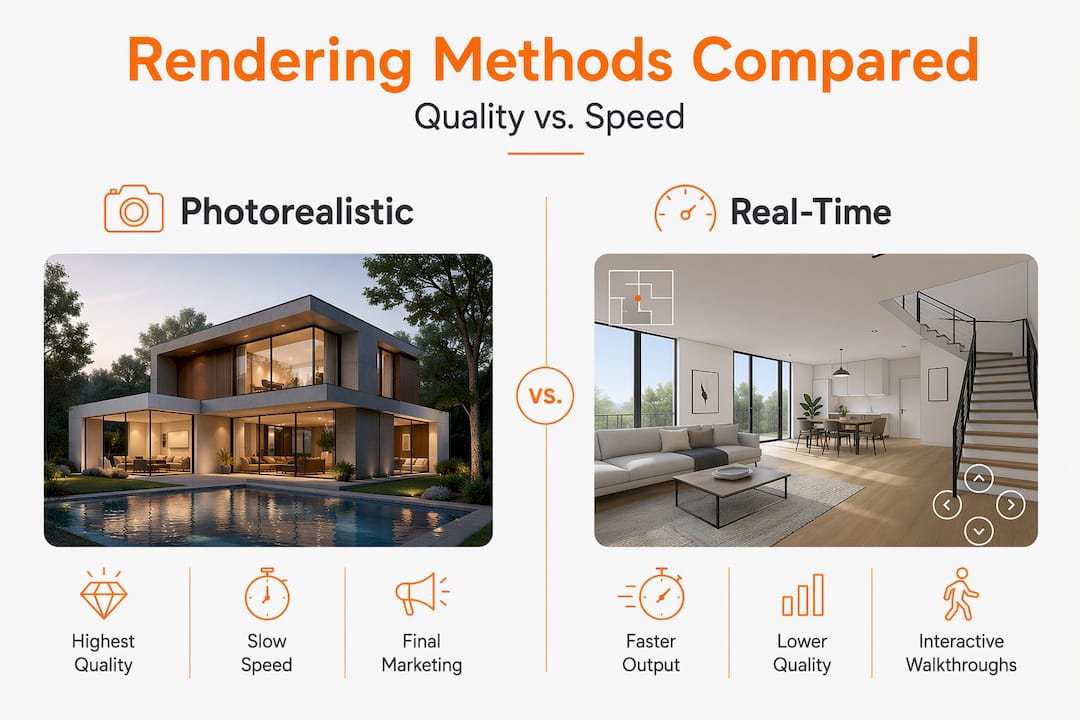
Real-time interactive walkthroughs use game engine technology to let users navigate freely. The experience is immersive but the visual quality, while improving rapidly, does not yet match high-end offline rendering for all use cases.
The technical distinction between rendering types is important: real-time rendering approximates lighting for speed, while photorealistic offline rendering uses computationally intensive methods like path tracing to simulate physical light behavior accurately.
The CGI rendering pipeline, step by step:
- Receive CAD or BIM files from the architectural team
- Build or refine the 3D model to the required level of detail
- Apply materials and textures, including reflectivity, roughness, and translucency
- Set up the scene: camera angles, time of day, surrounding environment
- Establish lighting, including sun position, artificial light sources, and sky conditions
- Configure render settings: resolution, sampling quality, output format
- Render the image or sequence, review for errors, and revise as needed
- Post-process in compositing software for color grading and final polish
| Rendering method | Visual quality | Speed | Interactivity | Relative cost |
|---|---|---|---|---|
| Photorealistic offline | Very high | Slow | None | Higher |
| Real-time (game engine) | High, improving | Fast | Full | Moderate |
| Hybrid rendering | High | Moderate | Partial | Moderate |
| Sketch/concept render | Low | Very fast | None | Low |
Pro Tip: Match your rendering approach to what the output is actually for. Final marketing visuals demand photorealism. Early design reviews and client walkthroughs work well with real-time renders. Spending the budget on photorealistic output at the concept stage is a common misallocation. Check these 3D rendering best practices for guidance on aligning output quality with project phase.
How to use CGI effectively to enhance your architectural projects
Knowing what CGI is and knowing how to deploy it are different things. The most common mistake architects and developers make is treating CGI as a late-stage activity, something commissioned once a design is frozen for marketing. That approach wastes its greatest value.
Using BIM or CAD models directly in real-time engines saves time and creates immersive experiences that accelerate both design development and sales. The data already exists in your workflow. CGI studios can work from it.
Seven steps to create compelling CGI presentations:
- Brief your CGI studio with camera angles, intended use, and target audience before any modeling begins
- Share your latest BIM or CAD files and material specifications in one go to avoid costly revision cycles
- Request a low-resolution preview render before full-quality output to check composition and lighting
- Gather structured client feedback on the preview using specific, visual terms rather than general impressions
- Approve one final round of refinements before committing to full render production
- Match the CGI visual style to your marketing materials for brand consistency across channels
- Archive all scene files and assets so future project phases can reuse and update the same CGI
Common pitfalls to avoid when commissioning CGI:
- Commissioning CGI without a clear brief leads to generic output that does not serve your project’s specific context
- Approving renders before checking that material choices match what will actually be built
- Using real-time preview renders for final marketing materials without understanding their lighting limitations
- Ignoring surrounding context in exterior renders, which makes otherwise strong images look detached and unrealistic
- Treating CGI as a one-off deliverable rather than an evolving visual asset throughout the project lifecycle
The architectural visualization guide walks through the full briefing and production process in detail.
Fresh perspectives on CGI’s role in architecture and development
Here is something the industry does not say often enough: fast real-time renders can cause genuine design misjudgments. When a game-engine preview approximates soft light beautifully and your client approves a material or spatial configuration based on that preview, they may be responding to the engine’s interpretation of the design, not the design itself. Photoreal offline renders require subtle settings to truly match physical light, meaning quick previews can mislead if their limitations are not understood by everyone in the room.
This is not an argument against real-time tools. It is an argument for being clear with clients about what they are looking at. Label your outputs. Distinguish between a design preview and a photorealistic marketing render. One is a working sketch. The other is a finished visual claim about what the building will be.
The second uncomfortable truth is that CGI does not replace physical models or traditional drawings in a well-run practice. It replaces them for client-facing communication. Internally, experienced architects still think spatially through hand sketches and physical models in ways that CGI workflows do not replicate. The 3D rendering best practices that produce the most compelling outputs are almost always those where the design team came in with a clear spatial idea first and used CGI to communicate it, not discover it.
CGI is at its most powerful when it makes a confident design legible to people who do not speak architecture. It is at its weakest when it is used to make an unresolved design look resolved.
Pro Tip: Before handing files to a CGI studio, do a fast internal review of the design in a basic 3D viewer. If the spatial logic does not read clearly at that level, no amount of photorealistic rendering will fix it. Resolve the design first.
Explore high-quality architectural CGI and visualization services
If this article has clarified what CGI in architecture can do for your projects, the next step is finding a studio with the technical depth and design sensibility to produce visuals that actually move your work forward.

Rendimension specializes in photorealistic 3D rendering and architectural visualization services for architects and real estate developers working on both residential and commercial projects. With over 1,000 projects delivered globally, the team works directly from your BIM or CAD files to produce still renders, animations, and immersive 3D walkthroughs aligned with your project milestones. Whether you need planning visuals, investor presentations, or launch-ready marketing assets, every deliverable is built around your timeline and your brief.
Pro Tip: Engage your CGI studio at the design development stage, not the marketing stage. Aligning deliverables with project milestones from the start avoids last-minute rushes and produces stronger, more consistent visual assets.
Frequently asked questions
What does CGI mean in architecture?
CGI in architecture stands for Computer-Generated Imagery and refers to digitally created visualizations of buildings and spaces produced before construction begins, typically as rendered images or animations.
How does CGI help architects communicate with clients?
Architectural CGI communicates design intent through realistic images and animations that make complex spatial concepts far easier to understand than 2D drawings, reducing client misunderstandings and accelerating approvals.
Can CGI accelerate property sales and improve prices?
Yes. Projects using advanced visualization tools sell up to 20% faster and achieve 3 to 7% higher prices, with virtual tours increasing qualified leads by 35% and sales by 15%.
What are the main types of architectural CGI?
Architectural CGI includes still images, animations, and interactive virtual spaces, each suited to different project phases, from planning submissions and design reviews to full-scale marketing campaigns.
Is photorealistic rendering the same as real-time rendering?
No. Real-time previews approximate lighting for speed using simplified calculations, while photorealistic offline rendering uses physically accurate light simulation methods like path tracing that require significantly more computing time but deliver higher visual fidelity.
Recommended
- Renders CGI Guide: Mastering Digital Visualization In 2026
- Render In Architecture Meaning: Complete Guide To 3D Visuali
Related guides
For scope, deliverables and pricing across a full visualization package, see our architectural rendering work. For apartment and mixed-income developments specifically, see rendering for multifamily developments.