Rendering Scope Creep: Contract Clauses and Change Log for Architects

Rendering Scope Creep: Contract Clauses and Change Log for Architects
Rendering scope creep is any expansion of an approved visualization brief after production starts, from extra camera views to a late request for animation, redesigned geometry, or endless revision rounds. It erodes fees and blows schedules fast, so the moment a request falls outside what was signed off, pause that task and log it before anyone touches the model again. Frameworks like PMI’s integrated change control and AIA’s additional-services language exist for exactly this reason, and some firms build their contracts around the same logic.
TL;DR:
- Clear scope baselines should specify the number of images, camera angles, resolution, model detail, source files, purpose, and revision limits before starting the project.
- Change requests beyond corrections require a documented change order, including impact on schedule, fees, approval authority, and justification, to prevent scope creep.
- Minor requests like additional camera angles or rendering revisions can significantly increase costs and delays, especially if not priced upfront or documented properly.
- Most scope creep stems from incomplete briefs, poorly defined approvals, late design changes, and no revision allowances, leading to unchecked requests and disputes.
- Using fixed-price add-ons, hourly rates for open-ended changes, and detailed contracts with exclusions helps control costs and protect margins on visualization projects.
Table of Contents
- What Rendering Scope Creep Looks Like in Practice
- Common Causes of Scope Creep in Visualization Projects
- How Scope Creep Affects Fees, Schedules, and Risk
- A Rendering-Specific Scope Baseline and Change-Control Checklist
- The Change-Request Process, Step by Step
- Pricing Additional Rendering Work
- Rendimension’s Perspective: Visualization as an Approval Gate, Not an Afterthought
- Get a Scoped Rendering Quote With Change Control Built In
- Sources
- FAQ
What Rendering Scope Creep Looks Like in Practice
Scope creep rarely announces itself as a big ask. It shows up as a client asking for “just one more angle,” then a second, then a request to animate a still that was never scoped for motion. A site plan gets swapped for a different lot. A finished lobby render gets sent back for the fourth time because someone new joined the approval chain and wants a different mood.
Each of these feels minor in isolation. The problem is that rendering work doesn’t scale down the way the request does. Changing the camera angle on an exterior shot often means re-lighting, recomposing, and re-rendering at full resolution, not a five-minute tweak. A “small” material swap can ripple through reflections, shadows, and post-production color grading across every frame that includes it.
Not every change request is scope creep. It helps to sort requests into four buckets:
- Corrections bring a render into line with the brief that was already approved, like fixing a window count that doesn’t match the drawings.
- Preference changes revisit a decision that was already signed off, such as swapping an approved material for a different one because someone changed their mind.
- Design changes reflect an actual shift in the underlying architecture the render has to depict.
- Additive requests create a new asset entirely, like a walkthrough animation added onto a stills-only contract.
Only the first category is free. Everything else belongs in a change order.
Common Causes of Scope Creep in Visualization Projects
Most rendering scope creep traces back to a handful of preventable gaps, and they tend to show up in a predictable order.
- An incomplete brief. Missing BIM or Revit references, vague site context, or no clarity on which elements are fixed versus flexible leaves the visualization team guessing, and guesses get revised.
- Approval without enough visual context. A client who signs off on a floor plan or a single still frame often can’t picture the finished space, so they approve now and object later once they see it rendered in full.
- No documented revision allowance. If the contract never states how many rounds of feedback are included, every round feels free to the client, and none of them are.
- Unclear approval authority. When three people at the client’s firm can request changes but nobody has final sign-off, requests pile up faster than anyone tracks them.
- Late design changes treated as routine. Architectural revisions that arrive mid-production are sometimes waved through as if they were always part of the plan, blurring the line between supplemental services the firm expected and additional services discovered after the fact.
Low drawing literacy compounds all of this. A client reading a 2D elevation doesn’t always grasp what a 3D render will reveal, which is exactly why the visualization stage becomes the moment small ambiguities turn into big requests.
How Scope Creep Affects Fees, Schedules, and Risk
An aesthetic tweak that sounds trivial to a client, changing a facade color or repositioning a tree, can force a full re-render of every frame that includes it, consuming modeling, texturing, lighting, and post-production hours that were never billed.
The exposure depends heavily on how the contract is structured. Under a fixed fee, every unbudgeted round eats directly into margin. Under time-and-materials, the meter keeps running but trust erodes if the client feels blindsided by the invoice. Either way, one delayed round pushes back everyone downstream: the marketing team waiting on renders for a launch, the sales office expecting a walkthrough for an open house, the lender expecting visuals for a presentation.
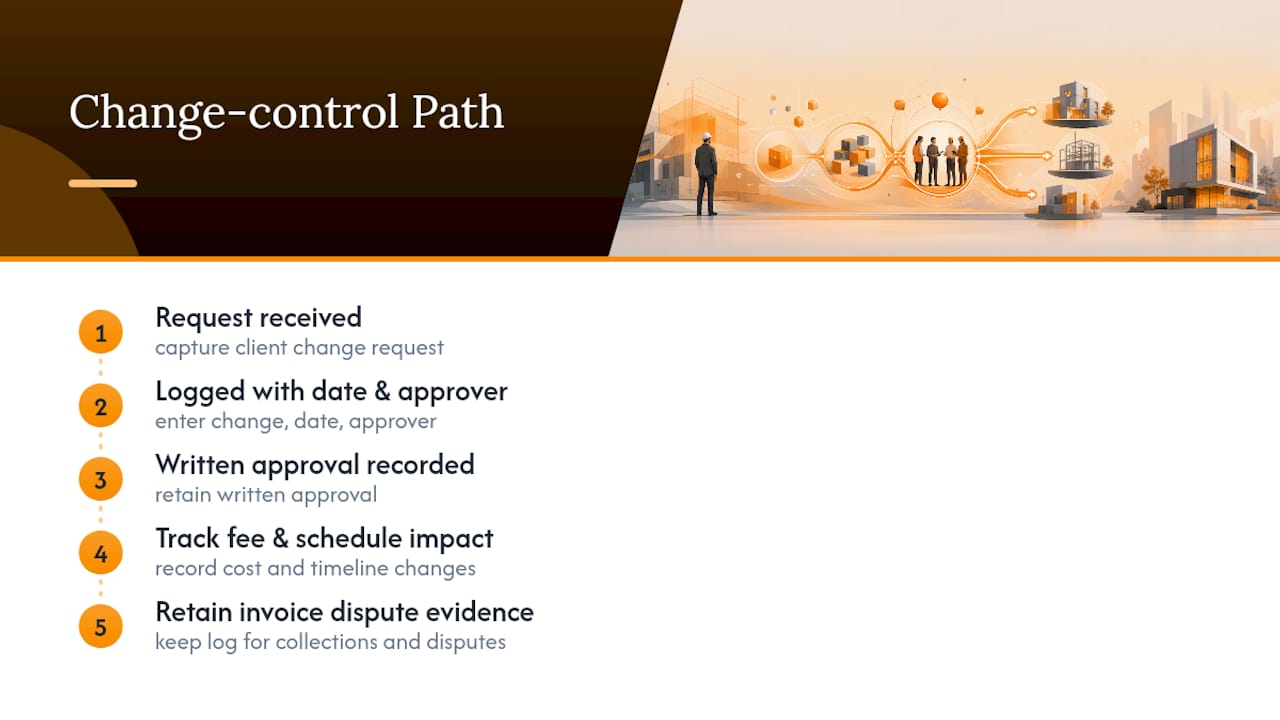
Statistic Callout: PM World Journal’s guidance on scope change control notes that undocumented change requests are especially risky precisely because teams accept small ones informally, without a change log entry or written approval trail. That habit is what makes later fee disputes so hard to win. If a request was never logged, dated, or tied to an approver, there’s no record to point to when a client questions the invoice, and that’s a collections problem as much as a project-management one.
A Rendering-Specific Scope Baseline and Change-Control Checklist
The fix starts before a single frame gets rendered. A written scope baseline, agreed at kickoff, turns “the client wanted something different” into “that’s outside the contract,” which is the entire point.
A workable baseline for a rendering engagement should spell out:
- Number and type of images (exterior, interior, aerial, detail shots)
- The specific camera list and angles agreed for each scene
- Resolution and aspect ratio for final delivery
- Level of model detail (schematic massing versus fully detailed geometry)
- Which source files are included, such as BIM or Revit models the client provides
- The stated purpose of each image (marketing, permitting, investor presentation)
- Final deliverable file formats
- Number of revision rounds included, with a clear stop point
- Milestone dates for draft and final delivery
- Who holds approval authority on the client side
- Explicit exclusions, such as “does not include animation” or “does not include VR conversion”
AIA’s contract practice offers a useful model here: separate the services the firm already expects to deliver from the ones that only surface once work is underway. AIA’s B201 scope guidance recommends listing supplemental and additional services in the scope table itself, rather than leaving them to be argued over later. A rendering contract can borrow this directly: list “additional camera view” and “animation conversion” as named additional services with their own fee, so nobody has to negotiate from scratch when the request lands. When a change genuinely requires the client’s authorization and a fee adjustment, a short written notice modeled on AIA’s G801 form does the job: state what changed, what it costs, and what it does to the schedule, then get a signature before work resumes.
Pro Tip: Keep the exclusions list as specific as the inclusions list. “Includes three exterior views” is only half a scope statement; “does not include additional camera angles, animation, or VR conversion” closes the loophole clients walk through most often.
The Change-Request Process, Step by Step
When a change request arrives, the sequence matters more than the paperwork.
- Pause the affected task. Stop modeling, texturing, or rendering on anything the request touches, and open a change log entry the same day.
- Fill in the essential fields. Record what changed, why the client is asking, which already-approved deliverables it affects, the estimated additional fee, the schedule impact in business days, any assumptions made, who needs to approve it, and the deadline for that approval.
- Evaluate against the baselines. Check the request against the scope baseline, schedule baseline, and cost baseline agreed at kickoff, the same inputs PMI’s guidance on integrated change control calls for before any change gets approved or rejected.
- Communicate the decision in writing, then update the baseline and the invoice to reflect it, so the next round starts from the corrected version, not the disputed one.
| Change-log field | Why it matters |
|---|---|
| What changed | Anchors the request to a specific deliverable, not a vague complaint |
| Why the client is asking | Distinguishes a correction from a preference or design change |
| Affected deliverables | Shows exactly what needs rework, and what stays untouched |
| Estimated fee and schedule impact | Gives the client a number before they commit, not after |
| Approver and deadline | Prevents the request from sitting unresolved while production stalls |
Pricing Additional Rendering Work
Once a request clears the change-control step, pricing it should be straightforward rather than improvised on the spot.
- Per-view add-on pricing works well for a discrete extra camera angle, priced as its own line item rather than folded into the base fee.
- Hourly modeling rates fit open-ended requests, like reworking a landscape design, where the scope of the fix isn’t fixed in advance.
- Packaged upgrades make sense for bigger additions, bundling an animation, a VR conversion, or a full walkthrough as a priced tier rather than negotiating each piece separately.
Whichever approach fits, be explicit about time. Tell the client the change adds three business days, not “a little longer,” and note any assumptions the estimate depends on. If a deadline is tight and there’s no time to wait on a signature, it’s sometimes right to start the work immediately under a delay-avoidance note rather than lose the schedule. Document that decision the same day, in writing, so the fee is still protected even though approval came after the work began.
Rendimension’s Perspective: Visualization as an Approval Gate, Not an Afterthought
The biggest mistake we see is treating visualization as the last step before delivery instead of a decision tool used throughout the project. Some firms keep clients involved from concept through final delivery for a reason: showing the right level of visual detail at the right moment, whether that’s a rough massing model, an annotated screenshot, or a real-time walkthrough, catches misunderstandings before they become billable revisions.
Across many projects, the pattern holds: teams that show a low-detail preview early get far fewer late-stage change requests than teams that jump straight to a polished final render and hope it lands. Before commissioning a rendering engagement, get a written brief covering current drawings or BIM files, site context, camera priorities, milestone dates, and exactly who has final approval. That single document prevents most of the disputes this article describes.
**
Get a Scoped Rendering Quote With Change Control Built In
Some firms build their processes around the exact controls this article describes: a defined scope baseline, a fixed number of revision rounds, and documented approvals before any change hits the timeline. Instead of an open-ended arrangement where “one more angle” quietly becomes five, Rendimension prices additional camera views starting at $425 one off, and full 3D walkthroughs run $4,500 to $8,000 one off, both quoted upfront so there’s no guessing what a change costs mid-project.

That structure matters most for architects and developers juggling multiple stakeholders, where an undocumented change can quietly cost more than the original render. Teams scope deliverables, camera lists, and revision rounds into the contract before production starts, then manage any change request through a change log process as outlined in this article. If a project needs a full visualization package rather than a single service, that’s available too. The next step is simple: request a scoped quote that includes a deliverable table and change-control terms in writing before production begins.
Sources
- PMBOK Guide, integrated change control and project baselines (PMI)
- Instructions: B201–2017 scope guidance (AIA)
- Scope change control process series (PM World Journal)
- How 3D visualization cuts client revisions and protects your design fee (Architectural Edition)
FAQ
What Is Scope Creep in a Rendering or Scrum Context?
In a rendering project, scope creep is any unapproved expansion of the agreed deliverables, like extra views, new animations, or repeated revision rounds beyond the allowance. In Scrum-based software work, the same term describes new requirements sneaking into a sprint without going through the backlog and sprint-planning process, but the underlying problem, uncontrolled change without documentation, is identical.
What Are the Three P’s of Project Management?
Different sources define this differently, so treat it as a loose framework rather than a fixed standard: common versions point to people, process, and product (or performance) as the pillars that keep a project on track. For rendering work specifically, the equivalent anchors are the approved brief, the documented change process, and the deliverable itself.
How Do You Stop Scope Creep on a Visualization Project?
Agree a written scope baseline before kickoff covering camera list, revision rounds, approval authority, and exclusions, then route every change request through a logged, approved change order instead of informal email threads. PMI’s guidance on scope control frames this as evaluating each request against the project’s objectives, cost, and schedule rather than accepting or rejecting it on instinct.
What Are Some Examples of Scope Creep in Rendering Projects?
Common examples include a client requesting an extra camera angle that wasn’t in the original quote, asking for a still image to be converted into an animation, swapping the site context late in production, or sending an approved render back for a fifth revision round when the contract only covered three. Rendimension prices some of these as named add ons, like additional camera views at $425 one off, specifically so they don’t get absorbed into the base fee by default.