Post-Production in Rendering: What Architects Need to Know

Post-Production in Rendering: What Architects Need to Know

TL;DR:
- Post-production in rendering refines raw 3D images into photorealistic visuals, accounting for about 30% of perceived quality. It involves techniques like color grading, compositing, and atmospheric effects to transform digital models into emotionally engaging images. Proper pre-production is essential, as post-production cannot fix fundamental issues in lighting or modeling.
Post-production in rendering is defined as the final refinement phase applied to a raw 3D image to transform it into a polished, photorealistic visual ready for client presentations and marketing. In the architectural visualization industry, this process is also called post-processing or compositing. Tools like Adobe Photoshop, After Effects, and DaVinci Resolve are the standard workhorses of this phase. Post-production adds roughly 30% of the perceived quality to a final architectural render. That single figure explains why developers, architects, and real estate marketers treat it as a non-negotiable step, not an optional polish.
What is post-production in rendering for architecture?
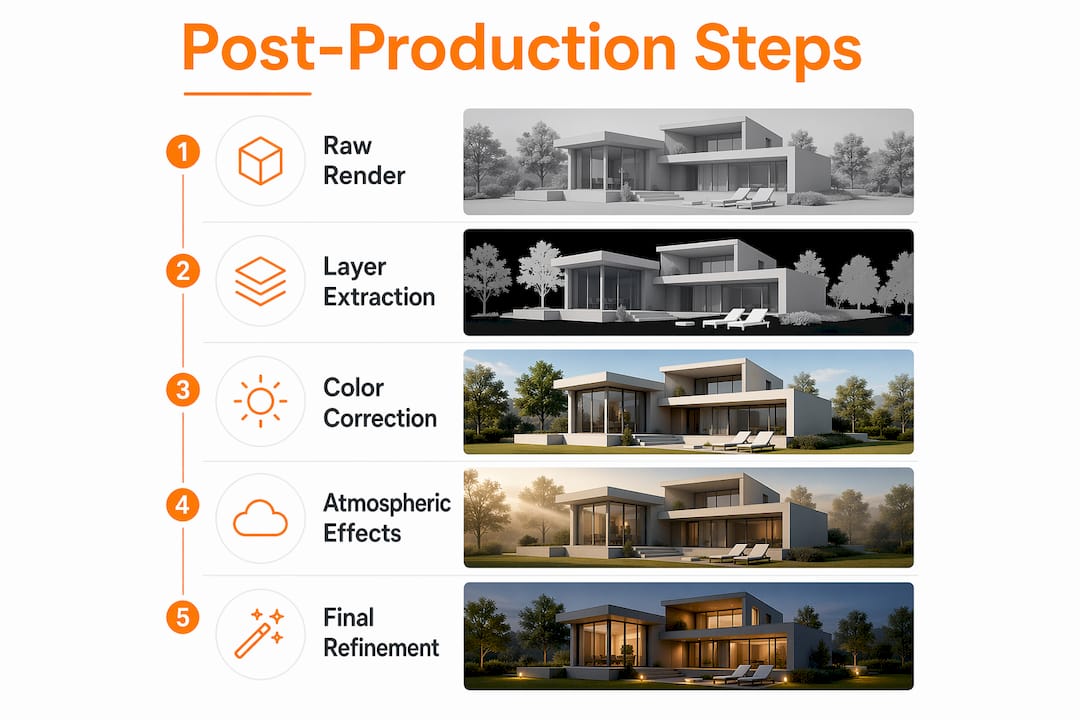
Post-production in rendering is the stage where a technically correct but visually flat 3D image becomes a compelling, story-driven visual. The raw render coming out of a visualization engine is accurate in geometry and materials, but it rarely looks like a photograph. Post-production closes that gap by layering color, light, atmosphere, and context on top of the base image.
The standard post-production sequence for architectural visuals includes:
- Color grading: Adjusting brightness, contrast, and saturation to set the emotional tone of the image. A warm afternoon palette reads very differently from a cool, overcast morning.
- Compositing: Layering sky replacements, background environments, and foreground elements like trees and people onto the base render. Output files are often saved as multi-layer HDR EXR files to preserve maximum editing flexibility.
- Lens effects: Adding depth of field, bloom, and subtle motion blur to mimic how a real camera captures space. These effects make the image feel photographed rather than generated.
- Lighting and shadow correction: Softening harsh shadows, boosting ambient fill, and correcting chiaroscuro lighting issues without re-rendering the entire scene. Photoshop techniques handle most of these corrections efficiently.
- AI artifact correction: Fixing incorrect window transparency, misaligned shadows, and other errors that appear in AI-assisted renders before the image goes to a client.
Pro Tip: Request that your visualization team deliver renders in EXR or layered TIFF format. These formats preserve separate lighting passes, which gives the post-production artist far more control over the final look without touching the original render.
How does post-production improve quality compared to raw renders?

A raw render is a technical achievement. Post-production turns it into a persuasive one. The difference matters enormously when you are presenting a pre-construction project to investors or marketing a luxury development to buyers who have never seen the physical building.
| Quality Factor | Raw render | Post-produced image |
|---|---|---|
| Color and tone | Flat, neutral, technically accurate | Warm, graded, emotionally directed |
| Sky and environment | Default or missing background | Replaced with a contextually appropriate sky |
| People and vegetation | Absent or placeholder geometry | Professional cutout libraries, correct scale |
| Lighting mood | Even and unambiguous | Atmospheric, time-of-day specific |
| Perceived realism | Digital and computer-generated | Photographic and believable |
The gap between these two columns is where post-production serves as the bridge from a digital-looking model to a photographic, emotionally engaging image. Clients do not evaluate geometry. They respond to light, warmth, and the feeling that they can picture themselves inside the space.
Atmospheric effects are one of the most underrated post-production techniques in architectural visualization. A slight haze on a distant skyline, a golden-hour glow on a glass facade, or a wet-pavement reflection on a commercial plaza all communicate quality and care. None of these require re-rendering. They are composited in post.
Pro Tip: When briefing a visualization team, specify the time of day and weather mood you want for each view. This single decision shapes the entire post-production direction and prevents costly revision rounds.
What are the best practices and common pitfalls in rendering post-production?
The most important rule in post-production is also the most frequently ignored: post-production is a refinement layer, not a repair shop. Post-production is not a substitute for good lighting and modeling. Attempting to fix poor base renders in post produces images that look artificial, with lighting that does not match the environment or shadows that contradict the sun angle.
Strong post-production practice follows these principles:
- Coordinate lighting before post begins. The 3D light setup must match the intended post-production mood. A sunset grade applied to a scene lit for midday creates an uncanny result that experienced clients notice immediately.
- Use professional cutout libraries. Cutout integration with correct scale and lighting is one of the clearest signals of post-production quality. Mismatched people or trees with wrong shadow directions undermine an otherwise strong render.
- Maintain consistency across multiple views. A project typically requires exterior, interior, and aerial views. Consistency across multiple views requires standardized color grading and a unified entourage style. Inconsistent post-production across a presentation set reads as unprofessional.
- Handle AI artifact correction carefully. AI-assisted rendering workflows introduce specific errors: incorrect window transparency, shadow artifacts, and generated human figures that look uncanny. Each of these requires manual correction in post, typically taking 15–45 minutes per hero image.
- Export at the right resolution. Print materials require 300 DPI output, while screen presentations work at 150 DPI. Final export formats saved as high-resolution TIFF or EXR files preserve color integrity across both uses.
The most common pitfall is treating post-production as a shortcut. Developers sometimes push for faster turnarounds by skipping thorough lighting setup and expecting post to compensate. The result is always visible. Early pre-production planning reduces costly corrections later, which means post-production works best as enhancement, not emergency repair.
How does post-production fit into the full rendering workflow?
Understanding where post-production sits in the rendering workflow helps you allocate time and budget more accurately. The full visualization pipeline for an architectural project follows a clear sequence.
- 3D modeling: The architect’s design is built as a detailed digital model, including geometry, materials, and spatial relationships. This is the foundation everything else depends on.
- Lighting setup: Interior and exterior light sources are placed and calibrated to match the intended time of day, season, and mood. Poor decisions here create expensive post-production problems.
- Rendering: The software calculates how light interacts with every surface and produces the raw output image. This is the computationally intensive step that can take hours per frame.
- Post-production: Color grading, compositing, lens effects, cutout integration, and final corrections are applied. This is where the image transitions from technical to compelling.
- Final delivery: Images are exported at the correct resolution and format for their intended use, whether that is a print brochure, a website, or a 3D walkthrough presentation.
For real estate marketing, post-production directly affects buyer engagement. A photorealistic exterior render with a well-graded sky and correctly scaled people communicates project quality before a single square foot is built. For architects presenting to planning boards or investors, the same principle applies. The visual must be believable enough to stand in for the finished building.
AI-assisted rendering is changing the time distribution within this workflow. AI tools accelerate the raw render step significantly, but they shift more work into post-production. Artifact correction, entourage replacement, and consistency grading across AI-generated views now represent a larger share of total project time than they did in traditional workflows. Understanding this shift helps you set realistic timelines with your visualization team.
Key takeaways
Post-production in rendering accounts for roughly 30% of a final image’s perceived quality, making it the phase that separates a technically correct render from a market-ready architectural visual.
| Point | Details |
|---|---|
| Post-production definition | The final refinement phase that transforms raw 3D renders into photorealistic, presentation-ready images. |
| Core techniques | Color grading, compositing, lens effects, and cutout integration are the primary post-production tasks. |
| Quality impact | Post-production contributes approximately 30% of perceived image quality in architectural visualization. |
| Workflow position | Post-production follows modeling, lighting, and rendering, and precedes final client delivery. |
| Common pitfall | Using post-production to fix poor base renders produces artificial results; strong pre-production prevents this. |
Why post-production defines the work we do at Rendimension
After completing over 1,000 projects globally, I can say with confidence that post-production is where architectural visualization becomes persuasion. The technical render proves the design is buildable. Post-production proves it is desirable.
The most underappreciated aspect of this phase is its role in emotional direction. Two renders of the same building, graded differently, tell completely different stories. One communicates energy and ambition. The other communicates calm and permanence. Neither is wrong. But only one matches what your client needs to communicate to their buyers or investors. That decision happens in post.
What I have seen consistently across residential towers, commercial developments, and luxury interiors is that clients who invest in thorough pre-production planning get dramatically better post-production results. When the lighting setup is deliberate and the materials are correctly calibrated, post-production becomes a creative conversation rather than a technical rescue operation. The storytelling potential of a well-executed render is only accessible when the foundation is solid.
The growth of AI-assisted rendering has made this even more true. AI tools produce raw images faster than ever, but they introduce new inconsistencies that require skilled post-production to resolve. The teams that understand both the technical and the artistic dimensions of this phase are the ones producing work that actually moves projects forward.
, Rendimension
How Rendimension delivers post-production that drives results
Every project Rendimension produces goes through a rigorous post-production process built on the same principles described in this article. Color grading, professional cutout integration, atmospheric compositing, and resolution-correct final delivery are standard across every engagement, not optional add-ons.

Whether you are marketing a pre-construction residential development, presenting a commercial design to stakeholders, or building a real estate campaign around photorealistic visuals, the quality of your post-production determines how your project is perceived. Rendimension’s architectural rendering services combine technical precision with the artistic direction that makes renders genuinely persuasive. If you want to see what expert post-production looks like applied to your project, explore Rendimension’s 3D rendering portfolio and connect with the team.
FAQ
What is post-production in rendering?
Post-production in rendering is the refinement phase applied after a raw 3D image is generated, using tools like Adobe Photoshop, After Effects, and DaVinci Resolve to add color grading, compositing, and lens effects. It accounts for roughly 30% of a final render’s perceived quality.
What happens in post-production for architectural visuals?
Post-production for architectural visuals includes color correction, sky replacement, cutout integration of people and vegetation, atmospheric effects, and shadow refinement. These steps transform a flat, digital-looking render into a photorealistic image suitable for marketing and client presentations.
How long does post-production take per render?
Post-production on a hero architectural image typically takes 15–45 minutes, depending on complexity and the number of AI artifact corrections required. Projects with multiple views require additional time to maintain consistent grading across the full presentation set.
Why is post-production important in real estate marketing?
Post-production is critical in real estate marketing because buyers and investors respond to emotional cues, not geometry. A well-graded render with correct lighting and professional entourage communicates project quality before construction begins, directly influencing purchase and investment decisions.
Can post-production fix a bad render?
Post-production can improve a render, but it cannot fix fundamental problems in lighting setup or modeling. Attempting to correct poor base renders in post produces artificial results that experienced clients notice. Strong pre-production planning is the only reliable path to high-quality final images.
Recommended
- Render Meaning In Architecture: Complete Guide To 3D Visuali
- Render In Architecture Meaning: Complete Guide To 3D Visuali
Frequently asked questions
What is post-production in rendering?
Post-production in rendering is the refinement phase applied after a raw 3D image is generated, using tools like Adobe Photoshop, After Effects, and DaVinci Resolve to add color grading, compositing, and lens effects. It accounts for roughly 30% of a final render's perceived quality.
What happens in post-production for architectural visuals?
Post-production for architectural visuals includes color correction, sky replacement, cutout integration of people and vegetation, atmospheric effects, and shadow refinement. These steps transform a flat, digital-looking render into a photorealistic image suitable for marketing and client presentations.
How long does post-production take per render?
Post-production on a hero architectural image typically takes 15–45 minutes, depending on complexity and the number of AI artifact corrections required. Projects with multiple views require additional time to maintain consistent grading across the full presentation set.
Why is post-production important in real estate marketing?
Post-production is critical in real estate marketing because buyers and investors respond to emotional cues, not geometry. A well-graded render with correct lighting and professional entourage communicates project quality before construction begins, directly influencing purchase and investment decisions.
Can post-production fix a bad render?
Post-production can improve a render, but it cannot fix fundamental problems in lighting setup or modeling. Attempting to correct poor base renders in post produces artificial results that experienced clients notice. Strong pre-production planning is the only reliable path to high-quality final images.