Why high-detail renders matter for architects and developers

TL;DR:
- High-detail photorealistic renders significantly improve project approval speed, stakeholder confidence, and marketing effectiveness. Investing in accurate lighting, materials, and environmental context reduces costly revisions, change orders, and delays across all project phases. Structured workflows and high-quality visuals build reputation, streamline approvals, and maximize sales opportunities.
Traditional 2D drawings are doing your projects a disservice. Architects and developers who rely on floor plans and basic sketches to communicate design intent are fighting an uphill battle through every approval meeting, investor presentation, and sales campaign. The reason why high-detail renders matter becomes obvious when you look at the numbers: projects using photorealistic renderings saw a 40% drop in change orders and stayed on schedule at a dramatically higher rate. This guide breaks down the mechanics, the business case, and the workflow implications of investing in visualization quality that actually moves projects forward.
Table of Contents
- Why high-detail renders matter: the real impact on approvals and outcomes
- Key visual factors that define high-detail renders
- How high-detail renders improve project communication and reduce costs
- Enhancing marketing and sales with photorealistic 3D renders
- Integrating high-detail renders into your workflow for maximum impact
- Perspective on why many underestimate the value of detailed renders
- Discover professional high-detail rendering services to elevate your projects
- Frequently asked questions
Key Takeaways
| Point | Details |
|---|---|
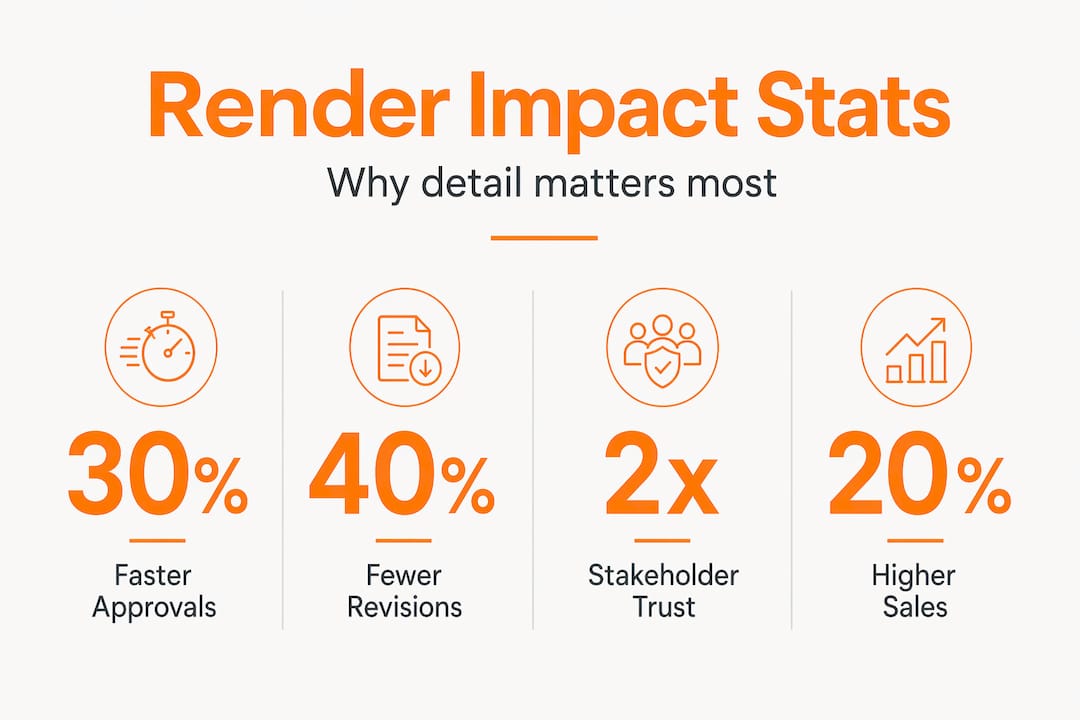
| Photorealistic renders reduce change orders | Detailed 3D visualizations improve stakeholder understanding, cutting costly design revisions by 40%. |
| Lighting and materials drive realism | Accurate lighting and texture fidelity account for 90% of perceived visual quality in renders. |
| High-detail renders accelerate approvals | Renderings shorten approval times by 20-30% and reduce revision cycles by up to 50%. |
| Renders improve marketing success | Virtual staging with photorealistic images can cut days on market by 38 and increase prices by up to 11%. |
| Workflow matters more than software | A disciplined 5-stage rendering workflow delivers better quality than merely upgrading rendering engines. |
Why high-detail renders matter: the real impact on approvals and outcomes
Photorealistic rendering is not simply “a prettier picture.” It is the process of generating an image from a 3D model using lighting simulation, physically accurate materials, and environmental context to produce something that looks like a photograph of a finished building. The difference between a basic render and a truly photorealistic one comes down to several compounding factors.
The key components that define the quality gap include:
- Accurate lighting simulation that mimics real-world sun angles and artificial light behavior
- High-resolution material textures with reflectivity, roughness, and depth that match actual construction materials
- Environmental context including surrounding buildings, landscaping, and atmospheric conditions
- Shadow depth and accuracy that anchors objects convincingly in their space
- Camera and lens settings that replicate how human eyes and cameras actually perceive space
These factors collectively determine how much perceptual cues of photorealism your render triggers in viewers. When those cues fire correctly, stakeholders stop asking “what will this look like?” and start making decisions.
The measurable payoff is significant. Photorealistic renderings cut approval times by 20-30% and revision cycles by up to 50%. That is not a marginal efficiency gain. For a mid-scale commercial development, cutting revision cycles in half can mean weeks off your timeline and thousands of dollars saved in design fees. When you consider how 3D rendering transforms architecture practices at the firm level, the cumulative gains across multiple projects become a genuine competitive advantage.
Key visual factors that define high-detail renders
Understanding which specific elements carry the most perceptual weight helps you make smarter decisions about where to invest effort in any given project visualization.
Here is how the major quality factors rank by their contribution to perceived realism:
- Lighting and illumination: This single factor impacts up to 50% of perceived rendering quality. Plausible light behavior, including soft shadows, bounce light, and accurate exposure, is what separates a render that reads as “fake” from one that reads as a photograph.
- Material definition and texture accuracy: At 40% of perceived quality, material realism is equally critical. Concrete should have pore-level texture variation. Glass should refract and reflect in physically accurate ways. Generic placeholder materials destroy believability regardless of how well everything else is executed.
- Shadow grounding: Shadows are how the human brain determines whether objects exist in real space. Hard, poorly calculated shadows create an uncanny valley effect even when lighting otherwise looks correct.
- View-dependent surface effects: Anisotropic reflections on brushed metal, subsurface scattering in stone and wood, and micro-imperfections in painted surfaces add the final layer of immersion. These are often skipped for budget reasons, but model quality importance extends to these fine details in high-stakes presentations.
- Underlying model quality: Even perfect rendering settings cannot rescue a poorly built 3D model. Geometry errors, non-manifold surfaces, and inaccurate proportions undermine realism at the foundational level.
Pro Tip: Before investing in rendering time, audit your model geometry. Lighting and materials can be refined after the fact, but bad geometry requires rebuilding. Spending one hour on model cleanup saves three hours in rendering iteration.
Applying these principles consistently is what separates presentation-ready visualization from imagery that raises more questions than it answers. For a detailed breakdown, 3D rendering best practices provides specific protocols for each stage.
How high-detail renders improve project communication and reduce costs
The financial case for why detail in renders matters is not abstract. It shows up in concrete line items: change order costs, rework fees, approval delay carrying costs, and marketing spend.
Consider the approval process with and without detailed renders:
| Factor | Basic drawings or low-detail renders | High-detail photorealistic renders |
|---|---|---|
| Stakeholder comprehension | Partial, requires interpretation | Immediate, intuitive |
| Revision cycles | 4-8 rounds typical | 2-4 rounds typical |
| Approval speed | Delays common | 20-30% faster approvals |
| Change order frequency | High | 40% reduction |
| Stakeholder confidence | Lower, more questions | Higher, faster sign-off |
| Marketing readiness | Requires additional production | Usable directly in campaigns |
The misunderstandings that cause change orders are rarely about design decisions. They are almost always about communication failures. A client approves a floor plan without realizing how a particular material will read under natural light in that space. A planning board approves massing without understanding how the building will visually relate to its neighbors. These gaps get filled during construction, which is the most expensive place to fill them.
“The renders made it possible for everyone on the ownership side to actually feel the space before we broke ground. We had almost no surprises during construction.” This type of feedback from developers who have moved from schematic drawings to photorealistic visualization reflects a pattern we see consistently across project types.
The benefits of eliminating late-stage changes include:
- Reduced design fee exposure from open-ended revision scopes
- Contractor pricing based on accurate, agreed-upon design intent
- Faster municipal approval cycles when planning boards can see final design clearly
- Investor and lender confidence boosted by professional, high-clarity presentations
For a fuller view of how benefits of photorealistic renders translate across project phases, the data points to visualization quality as one of the highest-return investments in the pre-construction period.
Enhancing marketing and sales with photorealistic 3D renders
The importance of realistic visuals does not stop at approvals. Once a project moves toward pre-sales or listing, render quality becomes a direct driver of revenue outcomes.
The numbers here are striking. Virtual staging data from 1,847 listings shows 38 fewer days on market, 6-11% higher sale prices, and 84% more online engagement compared to unstaged or unrendered listings. For a $2 million property, a 6% price premium is $120,000. The cost of professional photorealistic visualization is a fraction of that return.
Here is how to use high-detail renders most effectively in your marketing:
- Stage every room, including uncommon spaces. Utility rooms, home offices, and flex spaces are increasingly important to buyers. Leaving them empty in renders signals wasted potential.
- Offer multiple design style options. A single render locks you into one buyer profile. Presenting the same space in three distinct interior styles (contemporary, transitional, traditional) dramatically widens your buyer pool.
- Optimize renders for digital platforms. Renders destined for property portals should be framed and cropped differently from those used in print brochures or social media campaigns.
- Include exterior context renders. Neighborhood context, street-level perspectives, and aerial views build location confidence for buyers who may be purchasing remotely or off-plan.
- Always disclose virtual staging clearly. Ethical practice and platform compliance both require labeling rendered images appropriately. Buyers who feel misled withdraw trust immediately.
Pro Tip: For off-plan sales, create a sequence of renders that walks buyers through the property as a tour rather than a collection of individual images. Sequential storytelling creates emotional investment that static images alone cannot achieve.
For full implementation guidance, the architectural visualization guide covers how to align render deliverables with your sales and marketing calendar.
Integrating high-detail renders into your workflow for maximum impact
Knowing why detail in renders matters is only useful if your workflow actually produces consistent quality at scale. The benefits of detailed 3D graphics depend on how well the rendering process is structured from the start of a project.
The five core stages of an effective rendering workflow are:
- Modeling: Build accurate geometry to design intent. Use actual dimensions, not approximations. Proportion errors at this stage compound through every subsequent step.
- Lighting setup: Establish sun position based on actual project location and orientation. Layer in artificial light sources that reflect the design’s lighting plan, not generic studio setups.
- Material assignment: Use physically based rendering (PBR) materials with accurate roughness, metallic, and normal map values. Match specified materials from the project’s finish schedule.
- Rendering: Choose render settings appropriate to the output size and use case. A hero exterior image for a sales brochure requires different settings than a quick internal review render.
- Post-processing: Correct exposure, adjust color grading, and add environmental elements such as people and vegetation to complete the scene. This stage alone contributes at least 60% to final image quality, outweighing the rendering engine itself.
Iterative feedback loops between stages are what separate firms that consistently produce high-quality outputs from those that struggle. Building in two structured client review points — one after modeling and one after initial lighting — catches problems early when changes are inexpensive.
Pro Tip: When deciding between in-house rendering capability and external services, consider project volume and peak demand. Most firms find that outsourcing two to three hero renders per project to a specialist produces better results than stretching an in-house generalist’s time across multiple deliverables.
For a phase-by-phase breakdown, the visualization step-by-step guide provides a practical framework you can map directly to your existing project stages.
Perspective on why many underestimate the value of detailed renders
Here is a view that does not get stated enough in conversations about visualization budgets: the firms and developers who resist investing in render quality are not being cautious. They are taking on risk they cannot see.
The logic of “good enough” renders is tempting. Faster turnaround, lower cost per image, more deliverables for the same budget. But the calculus breaks down when you account for the cumulative costs of what cheap or rushed renders fail to prevent. One set of change orders triggered by a stakeholder who misunderstood a material or spatial relationship can erase the savings from three or four project cycles of budget rendering.
There is also a credibility dimension that rarely appears in ROI calculations. When a developer presents a project to investors or municipal boards using renders that look generic or unconvincing, the subconscious message is that the project itself may not be ready. Poor lighting, generic assets, and inaccurate materials reduce realism and stakeholder trust in ways that create approval delays you may never directly trace back to the visualization quality.
High-detail render advantages extend beyond any single project. Firms and developers that consistently present at a high visual standard build a reputation that opens doors. Planning boards recognize your submissions. Investors engage with more confidence. Buyers respond faster. That compounding reputation effect is real, and it is built image by image.
Our position is simple: allocate for quality over quantity. Two photorealistic hero renders that stop stakeholders in their tracks are more valuable than eight mediocre ones that prompt questions. If budget is constrained, narrow the scope before lowering the quality standard. The 3D rendering best practices framework we apply across projects is built entirely around this principle.
Discover professional high-detail rendering services to elevate your projects
The gap between knowing what great visualization requires and consistently producing it at project scale is where most firms struggle. Getting lighting, materials, and post-processing right on every deliverable takes specialized skill, calibrated tools, and the kind of iterative refinement that only comes from doing it across hundreds of project types.

At Rendimension, our 3D rendering services are built around the principles covered in this article: accurate geometry, physically based materials, location-specific lighting, and post-processing that makes every image presentation-ready from day one. With over 1,000 projects completed across residential and commercial developments globally, our workflows are designed to fit your timeline without sacrificing the quality that moves approvals forward and drives sales results. Our architectural visualization services are fully customized to your project’s complexity, with structured feedback loops that keep you in control at every stage. Whether you are preparing for a planning submission, investor presentation, or pre-sales campaign, see how our step-by-step process turns your design intent into imagery that works.
Frequently asked questions
How do high-detail renders reduce project change orders?
They give every stakeholder a precise, unambiguous view of materials, spatial relationships, and design intent before construction begins, eliminating the misinterpretations that generate costly late-stage adjustments. Projects using photorealistic renderings saw a 40% drop in change orders as a direct result.
What visual elements most affect perceived photorealism?
Lighting and material definition together drive roughly 90% of perceived realism, with accurate shadows and texture fidelity being especially critical. Specifically, lighting impacts up to 50% and material definition accounts for 40% of how real an image reads to viewers.
Can detailed renders help sell properties faster?
Yes, the impact is measurable and significant. Virtual staging and photorealistic renders reduce days on market by up to 38 days, increase sale prices by 6-11%, and generate 84% more online engagement than unstaged or unrendered listings.
Why do some renders fail to build stakeholder trust?
Renders that use generic materials, imprecise lighting, or inaccurate textures fail to trigger the perceptual cues that make an image believable. Poor lighting and generic assets reduce realism and create skepticism that slows approvals and erodes confidence in the project itself.
What are best practices for integrating rendering into project workflows?
Use a structured five-stage process covering modeling, lighting, materials, rendering, and post-processing, with two client review checkpoints built in. Workflow stages contribute at least 60% to final image quality, meaning process discipline matters more than simply using a powerful rendering engine.