What Is Panoramic Rendering? A Pro Guide

What Is Panoramic Rendering? A Professional Guide

TL;DR:
- Panoramic rendering creates 360-degree views from 3D models, enabling interactive exploration from a fixed point. It mainly uses equirectangular or cube map projections, with software like Blender, 3ds Max, and Lumion supporting the workflow. This technique enhances client understanding, supports remote presentations, and is now a standard in architectural visualization.
Panoramic rendering is defined as the process of generating a 360-degree visual environment from 3D geometry, allowing viewers to explore a space interactively from a fixed point of view. Unlike a standard architectural render that frames a single camera angle, a panoramic render wraps the entire scene around the viewer, covering the full sphere of vision. Tools like Blender, Autodesk 3ds Max, and Lumion all support panoramic output natively, while interactive viewers like Marzipano handle web-based deployment. For architects, real estate developers, and visualization professionals, panoramic imaging for immersive XR has become a standard deliverable for client presentations and pre-construction reviews.
What is panoramic rendering and how does it work technically?
Panoramic rendering works by projecting a complete 3D scene onto a spherical surface, then encoding that sphere into a flat image format a display device can read. The two dominant formats are the equirectangular projection and the cube map. Understanding both is non-negotiable if you want predictable output quality.

Equirectangular vs. cube map projection
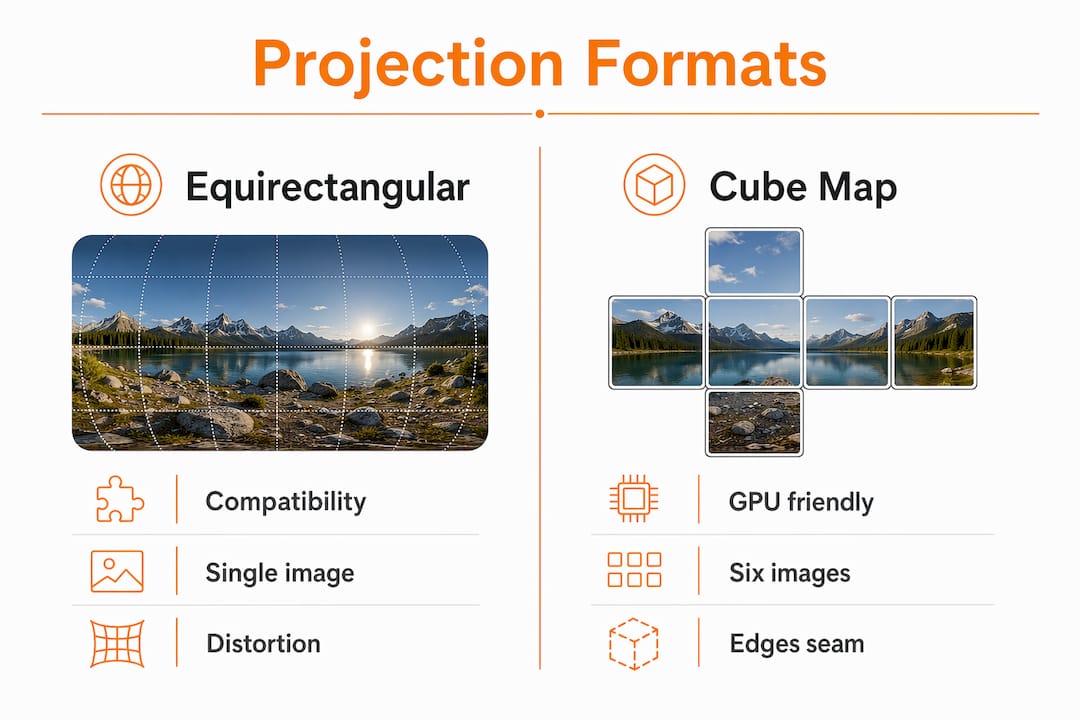
The equirectangular format maps the full sphere onto a rectangle with a 2:1 aspect ratio, treating horizontal position as longitude and vertical position as latitude. A fragment shader converts each pixel’s view direction into UV coordinates that sample the texture, which is why equirectangular files look stretched at the poles. The format is universally supported across platforms, from Facebook 360 posts to VR headsets, making it the default choice for most architectural visualization workflows.
Cube maps take a different approach. The renderer fires six perspective cameras, each pointing along one axis of a cube, and captures one face per camera. The six images are then stitched together. Autodesk Community documentation describes a 6K x 3K panoramic stitch taking roughly 20 hours, which illustrates the real production cost of high-resolution output. Cube maps sample more uniformly at the poles, but seam handling at cube edges requires precise UV mapping to avoid visible artifacts.
| Format | Strengths | Weaknesses |
|---|---|---|
| Equirectangular | Universal compatibility, single image file | Pole distortion, stretched pixels at top and bottom |
| Cube map | Uniform sampling, less pole distortion | Six-face stitching, seam artifacts at edges |
Pro Tip: Pre-converting an equirectangular panorama to a cube map at load time simplifies runtime GPU sampling and noticeably improves playback performance on web viewers.
Projection distortions and production workflow
UV mapping precision is the single biggest quality factor in panoramic output, more so than raw render resolution. Seams appear when adjacent faces of a cube map are rendered with slightly different lighting calculations or when the stitching algorithm fails to align sub-pixel edges. For architectural projects, a misaligned seam running through a feature wall or a glazed facade is immediately visible to clients.
Production workflows for high-quality panoramic renders typically involve rendering at 8K or higher, applying denoising passes, and then exporting to the target projection format. Render times scale aggressively with resolution. A scene that takes 10 minutes at 4K can take over an hour at 8K due to the quadratic increase in pixel count.
What software is used for panoramic rendering?
The software ecosystem for panoramic rendering spans dedicated 3D applications, real-time engines, and web-based viewers. Each category serves a different stage of the production pipeline.
Core 3D rendering applications:
- Blender supports equirectangular panoramic cameras natively through its Cycles and EEVEE render engines. The output is a single 2:1 image ready for any 360 viewer. Blender’s open-source model makes it accessible for independent visualization studios.
- Autodesk 3ds Max with V-Ray or Arnold supports panoramic output through dedicated camera rigs or the VRayDome camera. It remains the industry standard for high-end architectural visualization in the United States.
- Lumion generates interactive 360 panoramas directly from its real-time engine, with output times measured in minutes rather than hours. The trade-off is less photorealistic lighting compared to path-traced solutions.
- KeyShot targets product visualization but includes a spherical camera mode useful for interior product environments and showroom presentations.
Web-based interactive viewers:
Once the panoramic image is rendered, it needs a viewer. Marzipano is a WebGL-based viewer that implements tile-based progressive loading, meaning it streams high-resolution tiles as the viewer pans rather than loading the full image at once. This is critical for web deployment where a raw 8K equirectangular file would be impractical to load in a browser. CesiumJS extends this concept to geospatial contexts, positioning panoramas in 3D scenes with correct geographic orientation for site-specific architectural presentations.
For VR headset delivery, panoramic renders are packaged into platforms like Meta Quest or displayed through WebXR-compatible browsers. The architectural visualization guide at Rendimension covers how these workflows connect to full VR walkthrough pipelines for client presentations.
What are the benefits of panoramic rendering for professionals?
The practical value of panoramic rendering for architects, developers, and real estate professionals is direct and measurable. A standard render shows one angle. A panoramic render shows everything, and that difference changes how clients make decisions.
Here are the top practical benefits:
- Full spatial comprehension. Clients understand room proportions, ceiling heights, and spatial flow far better from a 360 view than from a curated single-angle render. This reduces revision cycles caused by spatial misunderstandings.
- Remote client presentations. A panoramic render embedded in a web link requires no software installation. A developer in New York can share a pre-construction visualization with investors in London without scheduling a VR demo session.
- Pre-construction marketing. Real estate developers use panoramic renders to sell units before a building is constructed. The types of architectural renderings used in pre-sale campaigns increasingly include 360 views as a standard deliverable alongside exterior stills.
- Design review and coordination. Architects and interior designers use panoramic renders during design development to review material combinations, lighting conditions, and furniture layouts from within the space rather than from outside it.
- Training and simulation. Facility managers and construction teams use panoramic renders of completed designs to train staff on spatial layouts before physical access is available.
Pro Tip: For real estate marketing, render your panoramas at two quality levels: a compressed 4K version for fast web loading and a full 8K version for VR headset presentations. Serving both from the same project doubles your delivery value without doubling render time.
The immersive quality of a panoramic render also ties directly to degrees of freedom. 56.41% of XR studies use 3DoF systems, meaning rotational viewing only, while 35.9% use 6DoF systems that add spatial movement. For most architectural client presentations, 3DoF panoramic renders delivered via a web link are sufficient. Full 6DoF experiences require real-time 3D engines and are better suited to dedicated VR walkthrough productions.
How does panoramic rendering differ from 360 photos and VR?
These three terms are used interchangeably in client briefs, but they describe technically distinct deliverables with different production costs and user experiences.
A panoramic image in the traditional sense covers a wide horizontal field of view, typically 180 degrees or more, but not necessarily the full sphere. A 360-degree photo captures the complete sphere using a physical camera like the Ricoh Theta or Insta360, stitching multiple lenses into one equirectangular file. A panoramic render generates the same spherical output from 3D geometry rather than a physical camera, giving the artist full control over lighting, materials, and time of day.
Panoramas vs. 360 photos vs. VR differ most significantly in degrees of freedom and interactivity. A panoramic render, whether from a photo or a 3D engine, locks the viewer to a single point in space. You can look in any direction, but you cannot walk forward. This is the defining limitation of single-viewpoint panoramas. Single-viewpoint systems lack parallax and true spatial translation cues, which is why they feel less immersive than full VR experiences that track head position.
| Technology | Field of view | Viewpoint movement | Production method |
|---|---|---|---|
| Panoramic image | 180° horizontal or wider | Fixed point | Camera or 3D render |
| 360-degree photo | Full sphere | Fixed point | Physical 360 camera |
| VR experience (6DoF) | Full sphere | Free spatial movement | Real-time 3D engine |
The practical implication for professionals is clear. A panoramic render is the most cost-effective way to deliver immersive spatial understanding to a client. Full VR with positional tracking requires a real-time engine, optimized geometry, and often dedicated hardware. For most pre-construction presentations, a well-rendered 360 panorama delivered through a browser viewer achieves 80% of the immersive impact at a fraction of the production cost.
Key takeaways
Panoramic rendering is the most accessible path to immersive spatial communication for architecture and real estate professionals, requiring only a 3D scene, the right projection format, and a web-compatible viewer.
| Point | Details |
|---|---|
| Core definition | Panoramic rendering generates a full 360-degree view from 3D geometry, not a physical camera. |
| Projection format matters | Equirectangular offers broad compatibility; cube maps offer better pole quality but require precise seam handling. |
| Software options | Blender, Autodesk 3ds Max, Lumion, and KeyShot all support panoramic output with different quality and speed trade-offs. |
| Practical value | 360 renders reduce client revision cycles, support remote presentations, and power pre-construction marketing. |
| VR distinction | Panoramic renders fix the viewer to one point; true VR adds positional movement and requires a real-time engine. |
Rendimension’s perspective on where panoramic rendering is heading
After completing over 1,000 projects globally, we have watched panoramic rendering shift from a premium add-on to a baseline expectation in architectural visualization briefs. What surprises most clients is not the technology itself but how much the projection choice affects the final result. We have seen projects where a technically excellent render was undermined by a poorly handled equirectangular stitch, with a visible seam running straight through the center of a lobby ceiling. That is not a render quality problem. It is a workflow problem, and it is entirely avoidable.
The trend we find most significant right now is the convergence of BIM data and panoramic rendering. When a Revit model feeds directly into a rendering pipeline, the panoramic output carries spatial accuracy that a hand-modeled scene cannot match. This matters for construction coordination as much as it does for client presentations. Developers who use BIM-linked panoramic renders during design review catch spatial conflicts earlier, which reduces costly changes during construction.
We are also watching tile-based progressive loading mature rapidly. Tools like Marzipano have made it practical to deliver 8K panoramas in a browser without forcing users to wait for a full image download. The next step is real-time adaptive quality, where the viewer resolution adjusts based on connection speed without any manual configuration. For web-based client presentations, this removes the last remaining friction point.
The professionals who get the most value from panoramic rendering are not the ones with the fastest render farms. They are the ones who understand projection geometry, plan their camera placements deliberately, and match their output format to the delivery platform from the start of the project.
— Rendimension
See panoramic rendering in action with Rendimension

Rendimension produces photorealistic 360-degree architectural renders for developers, architects, and real estate professionals across residential and commercial projects. Whether you need a single panoramic view of a key interior space or a full suite of immersive 3D rendering services for a pre-construction marketing campaign, the team works with your existing 3D models or builds from concept drawings. For projects requiring full spatial walkthroughs, Rendimension’s 3D walkthrough services combine panoramic renders with interactive navigation for client presentations that go beyond static images. Contact Rendimension to discuss your next visualization project and get a tailored proposal for panoramic and immersive deliverables.
FAQ
What is panoramic rendering in simple terms?
Panoramic rendering is the process of generating a 360-degree image from a 3D scene, allowing viewers to look in any direction from a fixed point. It uses projection formats like equirectangular or cube map to encode the full sphere into a displayable file.
How long does a panoramic render take to produce?
Render time depends heavily on resolution and scene complexity. A high-resolution panoramic stitch at 6K x 3K can take approximately 20 hours for a complex architectural scene, though real-time engines like Lumion can produce lower-fidelity panoramas in minutes.
What is the difference between a panoramic render and a 360-degree photo?
A 360-degree photo is captured with a physical camera; a panoramic render is generated entirely from 3D geometry. The render gives the artist full control over lighting, materials, and time of day, which a photo cannot provide.
Which software is best for architectural panoramic rendering?
Autodesk 3ds Max with V-Ray is the industry standard for photorealistic architectural panoramic output. Blender is a strong open-source alternative, while Lumion suits projects where speed matters more than maximum photorealism.
Can panoramic renders be viewed on VR headsets?
Yes. Panoramic renders exported as equirectangular images are compatible with most VR headsets and WebXR browsers. They deliver rotational viewing (3DoF) but not positional movement, which requires a real-time 3D engine for full 6DoF VR.