Visualization in Client Engagement: A Pro Strategy Guide
Visualization in Client Engagement: A Pro Strategy Guide
TL;DR:
- Visualization converts abstract project ideas into realistic images or interactive formats, enhancing client understanding and speeding up approval processes. It reduces cognitive load, shortens approval cycles, and helps identify project issues early by aligning client and team expectations through appropriate visual tools for each project stage. Effective visualization treats it as a conversational strategy rather than just a presentation, ensuring clarity, trust, and efficient decision-making throughout the project.
Visualization in client engagement is defined as the practice of converting abstract project concepts into clear, photorealistic, or interactive visual formats that accelerate client understanding and decision-making. For project managers, marketing specialists, and sales leaders, this is not a presentation upgrade. It is a fundamental shift in how clients process, react to, and approve your work. Tools like photorealistic 3D renderings, VR walkthroughs, and data visualization dashboards from platforms like ThoughtSpot have proven that clients who see a finished concept respond faster, with more confidence, and with fewer revision cycles. Rendimension has observed this pattern across more than 1,000 projects globally.
What is the role of visualization in client engagement?
Visualization in client engagement works by removing the mental gap between a technical plan and a client’s ability to understand it. Without visuals, clients must translate floor plans, material specs, and project timelines into a mental image of the finished result. That translation process is slow, error-prone, and exhausting.

Cognitive load is the term psychologists use to describe the mental effort required to process new information. When clients carry high cognitive load, they hesitate, ask more questions, and delay approvals. Photorealistic 3D renderings eliminate that burden by showing the finished result directly. Clients shift from imagining to reacting, and that shift is where engagement quality improves.
The approval cycle impact is measurable. Photorealistic 3D rendering reduces client approval cycles from 4–6 rounds to 1–2 rounds in interior design presentations. That reduction translates directly into shorter project timelines and lower revision costs for your team.
Visual aids also reduce client anxiety. Visuals improve client understanding and involvement, reducing anxiety and building trust throughout the decision-making process. A client who trusts what they see is a client who signs off faster.
Key benefits of reducing cognitive load through visualization:
- Clients spend less time asking clarifying questions
- Misunderstandings about materials, scale, and spatial layout drop significantly
- Approval meetings become shorter and more productive
- Clients feel ownership over the project earlier in the process
Pro Tip: Present photorealistic renders before your first detailed technical review meeting. Clients who see the outcome first engage with the technical details more confidently and with better questions.
What types of visual tools work best for client-facing professionals?
The visualization toolkit available to client-facing professionals has expanded well beyond mood boards and 2D floor plans. Each format serves a distinct purpose, and choosing the wrong one for the wrong project stage costs you time and credibility.
Photorealistic 3D renderings
Photorealistic 3D renderings are static images that show a finished space or product with accurate lighting, materials, and spatial proportions. They are the most widely used format in architecture and real estate because they communicate quality and intent without requiring client imagination. 3D visualization reduces hesitation and improves stakeholder alignment across industries, from residential development to commercial interiors.
3D walkthroughs and VR experiences
3D walkthroughs and VR experiences let clients move through a space before it is built. This format is particularly effective for large-scale residential or commercial developments where spatial flow matters. Digital property visualization bridges the gap between technical plans and market-ready communication, improving buyer confidence in real estate development. Developers using VR walkthroughs report stronger pre-sales performance because buyers can evaluate the property as if they were already inside it.
Data visualization dashboards
Data visualization dashboards serve a different function. They translate project timelines, budget tracking, and performance metrics into charts and graphs that non-technical stakeholders can read at a glance. ThoughtSpot and similar platforms make these dashboards accessible to all team members, not just analysts.
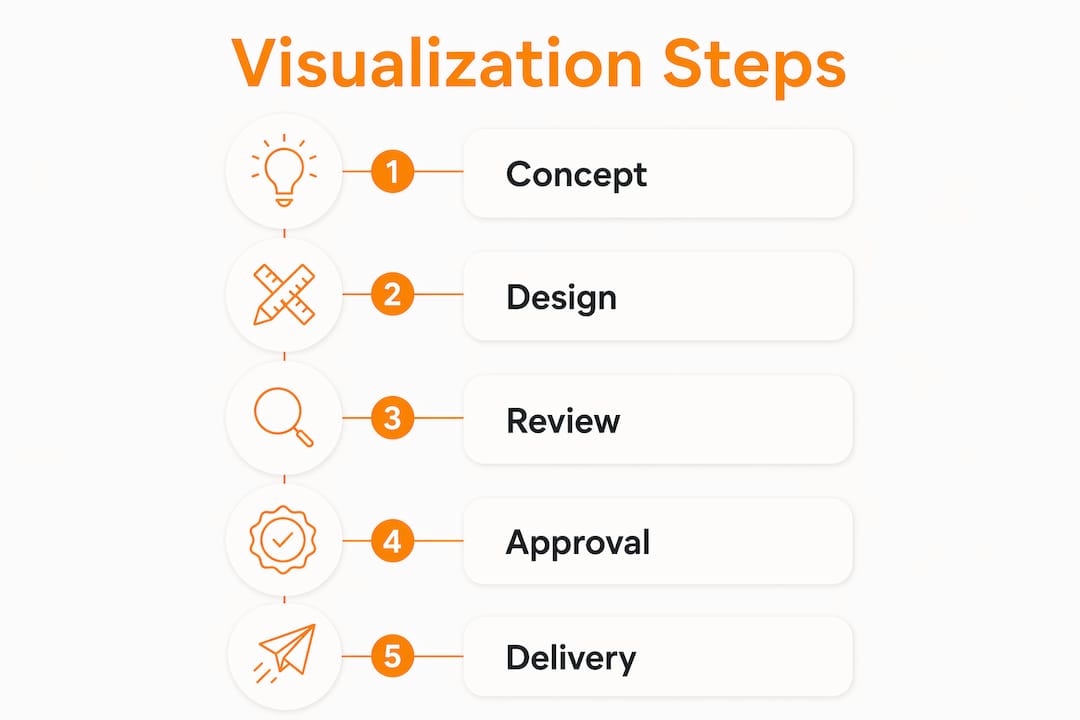
Here is a direct comparison of the main visual tool formats:
| Format | Best use case | Client engagement benefit |
|---|---|---|
| Photorealistic 3D rendering | Design approval, marketing materials | Cuts approval rounds from 4–6 to 1–2 |
| 3D walkthrough | Spatial review, pre-sales presentations | Builds spatial confidence before construction |
| VR experience | Immersive stakeholder review | Highest emotional engagement and recall |
| Data visualization dashboard | Project status, budget, and timeline reporting | Makes complex data readable for all stakeholders |
| Mood board | Early concept exploration | Low fidelity; useful only at concept stage |
Pro Tip: Match the format to the project stage. Use mood boards at concept, photorealistic renders at design approval, and VR walkthroughs for pre-sales or investor presentations. Mixing formats out of sequence confuses clients about how final the design is.
How does visualization help identify project blockers early?
Project blockers are misalignments between what the client expects and what the team is building. They surface as late-stage revision requests, scope disputes, and budget overruns. Visualization catches these misalignments before they become expensive.
Data visualization makes insights accessible to all stakeholders, enabling faster identification of blockers and informed decisions. When a project manager presents a visual timeline or a 3D progress model in a client meeting, both parties are looking at the same reality. There is no room for a client to claim they imagined something different.
Visualization serves as a key tool for spotting project bottlenecks before they impact delivery, enabling proactive management. This applies equally to construction schedules and marketing campaign timelines.
Consider a real estate developer presenting a mixed-use commercial project to investors. A 2D site plan requires investors to mentally calculate square footage, traffic flow, and retail placement. A photorealistic aerial rendering with labeled zones communicates the same information in seconds. Investors identify concerns about parking or retail visibility immediately, rather than raising them after construction begins.
Non-technical stakeholders understand complex projects and grasp critical details quickly when visuals are present, facilitating faster decisions. This is the core value of visualization in multi-stakeholder environments where not every decision-maker has a technical background.
Practical ways visualization surfaces blockers early:
- Photorealistic renders reveal material or color conflicts before procurement
- 3D walkthroughs expose spatial flow problems that floor plans miss
- Dashboard timelines make schedule slippage visible to all parties simultaneously
- Interactive diagrams let clients flag concerns in real time during review sessions
What are the best practices for implementing visualization in client work?
Effective visualization is not about showing clients everything you can produce. It is about showing the right detail at the right moment to move the project forward.
-
Match visualization detail to the project stage. Early-stage concepts should use lower-fidelity visuals to signal that decisions are still open. Over-visualizing can cause decision paralysis and create false expectations. A hyper-detailed render presented at the concept stage tells clients the design is final when it is not.
-
Make visualization interactive wherever possible. Active client involvement via visualization improves engagement and confidence. Live software walkthroughs and interactive diagrams let clients explore options rather than passively receive them. This shift from passive viewing to active exploration produces clearer, faster decisions.
-
Pair every visual with a clear verbal explanation. Visuals communicate quickly, but they do not replace context. A photorealistic render of a lobby tells a client what the space looks like. Your explanation tells them why those material choices serve the project’s goals. Both are necessary.
-
Use visualization to set and protect expectations. When a client approves a photorealistic render, that approval becomes a documented reference point. If scope creep or revision requests emerge later, you can return to the approved visual as the agreed baseline. This protects your team and keeps the client aligned.
-
Review your visual library after every project. The formats and detail levels that worked for one client type may not work for another. A residential buyer responds differently to a VR walkthrough than a commercial investor does. Track which formats produce the fastest approvals and refine your approach accordingly. You can also explore visualization techniques for AEC professionals to see how leading firms structure their visual presentations.
Pro Tip: Never present a visualization without first telling the client what decision you need them to make. A render shown without a clear question attached becomes a conversation piece instead of a decision tool.
Key takeaways
Visualization in client engagement works because it replaces imagination with direct perception, cutting approval cycles, reducing misunderstandings, and building client trust at every project stage.
| Point | Details |
|---|---|
| Cognitive load reduction | Photorealistic 3D renders cut approval rounds from 4–6 to 1–2 by removing the need to imagine outcomes. |
| Match format to stage | Use mood boards at concept, renders at design approval, and VR walkthroughs for pre-sales or investor review. |
| Early blocker detection | Visual timelines and 3D models surface scope misalignments before they become costly revision requests. |
| Interactive beats passive | Clients who explore visuals actively make faster, more confident decisions than those who view static presentations. |
| Avoid over-visualization | Excessive detail at early stages creates false expectations and slows client decision-making. |
What we have learned from 1,000+ visualization projects
The most common mistake I see client-facing professionals make is treating visualization as a finishing touch rather than a communication strategy. They produce a beautiful render, present it at the end of a long technical meeting, and wonder why clients still hesitate. The render was not the problem. The timing was.
Visualization works best when it leads the conversation, not closes it. When you open a client meeting with a photorealistic image or a walkthrough, you give clients something concrete to respond to. Their feedback becomes specific and useful. Compare that to opening with a spreadsheet or a floor plan, where clients nod along without truly engaging.
I have also seen the opposite failure: teams that over-visualize at the wrong stage. A hyper-detailed VR experience presented during an early concept review tells clients the design is locked in. When changes are needed, clients feel they are undoing finished work rather than refining a concept. That perception creates friction and erodes trust.
The professionals who use visualization most effectively treat it as a conversation tool, not a presentation tool. They show clients something, ask a specific question, and use the client’s visual reaction to guide the next decision. That approach turns every visual into a productive step forward rather than a one-way broadcast.
The benefits of 3D visualization for architects extend directly to the client relationship. When clients see their project clearly, they engage more deeply, decide more quickly, and refer more confidently.
— Rendimension
See your project through your client’s eyes with Rendimension

Rendimension produces photorealistic 3D renderings and architectural visualization services that give your clients a clear, confident view of every project before a single wall goes up. From interior and exterior renders to immersive 3D walkthrough services and VR experiences, Rendimension’s team has delivered over 1,000 projects across residential and commercial sectors globally. If you are ready to cut approval cycles, reduce revision rounds, and present your work with the clarity clients respond to, explore Rendimension’s full 3D rendering services and start your next project with visuals that do the heavy lifting.
FAQ
What is the role of visualization in client engagement?
Visualization in client engagement converts abstract project concepts into photorealistic or interactive formats that clients can immediately understand and respond to. This reduces cognitive load, cuts approval cycles, and builds client trust throughout the project lifecycle.
How does 3D rendering reduce client approval rounds?
Photorealistic 3D rendering reduces client approval cycles from 4–6 rounds to 1–2 rounds by showing clients the finished result directly, eliminating the guesswork that causes repeated revision requests.
What visual tools work best for non-technical stakeholders?
Photorealistic 3D renders and data visualization dashboards are the most effective formats for non-technical stakeholders. Both communicate complex information visually without requiring the viewer to interpret technical drawings or specifications.
Can visualization help catch project problems early?
Yes. Visual timelines, 3D progress models, and interactive diagrams surface scope misalignments and design conflicts before they escalate into costly changes. ThoughtSpot’s research confirms that data visualization speeds up blocker identification across project teams.
Is there such a thing as too much visualization?
Over-visualizing at early project stages can create false expectations and decision paralysis. The best practice is to match visualization detail to the project stage, using lower-fidelity formats during concept development and full photorealistic renders only when design decisions are ready for approval.