Picture this: you’re presenting a groundbreaking mixed-use development to a room of investors. You unfold blueprints, gesture at floor plans, and describe the vision in vivid detail. Yet faces remain skeptical, questions multiply, and approval stalls. The problem isn’t your concept—it’s how you’re showing it. Traditional 2D drawings fail to convey spatial reality, material richness, or the emotional experience of a finished space. Photorealistic 3D renderings transform abstract ideas into tangible experiences, letting stakeholders walk through spaces before construction begins. This guide reveals how to leverage rendering technology, interactive walkthroughs, and immersive visuals to win approvals faster and build investor confidence.
Table of Contents
- Why showcasing design concepts matters in real estate
- Essential tools for presenting design concepts
- Step-by-step: How to showcase your design concept effectively
- Common mistakes to avoid when presenting designs
- Maximizing engagement with interactive and immersive visuals
- The impact: Results you should expect from exceptional design showcases
- Take your design showcases to the next level
- Frequently asked questions
Key Takeaways
| Point | Details |
|---|---|
| Impactful visuals are essential | Compelling 3D renderings and immersive visuals drive approvals and investment. |
| Use the right tools | Combining digital and interactive tools creates powerful presentations for all audiences. |
| Avoid common pitfalls | Tailor visuals to your audience, focus on quality, and leverage feedback cycles. |
| Interactive engagement wins | Walkthroughs and real-time edits captivate stakeholders and speed up decisions. |
Why showcasing design concepts matters in real estate
Real estate development operates in a high-stakes environment where visual communication determines project success. Clients and investors now expect more than sketches—they demand immersive experiences that reveal exactly what they’re funding. When you rely solely on floor plans or elevation drawings, you leave spatial relationships, lighting quality, and material textures to imagination. That ambiguity breeds hesitation.
Consider the numbers: stakeholders are three times more likely to invest when they fully understand the design intent. Photorealistic 3D renderings increase client understanding by eliminating guesswork. Instead of asking viewers to mentally construct a lobby from lines on paper, you show them sunlight streaming through glass, reflecting off polished marble, casting shadows that change throughout the day.
Key benefits of effective visual showcases:
- Accelerated decision cycles—approvals happen in weeks, not months
- Reduced revision requests because stakeholders see the full picture upfront
- Stronger emotional connections that drive pre-sales and funding commitments
- Clear communication across diverse audiences, from architects to marketing teams
Modern architectural visualization doesn’t just illustrate—it persuades. When investors can virtually tour a penthouse or explore amenity spaces in photorealistic detail, objections dissolve. They’re no longer evaluating an idea; they’re experiencing a future reality.
“The difference between showing a floor plan and presenting a 3D walkthrough is the difference between describing a meal and tasting it. One informs, the other convinces.”
Pro Tip: Pair renderings with real-world context shots—show your proposed tower against the actual skyline or your retail space within its neighborhood. This grounds fantasy in reality and builds trust.
Once we understand the core importance of presentation, let’s look at what you’ll need to prepare effective visual showcases.
Essential tools for presenting design concepts
Building compelling presentations requires the right technology stack. Your toolkit determines whether you deliver static images or fully interactive experiences. Start with rendering software capable of photorealism—platforms that handle complex lighting calculations, material physics, and camera movements. Look for VR-ready options if you plan immersive walkthroughs.
Hardware matters equally. High-resolution displays reveal texture details that laptops miss. VR headsets transform presentations into experiences, letting clients explore spaces at their own pace. For group presentations, consider large-format screens or projection systems that maintain image quality at scale.
Core presentation technology:
| Tool Category | Purpose | Best For |
|---|---|---|
| Rendering Software | Create photorealistic stills and animations | Detailed material showcases, lighting studies |
| VR Platforms | Enable immersive walkthroughs | Client engagement, spatial understanding |
| Interactive Viewers | Allow real-time material/finish changes | Design iteration, stakeholder feedback |
| Presentation Hardware | Display visuals at optimal quality | Group meetings, investor pitches |
Physical models still have value for tactile learners and public hearings, but digital experiences offer flexibility physical mockups can’t match. 3D renderings and mock-ups let you showcase multiple design options without building each variation. Change exterior cladding with a click, swap furniture layouts instantly, or demonstrate seasonal lighting conditions in minutes.
Choose between static and interactive based on your audience. Static high-resolution images work beautifully for marketing collateral and initial concept approvals. Interactive experiences shine during stakeholder workshops where real-time feedback drives design refinement. Many successful presentations combine both—static hero shots for emotional impact, interactive tools for detailed exploration.
Pro Tip: Invest in a portable VR setup for on-site presentations. Walking investors through a space while standing on the actual construction site creates powerful cognitive connections between current reality and future vision.
Consider how different tools serve different presentation moments. A 3D rendering guide helps with initial concept validation. 3D animation services bring movement and narrative to marketing campaigns. 3D walkthroughs enable self-guided exploration during open houses or investor roadshows.
With a toolset in place, you’re ready to start planning the steps to design concept showcase.
Step-by-step: How to showcase your design concept effectively
Successful presentations follow a structured process that transforms raw architectural data into compelling visual narratives. This workflow ensures nothing gets overlooked while maintaining flexibility for creative exploration.
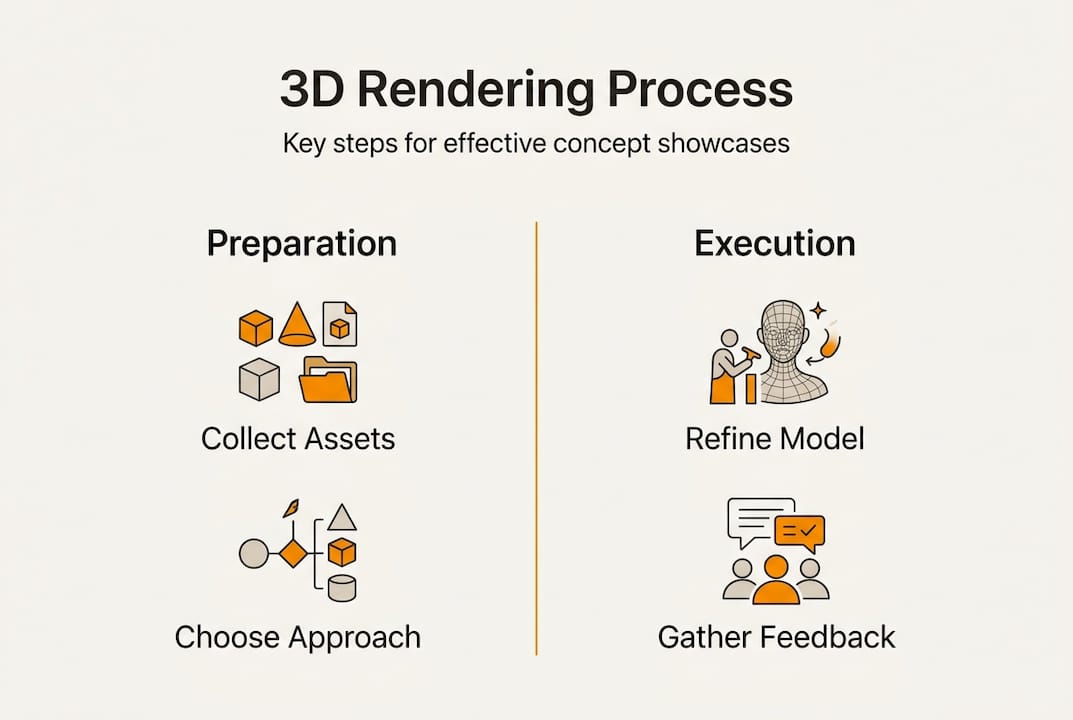
1. Gather comprehensive assets
Collect CAD plans, material specifications, finish samples, and inspiration images. Include site photos, surrounding context, and any branding guidelines. The more complete your asset library, the more accurate your visualizations. Missing details force guesswork that undermines credibility.
2. Select the optimal visualization approach
Match your tool to your goal. Need to showcase exterior aesthetics? High-resolution still renderings capture architectural details beautifully. Want to demonstrate circulation flow? Animated walkthroughs reveal how people move through spaces. Seeking investor engagement? VR experiences create memorable emotional connections. 3D floor plans and walkthroughs help clients understand spatial relationships before construction starts.
3. Model with precision and iterate collaboratively
Build your 3D model following 3D design best practices that prioritize accuracy. Share early versions with your design team and key stakeholders. Iteration at this stage costs hours, not weeks. Waiting until final renderings to discover misaligned expectations wastes time and budget.
4. Fine-tune lighting, materials, and atmosphere
This step separates amateur visualizations from professional presentations. Study how natural light enters your space at different times. Match material textures to actual product specifications. Add subtle imperfections—perfectly uniform surfaces look artificial. Consider seasonal variations if your project includes significant landscaping.

5. Present interactively and capture feedback systematically
Don’t just show—facilitate exploration. Let stakeholders navigate spaces, toggle finish options, and ask questions in real-time. Document every comment and concern. Stakeholder collaboration during presentation prevents costly changes during construction.
| Presentation Stage | Primary Goal | Key Deliverable |
|---|---|---|
| Concept Validation | Confirm design direction | Mood boards, preliminary renderings |
| Design Development | Refine details, materials | Detailed stills, material studies |
| Approval Pitch | Secure funding/permits | Full walkthroughs, VR experiences |
| Marketing Launch | Generate buyer interest | Hero images, animated tours |
Pro Tip: Create a presentation narrative that mirrors how people will actually experience the space. Start with arrival, move through entry sequences, highlight key amenities, then showcase individual units. This storytelling approach feels natural and keeps audiences engaged.
Integrate architectural drawings alongside renderings to satisfy technical reviewers while maintaining visual appeal for non-technical stakeholders. This dual approach addresses diverse audience needs within a single presentation.
Even with a clear process, it’s easy to fall into common pitfalls—be alert to these and ensure your presentations stand out.
Common mistakes to avoid when presenting designs
Even experienced teams stumble over presentation pitfalls that undermine otherwise excellent work. Recognizing these errors helps you deliver consistently impressive showcases.
Overwhelming viewers with excessive detail
More isn’t always better. Showing every electrical outlet, every door hinge, and every minor finish variation creates cognitive overload. Focus on hero moments—the views that sell the vision. Save technical minutiae for specification documents.
Neglecting emotional impact through poor lighting
Lighting transforms mood. A lobby rendered under flat, even illumination feels sterile and uninviting. That same space with dramatic natural light, warm accent lighting, and realistic shadows becomes aspirational. Study how light behaves in similar completed projects, then replicate those conditions.
Presenting a single frozen version
Design involves choices. When you show only one option, stakeholders either accept or reject wholesale. Offering variations—different material palettes, furniture arrangements, or landscaping schemes—invites collaboration rather than confrontation. Failing to tailor visualizations to audience needs results in missed buy-in opportunities.
Using outdated or low-resolution visuals
Nothing undermines credibility faster than pixelated images or obviously dated rendering styles. Technology evolves rapidly. Visuals that impressed three years ago now look amateurish. Invest in current tools or partner with specialists who maintain cutting-edge capabilities. Check rendering examples to understand current quality standards.
“The goal isn’t photographic accuracy—it’s emotional authenticity. Viewers should feel they’re previewing a real place, not examining a computer model.”
Pro Tip: Test presentations on non-technical audiences before high-stakes meetings. If your neighbor or spouse can’t understand the space from your visuals, neither will investors.
Mastering these pitfalls puts you on the path to impressive, successful showcases. Now let’s look at ways to maximize stakeholder engagement.
Maximizing engagement with interactive and immersive visuals
Static images inform, but interactive experiences engage. When stakeholders actively explore rather than passively view, they develop ownership over design decisions. This psychological shift accelerates approvals and reduces post-approval changes.
VR walkthroughs represent the gold standard for immersive presentation. Clients don headsets and navigate spaces at human scale, experiencing ceiling heights, room proportions, and view corridors exactly as built. This first-person perspective reveals design strengths and weaknesses that plan views miss. Interactive experiences increase engagement and accelerate decision cycles by up to 40%.
Real-time configurators take interaction further. Let viewers toggle between flooring options, swap cabinet finishes, or adjust furniture layouts during the presentation. Each change renders instantly, showing consequences immediately. This capability transforms presentations into collaborative design sessions where stakeholders co-create rather than critique.
Interactive presentation tactics:
- Provide tablet-based viewers for self-guided exploration during open houses
- Enable side-by-side comparisons of design alternatives
- Incorporate 360-degree panoramas for web-based virtual tours
- Add hotspots that reveal technical details or material specifications on demand
Digital feedback tools streamline input collection. Embed comment functionality directly into visualization platforms. Stakeholders mark specific locations with concerns or suggestions, creating a visual record that prevents miscommunication. This documentation proves invaluable during design development and construction administration.
3D walkthroughs in design bridge the gap between professional visualization and client understanding. Non-technical stakeholders grasp spatial concepts through exploration that would remain abstract in traditional presentations.
Armed with these advanced approaches, you’re positioned to deliver presentations that truly set your projects apart. Next, we’ll recap the business impact these techniques can provide.
The impact: Results you should expect from exceptional design showcases
Investing in sophisticated visualization pays measurable dividends throughout project lifecycles. Track these metrics to quantify presentation effectiveness and justify technology investments.
Accelerated approval timelines
Successful presentations reduce approval timelines by up to 50%. When stakeholders immediately grasp design intent, questions resolve faster and confidence builds quickly. Projects move from concept to construction without the delays that plague poorly communicated proposals.
Increased pre-sales and investor confidence
Buyers commit to unbuilt properties when visualizations make future reality tangible. Marketing suites featuring VR experiences and interactive renderings generate higher deposit rates and faster sellouts. Investors fund projects with greater conviction when presentations eliminate uncertainty about final outcomes.
Smoother stakeholder alignment
Misaligned expectations cause expensive mid-construction changes. Comprehensive visual presentations ensure everyone—architects, developers, contractors, and end users—shares a unified vision before breaking ground. This alignment prevents the scope creep and change orders that erode profitability.
Competitive differentiation
In crowded markets, presentation quality separates winners from also-rans. Developers who showcase concepts through cutting-edge visualization signal professionalism, attention to detail, and commitment to excellence. This perception advantage influences everything from investor selection to buyer premiums.
Measurable outcomes to track:
- Days from presentation to approval decision
- Percentage of pre-sales achieved before construction start
- Number of design revisions requested post-approval
- Stakeholder satisfaction scores
- Marketing material engagement rates
Review 3D animation case studies to see how similar projects achieved specific business outcomes through strategic visualization investments.
If you’re ready to implement these strategies, expert partners can empower your team further.
Take your design showcases to the next level
You now understand why exceptional presentation matters, what tools enable it, and how to execute effectively. But creating photorealistic renderings and immersive experiences requires specialized expertise that most development teams lack in-house. Building this capability internally demands significant technology investment, ongoing training, and dedicated personnel.
Rendimension delivers industry-leading 3D rendering services that transform architectural concepts into compelling visual narratives. With over 1,000 completed projects globally, we understand the unique presentation challenges facing real estate developers and marketing professionals. Our collaborative process ensures your vision translates accurately while our technical expertise handles the complex details that make visualizations convincing.

Whether you need photorealistic stills for marketing campaigns, animated walkthroughs for investor presentations, or VR experiences for sales centers, our team provides the visualization solutions that win approvals and drive pre-sales. We work alongside your architects and designers, integrating seamlessly into your workflow while delivering the visual quality that sets premium projects apart. Our step-by-step visualization process ensures predictable timelines and outcomes that match your strategic goals.
Ready to transform your next project pitch into a show-stopping experience? Partner with specialists who understand both the technical craft and business impact of exceptional design presentation.
Frequently asked questions
What are the best tools for showcasing design concepts?
The best tools include advanced 3D rendering software, VR platforms, and interactive walkthrough applications that deliver photorealism and enable client engagement. 3D renderings and mock-ups provide vivid previews for stakeholders far beyond paper plans.
How can 3D visualizations help win investor approval?
3D visuals clarify design intent and create emotional connections with proposed spaces, significantly increasing the likelihood and speed of investor buy-in. Photorealistic 3D renderings increase understanding and project approval rates among clients and funding partners.
Should I use static images or interactive walkthroughs?
Interactive walkthroughs provide deeper engagement and spatial understanding, while static images work effectively for quick overviews and print marketing materials. 3D floor plans and walkthroughs help clients experience spaces before construction starts.
What mistakes lower the effectiveness of design presentations?
Common mistakes include overwhelming viewers with excessive detail, neglecting lighting’s emotional impact, ignoring stakeholder feedback, and using low-quality or outdated visuals. Failing to tailor visualizations to specific audiences results in missed opportunities for buy-in and approval.
How much time can effective visualization save in the approval process?
Well-executed presentations can reduce project approval timelines by up to 50% by eliminating ambiguity and building stakeholder confidence quickly. Successful presentations accelerate decisions by helping all parties understand design intent immediately.
Recommended
- Architectural Visualization Guide For Stunning 3D Renderings
- Present 3D Renderings To Clients: Boost Engagement 45%
- 3D Walkthroughs: Transforming Design Presentations
- Types Of 3D Renderings: Architect & Real Estate Guide
- AR Education Posters by Amlogy: Print Meets Immersion
