How to Present Designs to Clients: A Guide
How to Present Designs to Clients: A Pro Strategy Guide
TL;DR:
- Effectively presenting designs requires strategic storytelling, clear visuals, and structured feedback to ensure client alignment and approval. Preparation involves understanding client goals, choosing appropriate fidelity, and defining a specific meeting ask, while structuring the presentation around context, evidence, insight, design, and impact keeps clients engaged. Prompt follow-up within 24 hours consolidates decisions, clarifies next steps, and builds long-term trust, transforming project progress and client relationships.
Presenting designs to clients effectively is the skill that separates designers who win approvals from those who cycle through endless revisions. The difference is not the quality of the work itself. It is how you frame, deliver, and manage the conversation around it. Knowing how to present designs to clients means combining strategic storytelling, clear visuals, and structured feedback workflows so that every meeting ends with alignment and a clear next step. Tools like Figma, FigJam, and Miro have made this more achievable than ever, but the method behind the meeting matters most.
How to present designs to clients: preparation that sets you up to win
Every strong client presentation starts long before you open a single file. Design presentations fail when designers focus on what they made instead of what the client needs. That single shift in mindset changes everything about how you prepare.

Start by revisiting the original brief and the client’s business goals. What problem were you hired to solve? What does success look like for their business, not just for the design? Write down two or three specific outcomes the client cares about, then check every design decision against them before the meeting.
Know your audience before you walk in. A founder making a gut-level decision needs different framing than a marketing director comparing options against brand guidelines. Anticipate the questions each type of stakeholder will ask and prepare concise answers. If you are presenting to a group, identify who holds final approval authority and speak to their priorities first.
Choose the right fidelity for the stage of the project. Showing a polished, pixel-perfect mockup during a discovery phase confuses clients into thinking the work is nearly done. Showing a rough wireframe during a final review signals a lack of progress. Match the visual detail to the decision you need the client to make.
Organize your frames in presentation order with clear, descriptive labels. Set a specific “ask” for the meeting before it starts. Do you need approval to move to development? Do you need a decision on two layout directions? Knowing your ask shapes every other preparation decision.
Pro Tip: Write your meeting ask at the top of your notes and state it out loud in the first two minutes of the presentation. Clients who know what they are deciding stay focused and give better feedback.
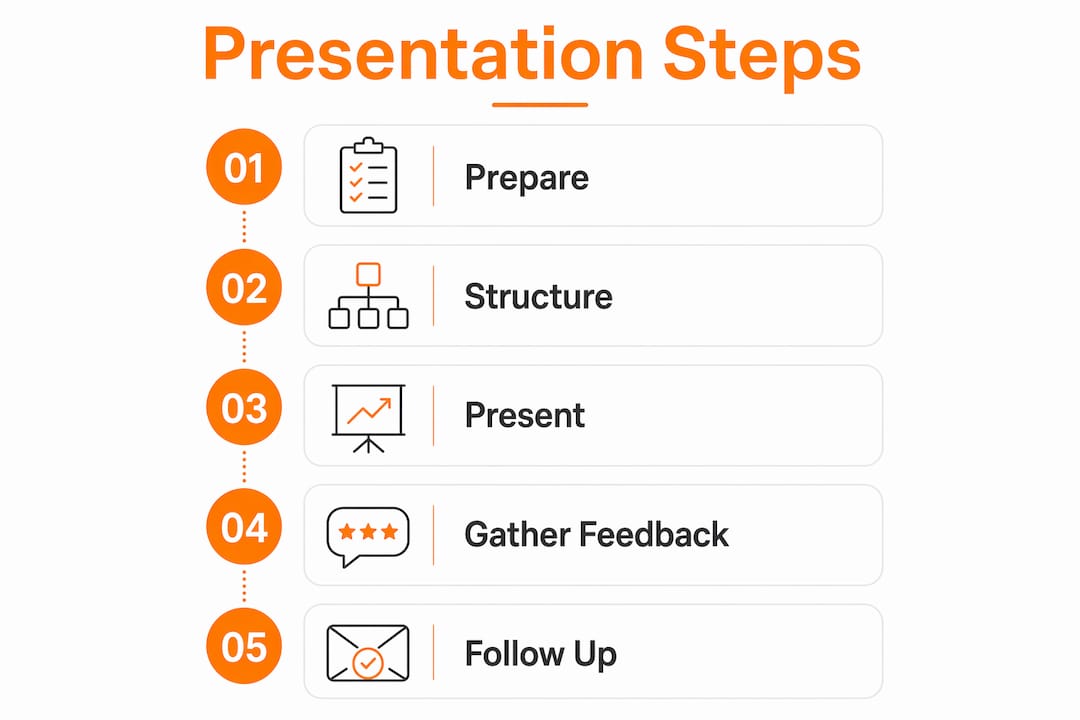
How should you structure a design presentation?
Effective presentations consist of three parts: an overview of the big picture, a detailed walkthrough of each section, and an explicit request for approval or feedback. This structure keeps clients oriented and ends the meeting with clear next steps rather than vague impressions.
Open by restating the client’s brief in your own words. This does two things. It confirms you understood the assignment, and it anchors every design decision that follows in the client’s own goals. Clients who hear their problem reflected back to them become more receptive to the solutions you present.
From there, use a storytelling framework built around five elements:
- Context: Describe the situation the design addresses. Who is the user or audience? What are they trying to accomplish?
- Evidence: Share any research, data, or user insight that informed your direction. Even one or two data points shift the conversation from opinion to strategy.
- Insight: State the core design principle or decision that emerged from the evidence. “Users were abandoning the form at step three, so we reduced it to a single screen.”
- Design: Walk through the work itself, explaining each choice in terms of the insight and the client’s goals.
- Business impact: Close each section by connecting the design back to the outcome the client cares about.
Storytelling through this framework reduces rounds of rework and shifts feedback from pixel opinions to strategic discussion. Clients stop asking “can you make the logo bigger?” and start asking “does this support our conversion goal?”
“Framing design presentations as business cases rather than design reviews elevates client conversations from subjective opinions to strategic decisions.” — LogRocket Blog
Presenting one recommended solution with confident rationale is more effective than showing multiple options. When clients see three directions, they instinctively try to combine the best parts of each, which produces incoherent feedback and increases revision rounds. Present your best answer and explain why it is the right one.
Close with your explicit ask. State what you need from the client before the meeting ends: approval to proceed, a decision on a specific element, or written sign-off on the direction. Leave no ambiguity about what “done” looks like for this session.
What tools work best for live and async design reviews?
The format of your presentation, live or asynchronous, changes the tools and techniques you need. Both have real advantages, and knowing when to use each one is a practical skill worth developing.
| Format | Best for | Key advantage | Main risk |
|---|---|---|---|
| Live presentation | Major milestones, complex decisions | Real-time clarification and relationship building | Feedback can be reactive and unconsidered |
| Async review | Iterative feedback, distributed teams | Clients review on their own schedule with time to think | Can become an unresolved email thread without clear workflow |
Figma’s presentation mode and organizing frames in presentation order creates clean, easy-to-follow live presentations and effective async reviews. Name each frame clearly, use “fit to screen” for consistent display, and share a direct link to the specific frame you want reviewed rather than the entire project file.
For async reviews, set clear review windows with defined scope and a closing deadline. An open-ended “let me know what you think” invitation produces scattered, low-quality feedback. A message that says “Please review the homepage layout linked below and leave comments by Thursday at noon. We need your input on the navigation structure only” produces focused, usable input.
Organize incoming feedback into three categories as it arrives: direction feedback (strategic, affects the whole approach), visual detail feedback (specific elements like color or spacing), and out-of-scope feedback (requests that fall outside the agreed brief). FigJam and Miro both support sticky note workflows that make this triage visible to everyone on the project.
Pro Tip: When running an async review, post a top-level comment on the shared frame that states exactly what feedback you need and when the review closes. This single step cuts irrelevant comments by more than half.
How to handle client feedback without losing project momentum
Client feedback falls into two categories, and treating them the same way is one of the most common mistakes in design practice. Differentiating personal preference feedback from strategic misalignment leads to healthier conversations and more productive outcomes.
When a client says “I don’t like this color,” that is preference feedback. When they say “this doesn’t feel like our brand,” that is a strategic signal worth investigating. Ask clarifying questions to find out which one you are dealing with. “Can you tell me more about what feels off? Is it the tone, the contrast, or the association with a competitor?” That question transforms a vague reaction into a specific, solvable problem.
Push for specifics on every piece of vague feedback before the meeting ends. “I want it to feel more premium” is not actionable. “I want the typography to feel more editorial, closer to what you see in Architectural Digest” is. Your job in the feedback session is to translate impressions into instructions.
Categorize feedback live during the meeting using these three buckets:
- Revision: Changes within the current scope that you will address in the next round.
- Scope change: New requests that fall outside the agreed brief and require a separate conversation about timeline and cost.
- Client-controlled: Decisions that belong to the client, such as final copy or brand color choices, that you will implement once confirmed.
Ending feedback sessions with explicit next steps and dates prevents ambiguity about what counts as done and reduces repetitive revision cycles. State the next action, who owns it, and the deadline before you close the meeting. Write it down and share it the same day.
Pro Tip: If a client requests a change that conflicts with a previous approval, note it explicitly in the meeting. Say: “That would revise what we agreed on in our last session. I want to flag that so we can decide together whether to move forward.” This protects the project and your professional authority.
What should you do after a design presentation?
A professional follow-up within 24 hours after a presentation keeps momentum and builds client trust. Stalled decision-making and scope creep both accelerate when there is no written record of what was agreed.
Your follow-up email or document should include:
- A summary of key decisions made during the meeting, written in plain language the client can forward to their own team.
- A list of agreed changes with enough detail that there is no room for misinterpretation later.
- The next milestone and its deadline, so both parties know what to expect and when.
- Any open questions that need resolution before work can continue, with a specific request for a response date.
Use tools like Notion, Google Docs, or a shared project management platform to house these summaries where both you and the client can reference them. A well-organized project communication record also protects you if scope disputes arise later in the project.
Consistent follow-up communication is one of the fastest ways to build long-term client relationships. Clients who feel informed and respected between meetings are far more likely to approve work quickly, refer new business, and return for future projects.
Key takeaways
Presenting designs to clients successfully requires combining strategic storytelling, structured feedback workflows, and disciplined follow-up to drive clear decisions and lasting client trust.
| Point | Details |
|---|---|
| Preparation is the foundation | Research client goals and set a specific meeting ask before every presentation. |
| Structure drives buy-in | Use the Context, Evidence, Insight, Design, Impact framework to anchor design choices in business outcomes. |
| One solution beats multiple options | Presenting a single recommended direction with confident rationale reduces conflicting feedback and revision rounds. |
| Triage feedback by type | Separate direction, visual detail, and out-of-scope feedback to keep projects on track and protect your scope. |
| Follow up within 24 hours | Send a written summary of decisions, agreed changes, and next steps to prevent delays and scope creep. |
What we have learned from over 1,000 client presentations
After completing more than 1,000 projects at Rendimension, the pattern is consistent: the presentations that win fast approvals are not the ones with the most polished visuals. They are the ones where the designer walked in knowing exactly what decision they needed and built every slide, every frame, and every sentence toward that outcome.
The biggest mistake we see design professionals make is treating the presentation as a reveal rather than a conversation. A reveal puts the client in the position of judge. A conversation puts you both in the position of problem-solvers. That shift in dynamic changes the quality of feedback you receive and the speed at which projects move forward.
Confidence in the feedback session matters as much as preparation. Clients read hesitation as uncertainty about the work. When you present a recommendation with a clear rationale, you are not being rigid. You are being the expert they hired. Hold your position on strategic decisions while remaining genuinely open to feedback that improves the outcome.
The one thing most articles on this topic skip: the follow-up is where trust is actually built. Any designer can run a good meeting. The ones clients call back are the ones who send a clear summary the next morning, hit every deadline they committed to, and never make the client chase them for an update. That discipline is what separates a one-time project from a long-term relationship.
— Rendimension
See your designs the way clients see them
The strategies above work for any design discipline. For architects, real estate developers, and construction professionals, the visual quality of what you present is just as important as how you present it. Photorealistic 3D renderings give clients an immediate, visceral understanding of a design that no floor plan or mood board can match. When clients can see exactly what they are approving, feedback becomes faster and more specific.

Rendimension’s architectural visualization services transform design concepts into photorealistic images, immersive 3D walkthroughs, and virtual reality experiences that make client presentations impossible to misread. With over 1,000 projects delivered globally, Rendimension helps architects and developers walk into every client meeting with visuals that close the gap between concept and approval. Explore the portfolio and see how the right visualization changes the entire conversation.
FAQ
How do you present design concepts without overwhelming clients?
Present one recommended solution with a clear rationale rather than multiple options. Showing a single direction with confident reasoning keeps clients focused and prevents conflicting feedback that stalls projects.
What is the best way to get useful feedback from clients?
Share a direct link to the specific design frame you want reviewed, state exactly what feedback you need, and set a clear deadline. Structured prompts produce far more useful input than open-ended requests.
How do you handle a client who keeps changing their mind?
Categorize each new request as a revision, a scope change, or a client-controlled decision during the meeting. Document every agreed change in writing and reference previous approvals when new requests conflict with them to protect the project timeline.
Should you present designs live or send them asynchronously?
Use live presentations for major milestones and complex decisions where real-time clarification matters. Use async reviews for iterative feedback rounds, especially with distributed teams, but always set a defined review window and clear scope to avoid unresolved threads.
How soon should you follow up after a design presentation?
Send a written summary within 24 hours. A professional follow-up that covers key decisions, agreed changes, and the next milestone prevents delays and builds the kind of client trust that leads to repeat work.