Photorealistic rendering: What observational techniques really mean

TL;DR:
- “Observational rendering” is a misunderstood term with no recognized industry standard, but real-world observation enhances perception-based rendering quality. Effective photorealism depends on consistent lighting, accurate materials, and spatial cues that trigger believable human responses, not just technical complexity. Using real environment references and artistic judgment ensures renderings resonate emotionally and convincingly with viewers.
If you’ve searched for “observational rendering” expecting a clear method or established workflow, you’ve likely hit a wall. No established definition or technique called “observational rendering” exists in professional architectural, real estate, or construction contexts. That gap creates real confusion for architects and developers trying to sharpen their visualization game. This article cuts through the ambiguity, decodes what the term actually points toward in practice, and delivers concrete principles you can apply right now to produce renderings that win clients, close deals, and make your projects unforgettable.
Table of Contents
- Why ‘observational rendering’ is a misunderstood term
- Core principles behind photorealistic architectural rendering
- Misconceptions: Perceptual plausibility versus technical complexity
- Observational insights: Applying real-world cues in your rendering workflow
- Why the best renderings borrow from both art and science
- Take your renderings to the next level with expert solutions
- Frequently asked questions
Key Takeaways
| Point | Details |
|---|---|
| No standard definition | Observational rendering lacks an official definition in architecture or real estate contexts. |
| Focus on perception | Successful renderings rely on perceptual cues like lighting, materials, and spatial arrangement. |
| Avoid technical pitfalls | Prioritize visual believability over complex computations. |
| Apply real-world references | Use observational strategies to guide lighting, materials, and atmosphere in digital renders. |
| Blend art and science | The most compelling renderings combine technical skill with observational artistry. |
Why ‘observational rendering’ is a misunderstood term
The phrase “observational rendering” sounds authoritative. It sounds like something you’d find in a software manual or a technical brief from a top-tier visualization studio. But when you dig into the architectural and real estate literature, it simply isn’t there.
“Observational rendering” does not appear in any recognized industry standard, professional guideline, or peer-reviewed publication focused on architectural visualization or real estate marketing.
Searches returned results on observational drawing and general photorealistic rendering techniques, but no specific “observational rendering” term emerged in any professional context. Observational drawing is a well-documented practice, referring to traditional sketching directly from life, where the artist trains their eye by studying real objects, light, and space with pencil and paper. That discipline is foundational in fine arts education but distinct from 3D digital rendering in every technical sense.
So why does the confusion persist? A few reasons:
- Blurred language: The word “observational” sounds natural when describing any rendering that mimics how we see the world, so practitioners use it informally without a precise definition.
- Cross-discipline mixing: Architects and designers trained in both traditional art and digital tools sometimes borrow language from sketching practice and apply it loosely to CGI workflows.
- Emerging usage: The term may be an emerging concept that practitioners are beginning to use before the industry has formalized it with a clear definition.
- Marketing language: Some studios use “observational” as a marketing adjective to imply their renderings are grounded in real-world perceptual accuracy, without defining a specific technique.
The impact for you as a practitioner is real. If you brief a studio asking for “observational rendering,” you may receive wildly different interpretations. Worse, you might spend time and budget chasing a technique that doesn’t exist as a packaged product. The smarter move is to shift focus toward what actually drives perceptual realism in photorealistic architectural visualization, where the principles are well-documented, measurable, and repeatable.
Core principles behind photorealistic architectural rendering
Once you set aside the ambiguous label, the underlying goal becomes clear: you want renderings that viewers believe. Not just admire, but actually believe. That distinction matters enormously in project marketing and stakeholder presentations.
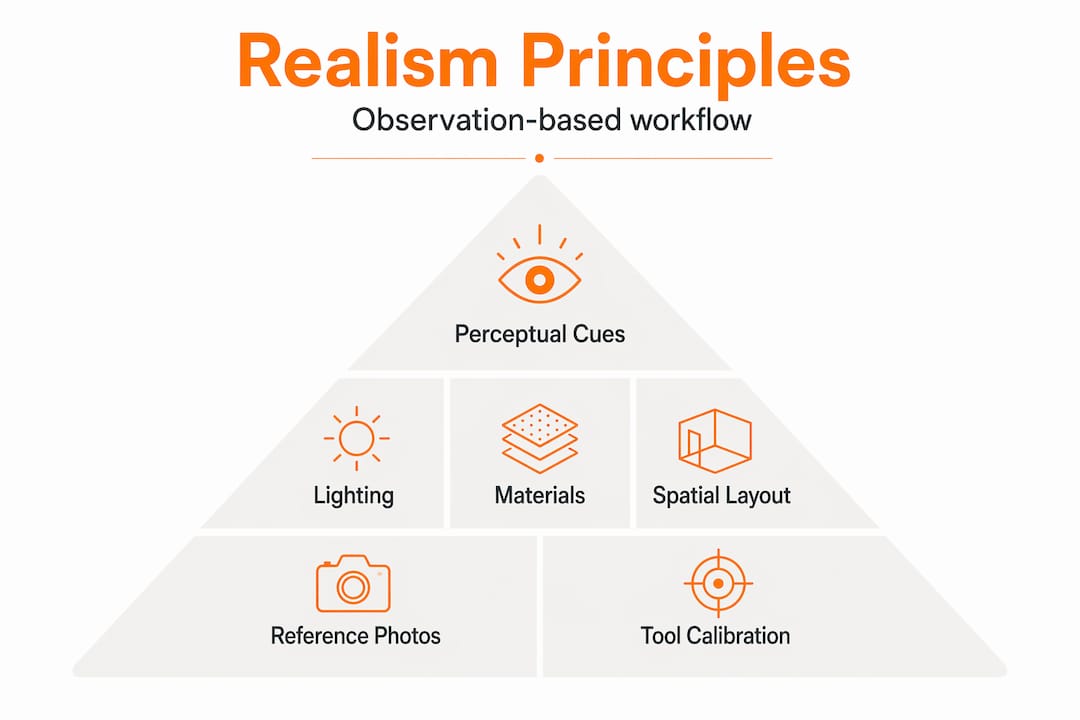
Photorealism in 3D architectural rendering relies on perceptual cues like lighting, material properties, and spatial layout rather than physical accuracy alone. This is a subtle but critical insight. Your rendering doesn’t need to simulate every photon bouncing off every surface. It needs to trigger the same perceptual response in a human viewer that the real space would trigger.
Here’s how the core principles break down in practice:
| Principle | What it means | Why it matters |
|---|---|---|
| Lighting consistency | Light sources match in direction, color temperature, and intensity | Inconsistent lighting instantly breaks believability |
| Material perception | Textures and reflectance match real-world counterparts | Wrong gloss or roughness makes surfaces look “digital” |
| Spatial composition | Camera angles and field of view match human sight | Unnatural perspective reads as artificial |
| Atmospheric depth | Haze, shadows, and ambient occlusion add depth | Flat images feel like illustrations, not spaces |
| Contextual accuracy | Site context, landscaping, and surroundings are realistic | Disconnected context undermines project credibility |
Lighting is the single biggest lever you have. Natural light behaves differently at 7 a.m. versus 3 p.m., and the color temperature shifts from warm golden to cool blue. A rendering that ignores this reads as generic, regardless of how detailed the geometry is. Skilled photorealistic 3D rendering always starts with a lighting study that maps real sun angles and sky conditions to the project’s specific geographic location.

Material perception is equally powerful. Concrete doesn’t reflect like polished marble. Matte paint doesn’t behave like glass. When you get material properties right, even viewers who can’t articulate why will feel that the image is real. When you get them wrong, even non-technical stakeholders sense something is “off,” even if they can’t explain it.
Pro Tip: Before starting any rendering project, collect a physical reference board. Pull real photographs of the materials you’re specifying, shot under lighting conditions similar to your intended render. This gives your visualization team an unambiguous target and eliminates costly revision cycles.
For residential projects specifically, our 3D house rendering guide walks through how these principles apply at the scale of a single home, from façade lighting to interior material calibration.
Misconceptions: Perceptual plausibility versus technical complexity
Here’s where many professionals make a costly mistake. When a rendering feels unconvincing, the instinct is to throw more technical resources at it. Higher polygon counts. More complex shader networks. Longer render times. More powerful hardware. But technical complexity and perceptual plausibility are not the same thing, and confusing them leads to wasted budgets with disappointing results.
Clients and stakeholders don’t evaluate renderings based on polygon counts. They evaluate them based on whether they can picture themselves in the space.
For architects and developers, prioritize perceptual plausibility (consistent lighting and materials) over computational complexity for effective project presentations. This doesn’t mean cutting corners. It means directing your technical investment toward the elements that actually move the needle for your audience.
Follow this sequence to ensure perceptual plausibility in every project:
- Define the lighting scenario first. Decide whether the render represents morning, afternoon, evening, or overcast conditions. Lock this before touching materials or geometry. Every other decision flows from the light.
- Calibrate materials against photographic references. Match roughness, reflectance, and color values to real photographs, not default software settings. Default settings almost always produce overly clean, “digital-looking” results.
- Set camera angles at human eye level. A camera positioned at 5 feet 6 inches, matching average human height, immediately makes a space feel inhabitable. Dramatic bird’s-eye views have their place in site plans, but they don’t create emotional connection.
- Add environmental imperfection. Real spaces have minor scuffs, slight color variation in flooring, plants with natural asymmetry. A perfectly uniform surface reads as fake. Strategic imperfection builds credibility.
- Review the image as a non-technical viewer. Step back from the technical process and ask: does this look like a photograph of a real place? If something feels off, it almost certainly is, even if you can’t immediately identify the technical cause.
Our detailed guide to photorealistic rendering expands on each of these steps with specific software workflows and settings that apply across the most commonly used platforms.
The perceptual plausibility principle also has a business dimension. Clients who receive believable renderings make faster decisions. Investors who can emotionally connect with a visualization approve funding more readily. The rendering’s job isn’t to show technical capability. Its job is to make the project feel real before the first shovel hits the ground.
Observational insights: Applying real-world cues in your rendering workflow
The term “observational rendering” may be a misnomer or an emerging concept not yet documented in established sources. But the underlying idea, that rendering quality improves when informed by careful real-world observation, is genuinely valuable and practically applicable.
Here’s how to structure an observation-informed rendering workflow:
- Visit comparable built environments. If you’re rendering a high-end residential tower, spend time in similar completed buildings. Observe how glass reflects surrounding buildings at different times of day. Notice how lobby materials read under different lighting conditions.
- Photograph extensively and systematically. Capture the same surface under morning light, afternoon light, and artificial interior light. These reference photographs become calibration anchors for your rendering team.
- Study weather and seasonal variation. A winter rendering with bare trees and low sun angles tells a completely different story than a summer rendering with full canopy and high sun. Both may be relevant depending on your project’s marketing timeline.
- Analyze shadows as carefully as light sources. Shadows define depth and three-dimensionality. In real environments, shadows have soft edges and color shifts toward blue in the ambient fill. Crisp, dark shadows with no color variation read as computer-generated instantly.
| Observational element | Real-world behavior | Rendering calibration tip |
|---|---|---|
| Morning light | Warm gold, long shadows, low angle | Set sun elevation below 20°, color temperature at 3000K |
| Overcast sky | Flat, diffuse, no direct shadows | Use HDRI overcast maps, minimize directional light |
| Wet surfaces | High reflectance, dark base color | Increase specular, add puddle geometry or decals |
| Aged concrete | Variation in tone, streaks, minor cracking | Use mixed texture layers with procedural variation |
| Interior artificial light | Warm pools, visible falloff | Match real fixture specs for lumen output and beam angle |
Pro Tip: Use visualization tool recommendations to match your software’s capabilities to the specific observational elements your project requires. Not every platform handles volumetric light or wet surface rendering with equal fidelity.
There are also practical tools for architects that support the physical site documentation process, from measurement to photographic reference capture, that feed directly into a stronger rendering brief.
The observation-informed approach isn’t just about aesthetics. It builds a shared reference language between architects, developers, and visualization teams. When everyone is looking at the same real-world reference, revision cycles shrink dramatically and final outputs land closer to the original vision on the first pass.
Why the best renderings borrow from both art and science
After working across more than 1,000 projects globally, one pattern stands out clearly: the renderings that consistently win client approval, drive pre-sales, and earn industry recognition are never purely technical achievements. They are also creative ones.
There’s an industry tendency, especially among technically focused teams, to treat photorealism as a hardware and software problem. Get a better GPU. Run more render passes. Use the latest physically based rendering engine. These investments matter, but they represent a ceiling, not a guarantee. Photorealism in 3D architectural rendering relies on perceptual cues that require human judgment to calibrate, not just computing power to calculate.
The artists who produce the most compelling architectural visuals are also keen observers of the real world. They notice how late afternoon light creates a specific warmth on brick that no default setting replicates. They understand that a bedroom render feels more inviting when the focal point is a made bed with slightly rumpled pillows rather than a geometrically perfect arrangement. These are artistic decisions that automation simply cannot make.
At the same time, pure artistic instinct without technical grounding produces beautiful but impractical work. A compositionally stunning render with physically impossible lighting or materials that don’t match specifications fails its primary purpose. The rendering must serve the project brief, not just the artist’s vision.
Our architectural visualization expertise is built on exactly this balance. We invest in both technical capability and artistic development, because clients deserve both. The studios that treat these as competing priorities will always plateau. The ones that integrate them produce work that genuinely moves markets.
Take your renderings to the next level with expert solutions
Applying perceptual realism principles sounds straightforward in theory, but executing them consistently across every project is where most teams struggle. Lighting calibration, material referencing, camera positioning, and atmospheric depth all require both technical knowledge and experienced creative judgment working in tandem.

Rendimension’s 3D rendering services are designed specifically for architects and real estate developers who need visualization outputs that perform in real marketing and presentation environments, not just in technical reviews. From initial brief to final delivery, our collaborative process ensures your project’s specific context and audience inform every perceptual decision. Explore our architectural visualization solutions for static rendering, or step further into immersive formats with our interactive 3D walkthroughs that let stakeholders experience a space before it’s built.
Frequently asked questions
Is observational rendering a recognized industry method?
No, “observational rendering” is not an established industry term; it is not currently documented in professional architecture or real estate sources, and practitioners should focus instead on well-defined photorealism principles.
How does observational drawing differ from rendering?
Observational drawing means sketching from life using pencil and paper to train perceptual skill, while rendering uses specialized 3D software to generate photorealistic digital images from architectural models.
What aspects matter most for photorealistic architectural visualization?
Lighting, material accuracy, and spatial layout are the most important factors, because these perceptual cues determine whether a viewer experiences the image as believable, regardless of the underlying computational complexity.
Can real-world observation improve rendering results?
Yes, and significantly. Referencing real environments for light, material behavior, and atmospheric mood gives rendering teams calibration anchors that default software settings simply cannot match.