TL;DR:
- Immersive 3D virtual walkthroughs sell homes faster and at higher prices.
- Proper preparation and teamwork are essential for high-quality, realistic walkthroughs.
- Iterative updates based on engagement analytics improve sales outcomes and design focus.
Properties marketed with immersive 3D virtual walkthroughs sell 20-31% faster and command 4-9% higher prices, yet most architects and developers still rely on static renders and PDF plans for client presentations. The gap between what clients expect and what firms typically deliver has never been wider. This guide walks you through every stage of the virtual walkthrough process: from choosing the right tools and setting up your models, to delivering a polished tour and measuring its real business impact. Follow this roadmap and you will have a repeatable system that wins more clients and closes deals faster.
Table of Contents
- Understanding the virtual walkthrough process
- Tools, requirements, and preparation
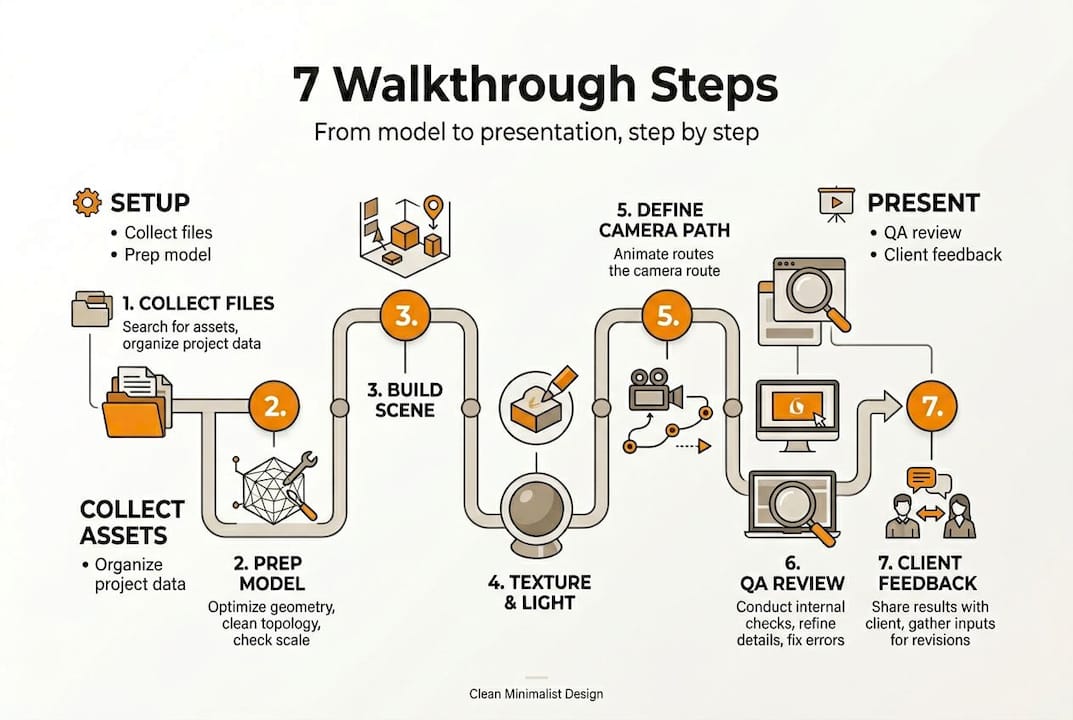
- Step-by-step: Creating an immersive walkthrough
- Quality assurance, delivery, and measuring success
- The overlooked power of walkthrough iteration
- Take your walkthroughs to the next level with rendimension
- frequently asked questions
Key Takeaways
| Point | Details |
|---|---|
| Better sales outcomes | Listings with virtual walkthroughs sell quicker and at higher prices. |
| Preparation is critical | Proper tools, assets, and team alignment set the stage for success. |
| Stepwise execution matters | Follow clear steps to ensure walkthroughs impress and inform clients. |
| Iterate for improvement | Use client feedback and analytics to refine walkthrough impact. |
Understanding the virtual walkthrough process
A virtual walkthrough is an animated or interactive 3D experience that lets viewers move through a digital model of a space, in real time or as a pre-rendered video sequence. Unlike a static render, which captures a single viewpoint, a walkthrough gives clients the sensation of actually stepping inside a building before it is constructed. A 3D walkthrough takes that concept further by combining photorealistic lighting, material textures, and spatial depth into a seamless, cinematic experience.
The contrast with traditional presentations is significant.
| Feature | Traditional presentation | Virtual walkthrough process |
|---|---|---|
| Format | PDFs, 2D plans, static renders | Interactive 3D or video tour |
| Client understanding | Often requires imagination | Space is immediately clear |
| Sales cycle | More revision rounds | 20-31% faster to close |
| Lead quality | General interest | Higher intent buyers |
| Cost of changes | High, late-stage edits | Early feedback reduces rework |
The business case is straightforward. 87% of buyers expect virtual tours when viewing listings, meaning clients now treat walkthroughs as a baseline, not a premium add-on. For architects and developers, that shift has real implications for how you pitch, sell, and retain clients.
Key benefits that justify the investment include:
- Higher lead quality: Interactive tours filter out unserious inquiries, so your sales team spends time with decision-makers.
- Better design alignment: When clients see exactly what they are buying, revision requests based on misunderstanding drop sharply.
- Brand differentiation: A firm that routinely produces cinematic walkthroughs stands apart from competitors who send over flat floor plans.
- Pre-sales velocity: Units and contracts move faster because stakeholders can evaluate a space without waiting for construction to progress.
Understanding the benefits for architects goes beyond aesthetics. A well-built walkthrough reshapes client expectations from the first meeting and sets a collaborative, professional tone for the entire project. It is also a core part of transforming design presentations into genuine sales tools rather than obligation documents.
Tools, requirements, and preparation
With a clear understanding of walkthroughs’ value, set up your project with the right tools and prep. The quality of your output depends heavily on decisions made before a single camera path is recorded.

| Tool or requirement | Purpose | Common options |
|---|---|---|
| 3D modeling software | Base model creation | ArchiCAD, AutoCAD, 3ds Max |
| Real-time render engine | Live walkthrough output | Unity, V-Ray, Corona, UE5 (supports real-time construction updates) |
| 360/photogrammetry camera | Site capture for hybrid tours | MatterPort, NavVis |
| High-spec workstation | Processing renders | 32GB+ RAM, RTX-class GPU |
| File management platform | Asset sharing, revision control | BIM 360, Google Drive |
The most common mistake at this stage is starting with an incomplete or poorly organized model. Before any render engine touches your files, run through this preparation checklist:
- Clean geometry: remove duplicate faces, close open meshes, and purge unused layers.
- Lock in materials: assign placeholder textures to every surface so lighting tests are accurate.
- Define scope with the client: confirm which rooms, views, and transitions must appear in the final tour.
- Set output specs: agree on resolution (4K is standard for premium projects), frame rate, and delivery format before work begins.
- Document revision rules: limit changes to two rounds before additional fees apply.
Three team roles drive the process: the architect owns the design intent and approves spatial accuracy; the visualizer handles the technical render pipeline; and the client coordinator manages feedback loops and prevents scope creep. When these roles are clearly assigned, projects run faster and cost less.
Homes with walkthroughs sell up to 10 days faster and for up to $50K more, figures that justify investing in a capable render workstation rather than cutting corners on hardware. Browse virtual tour examples to calibrate what a production-ready output looks like before you scope your own project, and explore 3D walkthrough services if you want to benchmark against professional studio output.
Pro tip: Loop your client into the material and color selection at the model prep stage, not after the first render. Early involvement eliminates the most expensive type of revision: changing finishes after lighting is fully set up.
Step-by-step: Creating an immersive walkthrough
You are equipped for setup; now execute the walkthrough process step by step.
- Import and validate the model. Open the cleaned 3D file in your render engine. Check that scale, orientation, and layer structure match the agreed scope. Fix any geometry errors before adding a single light.
- Build the lighting environment. Set the sky model (time of day, geographic location) and place interior lights based on the actual fixture schedule. Good lighting accounts for roughly 60% of perceived realism.
- Apply and refine materials. Use high-resolution PBR (physically based rendering) textures. Match material specs to actual product samples where possible. This step determines whether flooring looks like polished concrete or cheap laminate.
- Set up camera paths. Define the walkthrough route to prioritize the spaces clients care most about: entry sequences, living areas, key amenity zones. Each transition should feel natural and guide the eye purposefully.
- Add interactive or animated elements. Day/night toggles, furniture options, or finish selectors significantly increase client engagement and reduce post-presentation confusion.
- Run a preview render. Export a low-resolution pass to review pacing, lighting mood, and sightline quality before committing to full production rendering, which can take hours.
- Final render and export. Output at agreed specs. For video delivery, 4K at 30fps is the current professional standard. For interactive tours, optimize file size for web delivery without sacrificing visual quality.
Listings with 3D virtual walkthroughs generate 50% more qualified leads, which means every quality decision you make in this stage translates directly to better pipeline outcomes. Review the full walkthrough video guide for deep technical detail on each render stage, and see how these steps connect to broader walkthroughs in design workflows.
Common mistake: Many teams skip client sign-off at the preview render stage and proceed directly to final production. Even a 15-minute review at that checkpoint can prevent four to six hours of re-rendering. Always get written approval on the preview before the final render starts.
Pro tip: Before finalizing the camera path, walk through the space in the engine from the exact eye height of an average person (about 5.5 feet). Critical sightlines that look great in a bird’s-eye view sometimes feel cramped or disorienting at human scale.
Quality assurance, delivery, and measuring success
Once your walkthrough is built, ensure it is polished and delivers real value post-launch.
Before sharing any tour with a client, run through this QA checklist:
- Visual accuracy: Every material, fixture, and spatial proportion matches the approved design drawings.
- Audio sync: If voiceover or ambient sound is included, it aligns correctly with on-screen action.
- Navigation flow: Camera transitions are smooth, pacing feels natural, and no jarring cuts interrupt the experience.
- File performance: The tour loads within three seconds on standard broadband. Large file sizes kill engagement before the first room appears.
- Cross-device testing: Test on desktop, tablet, and mobile. A tour that crashes on an iPad will embarrasses you in the boardroom.
Choose your delivery format based on the use case:
| Format | Best for | Trade-offs |
|---|---|---|
| Live walkthrough (real-time engine) | Interactive demos, stakeholder meetings | Higher hardware cost |
| Pre-recorded video | Email campaigns, social media, listing sites | Less interactivity |
| Web-hosted 360 tour | Self-guided buyer exploration | File size management needed |
| VR headset experience | High-end client presentations | Equipment logistics |
After delivery, track these engagement metrics to measure real impact: view count, average viewing duration, drop-off points (where viewers stop watching), and conversion events (inquiries or contract signings after tour views). These numbers tell you which rooms need stronger presentation and which transitions lose interest.
Homes with walkthroughs sell for 4-9% more and close faster, so your walkthrough analytics are not just marketing data. They are signals that directly inform pricing strategy and project positioning. Check real estate walkthroughs and construction management insights for context on how leading teams are using delivery data to refine their sales process.
The overlooked power of walkthrough iteration
Most firms treat the virtual walkthrough process as a one-time deliverable: build it, send it, move on. That mindset leaves a significant amount of value on the table.
The firms consistently closing at the highest rates treat walkthroughs as living assets. They deliver a tour, collect engagement analytics, identify weak spots (rooms with high drop-off, transitions clients repeatedly replay), and update the asset before the next sales push. That loop sounds simple, but almost nobody does it systematically.
Virtual Tour Technology: Real Estate Growth data suggests iterative walkthroughs can further boost sales outcomes and client satisfaction beyond what a single polished delivery achieves. The reason is counterintuitive: the first walkthrough reveals what your client actually cares about, not what you assumed they cared about. The second version, refined by that data, is always stronger.
This iterative mindset also feeds better design decisions. If viewers consistently skip the utility spaces and linger on the rooftop terrace, that is a signal about where perceived value lives in your project. Feed those insights back into your step-by-step visualization guide and future projects will be stronger from the first draft. Build the review loop into every project contract, not as an optional add-on.
Take your walkthroughs to the next level with rendimension
When you are ready to elevate your workflow and impress more clients, here is how you can take action.
Rendimension has completed over 1,000 projects globally, partnering with architects and real estate developers who need walkthroughs that actually close deals, not just impress in pitch decks. Our studio handles the full pipeline: model preparation, photorealistic rendering, and interactive delivery, so your team focuses on design while we handle the visual production.

Explore our 3D walkthrough services to see how a professional pipeline accelerates your sales cycle. Browse immersive walkthrough solutions for portfolio examples across residential and commercial projects. Or start with our expert 3D rendering capabilities to understand the full scope of what we can build for your next project. Get in touch to discuss your specific project needs and timelines.
frequently asked questions
How long does it take to create a 3D virtual walkthrough?
Most projects take 1 to 2 weeks from model receipt to final delivery, depending on scope, the number of rooms covered, and how many revision rounds the client requests. Complex mixed-use developments with interactive features can run 3 to 4 weeks.
What file types or models are required for a walkthrough?
High-quality 3D models from software like ArchiCAD, AutoCAD, or 3ds Max are standard inputs. The cleaner and more complete the source file, including materials, layers, and scale, the faster and more accurate the final walkthrough output will be.
Can virtual walkthroughs really improve sales conversion?
The data is clear: walkthroughs increase leads by 50% and speed up sales by up to 31%, making them one of the highest-ROI marketing assets an architect or developer can invest in.
What’s the main difference between a virtual tour and a 3D walkthrough?
A virtual tour typically consists of linked 360-degree photos where viewers jump between fixed hotspots. A 3D walkthrough is a fully rendered, continuous experience where the viewer moves freely through a photorealistic model, with consistent lighting, depth, and spatial detail throughout.
Recommended
- 3D Walkthrough Guide: Create Immersive Project Visuals
- 3D Walkthroughs: Transforming Project Presentations
- Terminologia visite virtuali immersive in edilizia 2026
- Integrating DSM Modelling into Your Building Project: A Step-by-Step Guide – Complete EPC

