Most architects and real estate developers assume 3D rendering works like a photograph: point, click, and done. That assumption costs projects time, money, and quality. In reality, producing a photorealistic architectural visualization involves a structured, multi-stage pipeline where every step builds on the last. Each rendering stage impacts visual quality and project timelines in ways that directly affect your budget and client approvals. Understanding this pipeline gives you a real advantage: better briefs, fewer revisions, and visuals that actually win business.
Table of Contents
- Why understanding 3D rendering stages matters for your project
- Real-time and offline: Two main types of 3D rendering pipelines
- Breaking down the real-time rendering pipeline
- The stages of offline 3D rendering for architecture and construction
- Benchmarks, bottlenecks, and expert advice for better 3D visualizations
- How Rendimension brings every rendering stage to life
- Frequently asked questions
Key Takeaways
| Point | Details |
|---|---|
| Understand the pipeline | Each stage of 3D rendering has a specific purpose and affects final visual quality and project workflow. |
| Choose the right method | Know when to use real-time for speed and offline for photorealism in your architecture projects. |
| Optimize early | Planning light, camera, and scene geometry early saves time, costs, and results in better visualizations. |
| Watch for bottlenecks | Rendering slowdowns often come from complex geometry, heavy textures, or VRAM limits. |
Why understanding 3D rendering stages matters for your project
Knowing the rendering pipeline is not just technical curiosity. For architects, developers, and construction professionals, it is a practical tool for managing expectations and getting better results from your visualization partner.
When you understand what happens at each stage, you stop making rushed decisions that trigger expensive late-stage changes. You know when to provide feedback, what information your team needs upfront, and why certain requests take longer than others. That clarity translates directly into smoother workflows and higher-quality outputs.
Here is what pipeline awareness gives you as a client:
- Realistic timelines: You understand why a complex scene takes longer than a simple exterior shot.
- Smarter feedback: You can pinpoint issues at the right stage instead of requesting vague “improvements.”
- Cost control: You identify bottlenecks before they become budget overruns.
- Stronger collaboration: Your visualization team spends less time explaining and more time producing.
“A well-informed client is the single biggest factor in a smooth rendering project. When they understand the pipeline, revision cycles drop dramatically.” — Architectural visualization industry insight
The 3D rendering impact on a project goes far beyond aesthetics. It shapes how stakeholders perceive a development before a single brick is laid. Getting each stage right is what separates a compelling presentation from a forgettable one.
Real-time and offline: Two main types of 3D rendering pipelines
3D rendering pipelines are divided into real-time (rasterization-based) and offline (ray/path tracing-based) workflows. Each serves a different purpose, and knowing which one applies to your project changes how you plan and budget.
Real-time rendering processes frames instantly using rasterization, a technique that approximates lighting and shadows for speed. It powers video games, VR walkthroughs, and interactive design reviews. The tradeoff is visual accuracy: real-time images look good but rarely achieve the photorealism needed for marketing materials or investor presentations.

Offline rendering in architecture prioritizes photorealism over speed. It uses ray tracing or path tracing algorithms that simulate how light actually behaves in a space, bouncing off surfaces, casting accurate shadows, and producing the kind of imagery that makes a development look real before it is built.
Here is a quick comparison of the two pipelines:
| Feature | Real-time rendering | Offline rendering |
|---|---|---|
| Speed | Instant (30-60 fps) | Minutes to hours per frame |
| Visual quality | Good approximation | Photorealistic |
| Primary use | VR, interactive reviews | Marketing, client presentations |
| Algorithm | Rasterization | Ray/path tracing |
| Hardware demand | GPU-intensive | CPU/GPU farm |
For a deeper look at how these approaches compare in practice, the rendering methods comparison from Radar Render breaks down the pros and cons clearly. Most architectural projects use both: real-time for early design reviews and offline for final deliverables. Understanding the house rendering process helps you decide which pipeline fits each phase of your project.
Breaking down the real-time rendering pipeline
Real-time rendering is what makes interactive VR walkthroughs and live design approvals possible. Real-time graphics pipelines include application, geometry, rasterization, shading, and per-fragment operations. Each stage happens in milliseconds, which is what makes real-time navigation feel fluid.
Here is how each stage works in an architectural context:
- Application stage: The software prepares all scene data, including geometry, camera position, and lighting parameters. Think of this as loading your project file and telling the engine what exists in the scene.
- Geometry processing: The engine optimizes complex 3D models so they can be rendered quickly. High-polygon architectural models are simplified without losing visible detail.
- Rasterization: 3D geometry is converted into 2D pixels on your screen. This is the core of real-time rendering and happens extremely fast.
- Fragment and pixel shading: Basic textures, colors, and lighting effects are applied to each pixel. This is where materials like wood, glass, and concrete start to look recognizable.
- Per-fragment and output operations: Final depth testing and blending produce the complete frame, ready for real-time navigation or interactive review.
Pro Tip: When using real-time rendering for client walkthroughs, optimize your model’s polygon count before the session. Bloated geometry tanks frame rates and makes the experience feel clunky, which undermines confidence in the design.
For a full breakdown of how visualization unfolds step by step, you can see how real-time and offline stages connect across a complete project. The rendering algorithms behind each stage also reveal why certain hardware choices matter more than others.
The stages of offline 3D rendering for architecture and construction
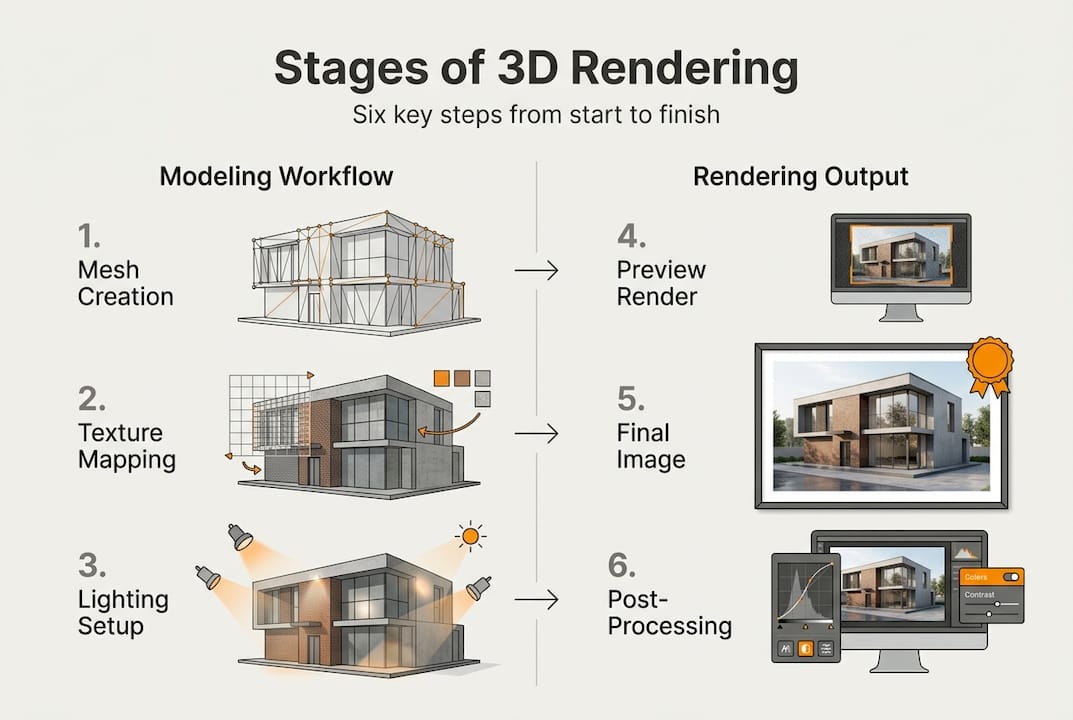
Real-time gets you instant previews, but for marketing and client presentation, the offline rendering path reigns. Offline rendering has six major stages: modeling, texturing, lighting, camera setup, rendering, and post-processing. Each one directly affects the final image quality your clients and investors will judge.
Here is how each stage breaks down:
- Modeling: Architects and designers convert drawings and plans into precise 3D objects. Accuracy here is non-negotiable. A wall that is 10 centimeters off in the model will look wrong in the final render. A solid modeling guide helps teams avoid these costly errors early.
- Texturing and materials: Lifelike surfaces are applied to every object. This includes brick patterns, glass reflectivity, wood grain, and concrete roughness. Physically based rendering (PBR) materials ensure surfaces respond to light the way real materials do.
- Lighting setup: This is where the scene comes alive. Natural sunlight, artificial interior lighting, and ambient light are all configured to mimic real-world conditions. Getting lighting for photorealism right is one of the most technically demanding stages.
- Camera and composition: Every render is a deliberate visual story. Camera angles, focal lengths, and framing are chosen to highlight the design’s strongest features and guide the viewer’s eye.
- Rendering: The software calculates every ray of light in the scene, producing the final high-resolution image. This is the computationally heavy stage that can take hours for complex scenes.
- Post-processing: Color grading, contrast adjustments, and subtle retouching refine the image for maximum impact. This stage is what gives professional renders their polished, magazine-quality finish.
The detailed rendering process shows how each of these stages connects and why skipping or rushing any one of them shows up in the final image.
| Stage | Key output | Common pitfall |
|---|---|---|
| Modeling | Accurate 3D geometry | Incorrect scale or missing details |
| Texturing | Realistic surface materials | Low-resolution or mismatched textures |
| Lighting | Believable illumination | Flat or overly bright scenes |
| Camera setup | Compelling composition | Poor framing that hides design strengths |
| Rendering | Final high-res image | Long render times from unoptimized scenes |
| Post-processing | Polished final visual | Over-editing that looks artificial |
Benchmarks, bottlenecks, and expert advice for better 3D visualizations
Knowing the pipeline is not just theory. Real-world benchmarks reveal where projects stall and where smart decisions pay off.
Complex scenes can take minutes to hours per frame in offline rendering, and optimization reduces times by up to 30%. That is a significant saving on large-scale commercial or residential projects where dozens of views are needed.
Here is where most architectural rendering projects run into trouble:
- Unoptimized geometry: High-polygon models that were not cleaned up before rendering inflate render times without improving visible quality.
- Late-stage lighting changes: Adjusting lighting after texturing and camera setup forces partial re-renders and delays delivery.
- VRAM limits: Scenes that exceed your GPU’s memory cause crashes or force lower-quality fallbacks. VRAM limits and denoising are among the most common technical bottlenecks in production environments.
- Overusing denoising: Aggressive denoising speeds up renders but introduces blurring artifacts that undermine photorealism.
- Missing PBR materials: Non-physically based materials look flat under complex lighting and require rework.
Real-time rendering targets 30 to 60 frames per second for smooth interactive navigation. Dropping below that threshold makes walkthroughs feel sluggish and unprofessional during client presentations.
Pro Tip: Lock in your lighting and camera setups before the final rendering pass. Changes at that stage are the single biggest cause of deadline overruns in architectural visualization projects.
“The difference between a good render and a great one is almost always in the preparation: clean geometry, accurate materials, and deliberate lighting before a single frame is calculated.”
For teams looking to push quality further, the advanced rendering workflow shows how each pipeline decision compounds into the final result. Practical rendering optimization strategies can also help studios cut production time without sacrificing the photorealism that clients expect.
How Rendimension brings every rendering stage to life
Understanding the pipeline is one thing. Executing it at a level that wins client approvals and drives real estate sales is another challenge entirely.

At Rendimension, we manage every stage of the offline rendering pipeline for architecture, real estate, and construction clients across more than 1,000 completed projects globally. From precise 3D modeling and PBR material setup to cinematic lighting and post-processing, our team treats each stage as a deliberate creative and technical decision. Whether you need photorealistic stills for a marketing campaign, interactive VR walkthroughs for investor presentations, or full architectural visualization services for a complex commercial development, we bring the expertise to deliver visuals that perform. Reach out to discuss your next project and see what a fully managed rendering pipeline looks like in practice.
Frequently asked questions
Why does rendering take so long for architectural projects?
Complex scenes take minutes to hours per frame because every ray of light must be calculated individually for photorealism, especially with advanced lighting setups and high-resolution textures across large architectural scenes.
How can I speed up my 3D rendering workflow?
Optimizing geometry, reducing texture file sizes, and finalizing lighting before the rendering pass can cut production times by up to 30 percent. Geometry and texture optimization are the fastest wins available to most teams.
What is the most important stage in the rendering pipeline?
Every stage matters. The six major stages of offline rendering each contribute to the final image, and a weakness in any one of them, from modeling accuracy to post-processing restraint, shows up in the result.
Is real-time rendering good enough for client presentations?
Real-time rendering works well for interactive design reviews and early-stage walkthroughs, but offline rendering delivers the photorealism required for final client presentations, marketing materials, and investor decks.
What can go wrong during 3D rendering in construction projects?
VRAM limits, denoising artifacts, and imprecise scale in the modeling stage are the most common issues, along with late-stage lighting changes that force costly re-renders and delay project delivery.
Recommended
- How To Create 3D Renderings For Professional Projects
- Architectural Visualization Guide For Stunning 3D Renderings
- Essential Guide To 3d Studio Max Render Techniques 2026
- 3D Rendering Of A House: Complete Guide For 2026
