Step-by-step visual storytelling for architecture success
TL;DR:
- Effective architectural presentations use narrative and sequencing to create emotional and logical engagement.
- Visual storytelling requires planning, tools, and testing to ensure clarity and impact.
- Controlling the story and editing visuals strategically builds client trust and accelerates approvals.
You’ve spent weeks refining a design that solves real problems, and then you present it, and the room goes quiet in the wrong way. Clients nod politely, ask a few surface-level questions, and say they’ll think about it. The design was strong. The presentation wasn’t. Architectural presentations carry enormous stakes because they drive million-dollar decisions, shape community outcomes, and define careers. This guide gives you a proven, step-by-step visual storytelling process that transforms how clients understand, feel, and ultimately approve your work.
Table of Contents
- Why visual storytelling matters for architects and developers
- What you need: Tools and prerequisites
- Step-by-step process for powerful architectural storytelling
- Presentation design: Boards, sequences, and captions
- Verification: Testing and refining your narrative
- Our perspective: Visual storytelling as the architect’s superpower
- Need help bringing your architectural story to life?
- Frequently asked questions
Key Takeaways
| Point | Details |
|---|---|
| Persuasion through narrative | Visual storytelling in architecture frames the project’s value and earns client trust beyond just aesthetics. |
| Preparation is key | Proper organization of references, tools, and materials accelerates your workflow and narrative quality. |
| Follow a clear structure | Guide your audience with purpose-built steps, from identifying the real problem to sequencing visuals and refining delivery. |
| Captions drive meaning | Interpretive captions and graphic hierarchy connect visuals with the story you need to tell. |
| Rehearse and refine | Testing your story with feedback and rehearsal polishes both the visual flow and its persuasive effect. |
Why visual storytelling matters for architects and developers
Most architects treat presentation as a formality after the design work is done. That’s a costly mistake. The way you sequence, frame, and narrate your visuals is what moves clients from uncertainty to conviction. Visual storytelling boosts persuasion and immersion in ways that isolated renderings simply cannot. A beautiful image without context is just decoration. A beautiful image inside a well-constructed story is an argument.
The difference shows up most clearly in developer pitches. Sequential visual stories address zoning concerns, build stakeholder support, and enhance pre-sale marketing in ways that static boards cannot replicate. That’s because story structure speaks to both the logical and emotional dimensions of decision-making simultaneously.
When the story is missing, presentations tend to fall into predictable traps:
- Visual overload with no clear hierarchy or purpose
- Context gaps where clients can’t picture how the building fits into its surroundings
- Data dumps of specs and materials with no emotional framing
- Abrupt endings that leave clients with no clear next feeling or action
Consider the contrast below. When visual storytelling is applied intentionally, the outcomes shift dramatically.
| Presentation approach | Client response | Common outcome |
|---|---|---|
| Images presented without sequence or narrative | Confusion, passive engagement | “We’ll think about it” |
| Data-heavy slides with minimal visuals | Analytical fatigue, disengagement | Delayed approvals |
| Structured visual story with captions and sequencing | Emotional connection, clarity | Faster sign-off, stronger trust |
| Immersive walkthrough with narrative context | High engagement, ownership feeling | Pre-sales and stakeholder buy-in |
“Images are never neutral. Every choice you make about what to show, and what to withhold, communicates your values and priorities to the client.”
Understanding why this works is the first step. The next is knowing what you need before you begin. Explore how visual storytelling drives sales at every stage of a project, and study how visuals function in client presentations before building your own system.
What you need: Tools and prerequisites
Before you craft a single slide, you need the right foundation. Strong visual storytelling requires both the right tools and a deliberate organizational approach that makes preparation efficient rather than chaotic.
Software to consider:
- 3D modeling and rendering: Revit, SketchUp, Rhino, Lumion, or V-Ray for photorealistic output
- Presentation tools: Adobe InDesign, PowerPoint, or Canva for board layouts
- Video and walkthrough tools: Lumion, Twinmotion, or Unreal Engine for animated sequences
- Collaboration platforms: Miro or Figma for team storyboarding before execution
Your visual materials checklist should include concept sketches, site diagrams, contextual photography, phased renderings, annotated floor plans, and material sample boards. Each asset plays a different role in the story. Concept sketches communicate intent. Renderings communicate reality. Diagrams communicate logic. Together they form a complete narrative.

Maintain a living visual archive for inspiration and reuse. This is one of the highest-leverage habits a firm can build. A well-organized reference library means you aren’t starting from scratch with every project. You’re drawing from a tested visual vocabulary that speeds up ideation and ensures consistency across presentations.
Organizational habits that save serious time include:
- Tagging assets by project type, material palette, and intended story moment
- Building master slide templates with your firm’s graphic standards baked in
- Keeping a “story bank” of successful narrative structures from past projects
- Annotating previous presentations with notes on what worked and what confused clients
Pro Tip: Create a dedicated folder structure per project with subfolders for “early narrative,” “mid-process,” and “final presentation.” You’ll thank yourself when revisions arrive at midnight before a client meeting.
Browse visualization examples from real pitches to build your own reference library with proven precedents.
Step-by-step process for powerful architectural storytelling
Here is the core framework. Each step builds on the previous one. Skip a step and you’ll feel the gap when you’re standing in front of a room full of stakeholders.
-
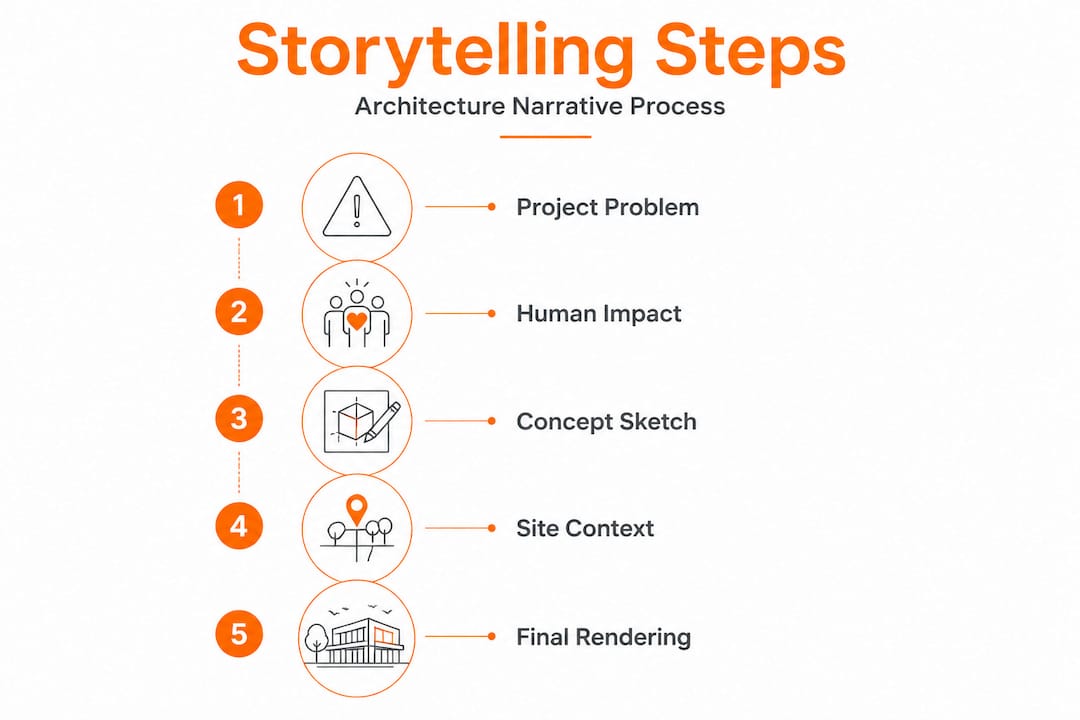
Identify the shift or problem. Start every presentation by naming why this project matters. What condition existed before, and what does this design change? This gives your entire story a reason to exist.
-
Set emotional context. Show the site, the neighborhood, the people who will use the space. A step-by-step storytelling method calls this the “context emotion” phase. You’re not just showing a location. You’re building empathy.
-
Define human stakes. This is where many architects get timid. Say explicitly what is at stake for the people who will occupy or live near this building. A community center isn’t a community center. It’s a place where kids who lack safe after-school space will finally have somewhere to go.
-
Make data emotional. Square footage, setback distances, and energy performance scores are real assets, but only if you wrap them in consequence. Instead of “25% lower energy consumption,” say “residents can expect heating bills 25% lower than comparable units in the same block.”
-
Design your slides as spatial experiences. Each slide or board should feel like entering a room. There’s a focal point, supporting elements, and clear hierarchy. Clutter is the enemy of persuasion.
-
Write interpretive captions. Never rely on images to speak for themselves. A caption that reads “South-facing courtyard allows passive solar gain in winter while shading in summer” teaches the client to see the image the way you intend.
-
Build a narrative scaffold. Arrange your visuals so each image answers a question raised by the previous one. Concept sketch leads to site diagram leads to contextual rendering leads to interior walkthrough. The logic must feel inevitable.
-
Rehearse verbal delivery. Rehearsing verbal delivery and sequencing is a critical final step that separates polished presenters from nervous ones. Practice your spoken transitions between every slide.
The comparison below shows how narrative-integrated approaches outperform traditional sequencing:
| Traditional approach | Narrative-integrated approach |
|---|---|
| Show all floor plans first | Open with the human problem, then reveal plans as the solution |
| Present materials as a list | Frame materials around durability, sensory experience, and cost benefit |
| End with a rendering | End with a human moment: a person using the space you designed |
| Q&A is reactive | Q&A is anticipated through story beats that pre-answer objections |
Pro Tip: If your presentation has more than one major audience (say, both city planners and end-user clients), create two distinct story versions of the same project. The facts are identical; the framing and emphasis shift completely. Explore our step-by-step visualization guide for a structured approach to building these layered presentations.
Presentation design: Boards, sequences, and captions
The physical and digital design of your presentation boards is where narrative structure becomes visible. This is not a graphic design exercise. It is an argument laid out spatially.
Sequence is everything. Effective boards move from concept to final, using diagrams, quality renderings, and clear visual hierarchy. Start broad with site and context, move to concept sketches that reveal your design intent, then progress through plans and sections to the detailed material and lighting choices. Finish with photorealistic renderings that show the project complete and inhabited.
Graphic hierarchy principles that actually work:
- Size: Your most important image should occupy the most real estate on the board. Don’t bury your hero rendering in a corner.
- Contrast: Use light and dark zones to guide the eye. The eye moves from bright to dark, and from large to small.
- Typography: Use no more than two typefaces. Hierarchy through weight and size, not variety.
- White space: Breathing room is not waste. It signals confidence and helps clients focus.
- Color: Use your project’s palette to tie the board’s design language to the building’s character.
“A presentation board should guide the viewer’s eye in a deliberate sequence, as intentionally choreographed as the building’s circulation path itself.”
Captions are the most underused tool in architectural presentation. They bridge the gap between what a client sees and what they should understand. A rendering of a glass facade means little without a caption that explains solar performance, privacy strategy, and cost rationale. Think of captions as the architect’s voiceover when you’re not in the room.
Common errors that undermine otherwise strong boards:
- Placing too many equal-weight images with no hierarchy
- Writing captions that only describe (“view from northwest”) rather than interpret (“northwest corner maximizes mountain views for 80% of residential units”)
- Using fonts below 9pt for any readable body text
- Mixing too many graphic styles across one board
Understanding how rendering shapes meaning for clients will help you select the right visual tone for each stage of the story.
Verification: Testing and refining your narrative
A presentation is not finished when the last slide is designed. It’s finished when you’ve tested it on real human beings and adjusted for clarity.
Start with a dry run in front of at least two trusted colleagues who were not involved in the project. Ask them to tell you, after watching, what they believe the project is trying to accomplish, who benefits from it, and what they would most want to ask about. If their answers don’t match your intentions, your story has gaps.
- Time yourself. Most clients lose focus after 20 minutes. Know your runtime before you’re in the room.
- Mark confusion points. Ask your test audience to flag any moment where they felt lost or needed more information.
- Adjust one variable at a time. Change either the sequence or the caption or the verbal delivery. Never change all three simultaneously or you won’t know what fixed the problem.
- Test the ending. The final image and the final sentence you speak are the most remembered. Make both deliberate.
Rehearsing sequencing is not just about memorizing what comes next. It’s about internalizing the story so deeply that you can respond to interruptions, pivot for a skeptical client, and still land on the emotional conclusion you planned.
“The most persuasive presenters are not the ones with the best visuals. They’re the ones who know their story so well they can tell it in any order and still reach the right destination.”
Use stunning 3D renderings as anchor points in your narrative testing. When a test audience consistently pauses at a rendering with genuine interest, you’ve found a story beat worth expanding. When they scroll past quickly, the image may need reframing or replacement.
Our perspective: Visual storytelling as the architect’s superpower
After reviewing hundreds of presentations, one pattern stands out. The architects who consistently win approvals, convert clients, and build reputations are not always the ones with the most technically brilliant designs. They’re the ones who control the narrative.
Here’s the uncomfortable truth: most architects stop at beautiful images. They treat visualization as the finish line. But images, however photorealistic, are not arguments. They’re raw material. The argument is built through selection, sequence, and interpretation. As research confirms, images are never neutral. Every image you choose to show, and every image you choose to omit, tells the client something about your values and your priorities.
The elite presenters we’ve observed treat editing as seriously as designing. They cut images that are technically impressive but narratively redundant. They reorder slides until the logic feels inevitable. They rewrite captions three times until each one earns its presence.
For developers, this discipline extends beyond client meetings. Approval meetings with city planners, community boards, and zoning committees require a completely different story structure. The emotional hook shifts from “imagine living here” to “imagine what this means for the neighborhood.” The visuals shift from interior warmth to street-level context and public space quality. Browse visualization examples for pitches and you’ll notice the best ones are not the most elaborate. They’re the most focused.
Client trust grows from clarity, not complexity. When a client finishes your presentation and feels like they fully understand what you’re proposing, why it works, and why it matters to them personally, that is when enthusiasm converts into commitment. That level of clarity is a direct result of treating storytelling as a design discipline in its own right.
Need help bringing your architectural story to life?
You’ve got the framework. Now the question is execution. Rendimension specializes in producing the photorealistic 3D renderings, immersive walkthroughs, and animated sequences that make visual storytelling land with genuine impact. Whether you’re pitching a residential development, presenting to a planning board, or building pre-sale marketing assets, high-quality visualization is the foundation every strong narrative needs.

Explore our professional 3D rendering services to see how photorealistic imagery can anchor your story at every stage. If you’re building your process from the ground up, our step-by-step architectural visualization resource walks you through the technical side of producing presentation-ready assets. And when you’re ready to work with a team that treats your project’s narrative with the same precision we bring to every pixel, work with our visualization experts to take your next presentation from draft to decision.
Frequently asked questions
What is the first step in visual storytelling for architects?
Start by identifying the central shift or problem your project solves. The first step is naming why the project matters to your specific audience before a single image is shown.
How do I create emotional impact with architectural visuals?
Use sequencing, captions, and contextual photography to frame images around human stakes and real-world outcomes. Showing context like a filmmaker and speaking in human consequences transforms passive images into active arguments.
What should I include in an architectural presentation board?
Sequence your board from concept sketches to final photorealistic renderings, combining site diagrams and clear graphic hierarchy. Presentation boards guide the viewer from broad concept to detailed resolution in a single visual journey.
Do images alone persuade clients, or are captions and story necessary?
Images alone rarely persuade. Interpretive captions reveal values and priorities that raw images leave ambiguous, making captions and story structure essential to a convincing presentation.
How do developers use visual storytelling for approval meetings?
Developers open with street-level sequences, directly address practical concerns like zoning and shadows, and use immersive renderings to build community support. Sequential storytelling builds stakeholder trust and moves approval meetings from debate to consensus.