TL;DR:
- Photorealistic interiors mimic real-world details, materials, lighting, and scale to fool viewers.
- Choosing the right rendering software depends on hardware, output needs, and workflow compatibility.
- Overcoming common pitfalls like VRAM overload and inaccurate scale is key to achieving believable results.
Choosing the right interior visual for a client presentation is harder than it looks. You’re not just picking a pretty image — you’re selecting the single frame that convinces a stakeholder to trust your vision, approve a budget, or greenlight a project. Photorealistic interior visualization has raised the bar for what clients expect, but achieving genuine photorealism requires more than pointing capable software at a 3D model. This article walks you through what photorealism actually means, five standout interior examples, how to choose the right rendering engine, and the pitfalls that quietly ruin otherwise excellent renders.
Table of Contents
- What makes an interior photorealistic?
- Five inspiring examples of photorealistic interiors
- How to choose the right rendering software for interiors
- Common pitfalls (and how to avoid them) in interior photorealistic rendering
- A fresh perspective: why chasing ultra-realism isn’t always best
- Take your interiors to the next level with professional rendering services
- Frequently asked questions
Key Takeaways
| Point | Details |
|---|---|
| Photorealism criteria | True photorealistic interiors feature lifelike lighting, authentic materials, and precise proportions. |
| Standout render examples | Review of five interior visualizations shows what makes images client-ready and inspiring. |
| Software selection | Choosing the right rendering engine depends on your workflow, hardware, and project needs. |
| Avoiding pitfalls | Common mistakes like scale mismatch and hardware limitations can derail true realism if not managed. |
| Realism versus communication | The most effective images sometimes favor clarity or mood over strict photorealism. |
What makes an interior photorealistic?
Photorealism in interior visualization means producing an image that a viewer cannot immediately distinguish from a photograph. That sounds simple, but the gap between a good-looking render and a truly photorealistic one is significant. Clients notice it even when they can’t articulate why.
The core attributes that define photorealistic interiors include:
- Accurate scale and proportion: Furniture, ceiling heights, and architectural details must match real-world dimensions. A sofa that reads even slightly oversized breaks the illusion instantly.
- Lifelike material behavior: Wood grain, polished concrete, brushed metal, and fabric all interact with light differently. Each material needs correct reflectance, roughness, and translucency values.
- Subtle imperfections: Real spaces have fingerprints on glass, slight scuffs on floors, and uneven paint texture. Adding controlled imperfections makes a scene feel inhabited rather than sterile.
- Physically accurate lighting: Natural light shifts throughout the day. Interior artificial sources cast warm pools with falloff. Both need to be simulated, not approximated.
- Camera realism: Depth of field, chromatic aberration, and lens distortion mimic how a real camera perceives a space.
The engine powering the render determines how convincingly these elements combine. Leading rendering software includes V-Ray for gold-standard ray tracing, Corona for interior-focused workflows with LightMix and UHD Cache, Unreal Engine for real-time results using Lumen and Nanite, and Enscape for SketchUp-integrated real-time previews. Each handles light transport differently, which directly affects how believable the final image looks.
Understanding why photorealistic renders matter for client trust is the foundation. From there, the technical choices you make about lighting techniques for realism determine whether your output crosses the threshold from impressive to indistinguishable.
Pro Tip: Consistent lighting is the single biggest contributor to perceived realism. Before adjusting materials or geometry, lock in your lighting setup and test it across multiple times of day. Inconsistent light sources are the fastest way to expose a render as artificial.
Five inspiring examples of photorealistic interiors
With clear standards established, here’s what photorealism looks like in action, using five standout interior visualizations.
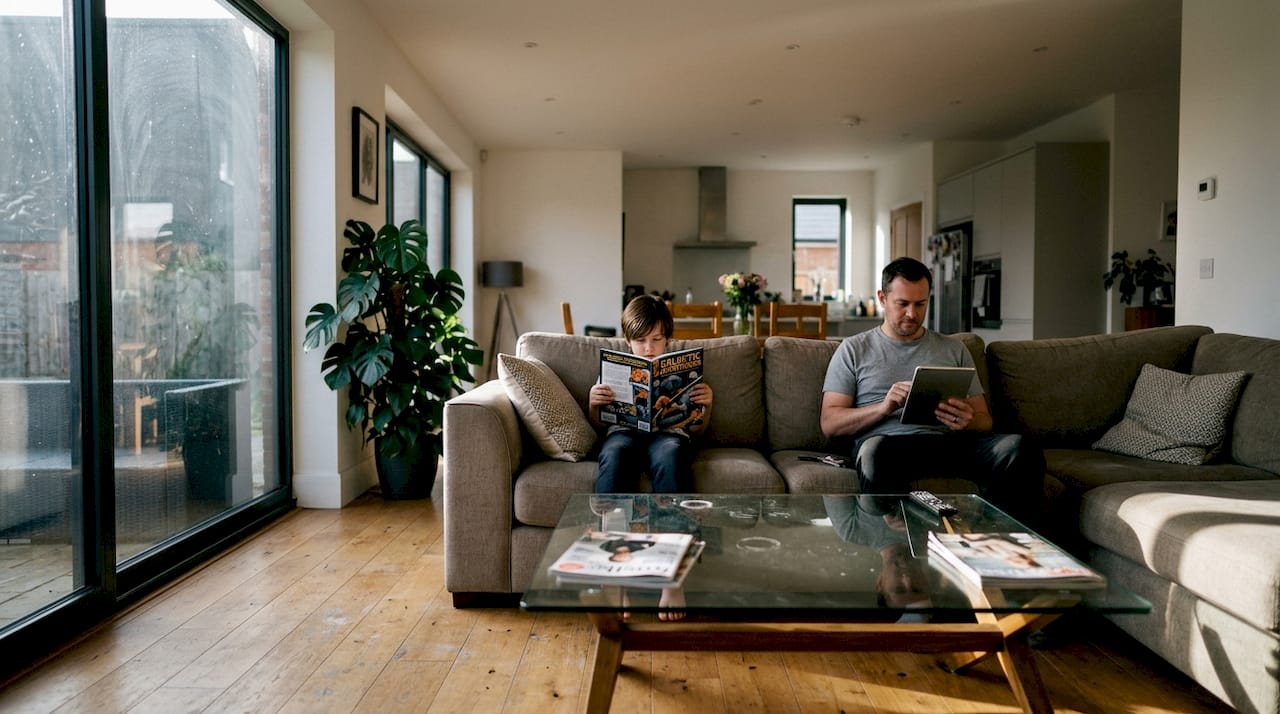
1. Residential living room: A warm, open-plan living space with floor-to-ceiling glazing. The key to realism here is the way afternoon sunlight creates sharp shadows across a textured rug, then softens as it bounces off a linen sofa. Material fidelity on the oak flooring, including visible grain variation, seals the effect.
2. Modern kitchen: Polished quartz countertops, matte cabinetry, and pendant lighting create a technically demanding scene. The challenge is balancing specular highlights on reflective surfaces without blowing out the image. Subtle grease marks near the cooktop add authenticity.
3. Boutique hotel lobby: Layered lighting from recessed LEDs, floor lamps, and a feature chandelier demands careful light mixing. The marble flooring needs accurate reflectance to show the room’s geometry without becoming a mirror.
4. Retail showroom: Product visibility is critical here. Controlled track lighting must illuminate merchandise without harsh shadows, while the overall environment still reads as designed and intentional.
5. Open-plan workspace: Natural light from skylights combined with task lighting creates complex shadow interactions. The lived-in quality comes from small details: a coffee cup, stacked books, a jacket on a chair.
| Interior type | Render engine | Unique challenge | Hardware note |
|---|---|---|---|
| Residential living room | Corona | Soft bounce light accuracy | 16GB VRAM recommended |
| Modern kitchen | V-Ray | Specular control on surfaces | GPU mode benefits |
| Hotel lobby | V-Ray | Multi-source light mixing | High CPU core count |
| Retail showroom | Enscape | Real-time client walkthroughs | Mid-range GPU sufficient |
| Open-plan workspace | Unreal Engine | Dynamic lighting transitions | Lumen requires RTX GPU |
Common technical challenges across these examples include texture scale mismatches that make tiles look oversized, over-denoising that blurs fine fabric detail, and VRAM limits that cause significant slowdowns. Rendering benchmarks vs. reality confirm that VRAM limits can cause up to a 3x slowdown, particularly with V-Ray caustics exceeding 12GB, while thin walls frequently block Lumen global illumination in Unreal Engine scenes.
Browse more render examples to see how these challenges are solved across different project types, or revisit the photorealistic rendering guide for a deeper technical breakdown.
How to choose the right rendering software for interiors
Impressed by those results? The next step is finding the software that will let you achieve similar outcomes on your own projects.
Evaluating a rendering engine isn’t just about image quality. Your workflow, hardware, timeline, and client expectations all shape the right choice. Here’s a structured approach:
- Assess your hardware first. GPU-accelerated engines like V-Ray GPU and Enscape demand VRAM. CPU-heavy workflows suit Corona. Unreal Engine’s Lumen system requires an RTX-class GPU for real-time global illumination.
- Define your output format. Still images, animations, and real-time walkthroughs each favor different engines. Enscape and Unreal Engine excel at interactive presentations; V-Ray and Corona dominate for print-quality stills.
- Consider your existing software ecosystem. Corona and V-Ray integrate tightly with 3ds Max. Enscape plugs directly into SketchUp, Revit, and Rhino. Unreal Engine accepts imports from most major DCC tools.
- Evaluate render time against deadline pressure. A photorealistic still in Corona may take hours; the same scene in Enscape renders in seconds at lower fidelity.
| Engine | Best for | Price range | Key strength | Limitation |
|---|---|---|---|---|
| V-Ray | High-end stills and animation | Subscription | Gold-standard ray tracing | Steep learning curve |
| Corona | Interior visualization | Subscription | LightMix, intuitive workflow | CPU-heavy |
| Unreal Engine | Real-time and VR | Free (royalty model) | Lumen GI, interactivity | Asset pipeline complexity |
| Enscape | Quick client previews | Subscription | SketchUp/Revit integration | Lower ceiling on realism |
The leading rendering software comparison confirms these trade-offs hold across typical architectural workflows. Understanding photorealistic rendering software options in detail, alongside a clear photorealistic rendering workflow, will help you make the switch with confidence.
Pro Tip: Always run a trial version on an actual project file before committing to a license. Benchmark renders on your own hardware, not vendor-supplied test scenes. The difference in real-world performance can be dramatic.
Common pitfalls (and how to avoid them) in interior photorealistic rendering
Even with the best software, some common pitfalls can easily undercut otherwise beautiful renders. Here’s what to watch out for and how to avoid them.
- VRAM overload: Pushing complex scenes beyond your GPU’s memory capacity doesn’t just slow things down. VRAM limits cause a 3x slowdown in GPU render modes, particularly with caustic effects above 12GB. Solution: split complex scenes into render layers or switch to CPU mode for memory-intensive passes.
- Incorrect scale: A floor tile that should be 600mm renders at 1200mm. The result looks wrong without the viewer knowing exactly why. Always import geometry with real-world units and verify against a reference object.
- Over-denoising: Denoising algorithms are powerful, but pushing them too far blurs fabric texture, softens wood grain, and flattens specular detail. Use denoising conservatively and increase sample counts instead.
- Poor texture mapping: UV seams on curved surfaces, stretched textures on non-planar geometry, and tiling that’s too obvious all destroy material believability. Invest time in UV unwrapping before touching render settings.
- Thin wall geometry blocking GI: In Unreal Engine, walls below a certain thickness can block Lumen’s global illumination calculations, creating dark patches that don’t correspond to any real light obstruction.
“The most common render failures we see aren’t software problems. They’re geometry and scale problems that no engine can fix automatically. Clean modeling is the foundation of every photorealistic interior.”
Catching these issues early means building a pre-render checklist: verify scale, check UV maps, run a low-sample test render before committing to a full overnight pass. Understanding photorealism in architecture at a deeper level, alongside a solid architectural visualization guide, will help you build that discipline into every project.
A fresh perspective: why chasing ultra-realism isn’t always best
Here’s something the render forums rarely say out loud: maximum photorealism doesn’t always win the room. We’ve seen projects where a near-photographic interior render confused clients because the design detail overwhelmed the core concept. The client spent the meeting asking about the throw pillow color instead of approving the spatial layout.
Some clients respond more decisively to slightly stylized renders that emphasize mood, proportion, and material palette without simulating every photon. A well-composed, slightly warmer, slightly softer image can communicate design intent more clearly than a technically perfect one.
Photorealism is a tool, not a goal. Use it when the project demands it: luxury residential, high-end hospitality, competitive tender submissions. For early-stage concept presentations, a mood-driven render that prioritizes atmosphere over technical accuracy often moves the conversation forward faster. Browse inspiring photorealistic renders with that lens and you’ll notice the most effective images aren’t always the most technically complex. They’re the ones that make a client feel something.
Take your interiors to the next level with professional rendering services
If you’re ready to elevate your presentations even further, consider how partnering with visualization specialists can transform your next project.

Rendimension’s team has delivered over 1,000 projects globally, covering everything from residential interiors to large-scale commercial developments. Whether you need a single hero image or a full suite of professional 3D rendering assets, the process is built around your workflow and timeline. If you’re new to commissioning visualization work, the visualization step-by-step guide walks you through exactly what to expect. For projects that demand more than static images, interactive walkthroughs give clients an immersive experience that static renders simply can’t match.
Frequently asked questions
What software produces the most photorealistic interior renders?
V-Ray, Corona, Unreal Engine, and Enscape lead the field in photorealistic interior rendering, each with distinct strengths suited to different workflows and output formats.
What are the most common mistakes when aiming for photorealism?
VRAM overload, scale mismatches, over-denoising, and improper UV mapping are the most frequent issues that undermine interior render quality, often appearing as blurs, artifacts, or oddly lit surfaces.
Do all clients require ultra-photorealism for interior presentations?
Not at all. Many clients respond more effectively to mood-driven or slightly stylized renders that keep the focus on design intent rather than technical perfection.
How can I ensure my renderings look photorealistic?
Prioritize accurate scale, physically correct materials, and a locked lighting setup before touching post-processing. Always test on a calibrated display before final delivery.
What hardware is needed for photorealistic interior rendering?
A modern GPU with at least 12GB VRAM is the practical minimum to avoid the 3x slowdown that occurs when scenes exceed GPU memory, particularly in caustic-heavy or complex interior scenes.
Recommended
- Photorealistic Rendering: Complete 2025 Guide For Architects
- Photorealistic Architectural Rendering: Complete 2025 Guide
- Why Use Photorealistic Renders In Architecture
- Role Of Photorealism In Architecture Visualization
- Why true-to-life 3D matters for e-commerce brands
