Animation rendering guide for architects and developers
TL;DR:
- Animation rendering transforms sequences of 3D scenes into visually consistent videos that impact marketing and client perception. It involves multiple technical stages, from scene optimization to denoising, with choices between real-time and offline methods affecting speed and realism. Success depends on early collaboration, understanding technical pitfalls, and selecting appropriate tools to meet project goals efficiently.
Pressing “render” in your 3D software is just the beginning. What actually separates a flat, unconvincing architectural animation from one that wins client approvals and drives pre-sales is a web of technical decisions most architects and developers never see. Rendering isn’t a single button or a passive process. It’s a discipline with significant impact on visual quality, project timelines, and marketing outcomes. This guide breaks down exactly how animation rendering works, what pitfalls to watch for, and how to make smarter decisions for your next architectural or real estate visualization project.
Table of Contents
- Defining animation rendering for architecture and real estate
- How animation rendering workflows power 3D visual presentations
- Real-time vs offline rendering: Choosing the right solution
- Advanced techniques and pitfalls: Secrets to stunning render animations
- Our take: What most guides miss about animation rendering in architecture
- Enhance your architectural presentations with expert animation rendering
- Frequently asked questions
Key Takeaways
| Point | Details |
|---|---|
| Rendering is complex | Great architectural animations depend on mastering rendering processes, not just hitting ‘render.’ |
| Workflow choice matters | The right rendering approach—real-time or offline—affects speed, quality, and project flexibility. |
| Common pitfalls to avoid | Issues like flicker and hardware slowdowns can ruin an animation, but have specific technical fixes. |
| Expert tactics save time | Using AI denoising, adjusting GI bounces, and working with pros can dramatically speed up and enhance your visuals. |
| Collaboration drives success | Partnering with rendering specialists turns technical hurdles into creative assets for marketing and client engagement. |
Defining animation rendering for architecture and real estate
Animation rendering is the computational process of converting a sequence of 3D scene frames into final, viewable images or video. Each frame in an architectural walkthrough or flythrough requires your rendering engine to calculate how light interacts with every surface, material, and camera position in that scene. String hundreds or thousands of those frames together and you have a rendered animation.
Understanding 3D animation explained in the architectural context means recognizing where rendering sits in the visualization pipeline. The process moves from concept and modeling, through texturing and lighting, into rendering, and finally post-production. Rendering is where your raw 3D data becomes the polished visual your clients and investors actually see. It is arguably the stage with the highest stakes.
The core difference between still image rendering and animation rendering is scale and consistency. A still image is one frame calculated to perfection. An animation might involve 3,000 to 10,000 frames, and each one must maintain visual consistency with the last. Any variation in lighting calculations, denoising behavior, or sample counts between frames shows up as flickering or popping in the final video, which instantly destroys the sense of realism you worked hard to create.
For animation in architecture, this consistency requirement changes the entire technical approach. Here’s why rendering matters beyond aesthetics:
- It directly shapes how investors and buyers emotionally respond to a project that doesn’t yet exist physically.
- Rendering quality determines whether a marketing video looks developer-grade or amateurish.
- Poor rendering choices can double or triple production timelines, affecting project launch dates.
- Sophisticated rendering communicates spatial quality, material authenticity, and lighting mood in ways that floor plans never can.
“Modern archviz pipelines combine hybrid raster and ray tracing approaches. Tools like Lumion and Unreal Engine use real-time rendering, while V-Ray and Cycles deliver offline photorealism. AI denoising now enables 4x fewer render samples without sacrificing output quality, and render farms provide the computational scale needed for large animation projects.”
This distinction matters because choosing the wrong tool for your project type can cost you weeks of unnecessary render time or compromise the visual quality you need for a high-stakes presentation.
How animation rendering workflows power 3D visual presentations
Now that you know what animation rendering is, let’s break down the process step by step. The workflow is not linear in practice. It loops, iterates, and occasionally throws unexpected problems at you, especially on complex architectural scenes.
The core animation rendering workflow typically follows this sequence:
- Scene preparation and optimization. Geometry is cleaned, materials are assigned, and the scene is optimized for rendering. This includes managing polygon counts, setting up proper UV maps, and verifying that no geometry is causing calculation errors.
- Lighting and camera setup. Lighting rigs are established, including HDRIs, artificial light sources, and natural light simulations. Camera paths are keyframed and reviewed before any rendering begins.
- Test rendering. Low-resolution test renders validate that lighting, materials, and camera movement look correct before committing to full-resolution output. Skipping this step is one of the most expensive mistakes in the workflow.
- Full render pass. The engine calculates every frame at full resolution and sample count. Depending on the scene complexity and hardware, this phase can take hours to days.
- Denoising and post-processing. Raw rendered frames often appear noisy. Denoising algorithms, particularly OIDN (Open Image Denoise), clean up that noise while preserving detail.
- Compositing and export. Frames are assembled into video, color-graded, and exported in the required format for presentation or marketing use.
For any architectural visualization project, the rendering phase is where teams most commonly encounter expensive surprises. The technical issues are real and consistent across projects:
- Temporal flickering happens when denoising or sample settings vary between frames. Using a consistent denoiser like OIDN across all frames is essential.
- Fireflies are bright pixel anomalies caused by caustics or aggressive lighting setups. Clamping values and adjusting Russian Roulette path termination settings resolves most firefly problems.
- VRAM overflow occurs when scene data exceeds your GPU memory, causing the renderer to slow down by 2 to 5 times as it offloads to system RAM.
- Motion blur and volumetric effects like fog, smoke, or atmospheric haze increase per-frame render times by 5 to 10 times compared to clean geometry scenes.
Pro Tip: Never skip a proxy test render on a representative frame before launching a full animation render job. A single hour of test time can prevent 48 hours of wasted production time on a scene with hidden errors.
Realistic time demands surprise most teams new to animation rendering. A 60-second walkthrough at 30 frames per second equals 1,800 frames. If each frame takes 10 minutes to render on a single workstation, that’s 300 hours of render time. Professional studios solve this with render farms that distribute the job across dozens or hundreds of machines simultaneously.

Real-time vs offline rendering: Choosing the right solution
Understanding the workflow raises a critical decision: which rendering approach best serves your goals? The answer depends on your project stage, budget, timeline, and the quality bar required.
Real-time rendering engines like Unreal Engine and Lumion generate frames almost instantly as you navigate the scene. They achieve this speed by using rasterization (a faster but less physically accurate method) combined with selective ray tracing for specific effects. The visual quality has improved dramatically in recent years, but real-time approaches still trade some realism for speed.
Offline rendering engines like V-Ray and Blender’s Cycles calculate full global illumination, accurate reflections, and complex light bounces for every frame. The results are photorealistic in ways that are difficult to distinguish from photography, but each frame takes significantly longer to produce.
The render time optimization guide makes the trade-off clear: real-time tools like Unreal and Lumion are faster for design iteration and client reviews, while offline photoreal tools like V-Ray and Cycles consistently deliver superior realism for final marketing assets. AI-assisted denoising is now closing that gap, making offline rendering more competitive on timelines.
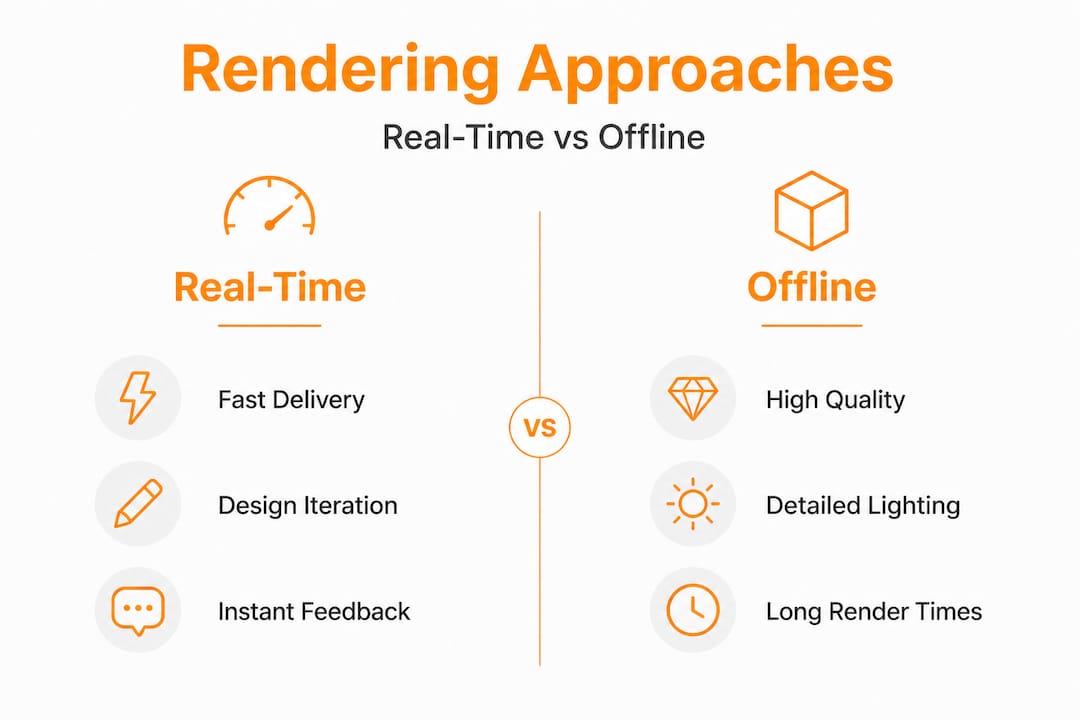
| Feature | Real-time rendering | Offline rendering |
|---|---|---|
| Speed | Near instant to minutes | Hours to days per animation |
| Visual quality | Very good, improving rapidly | Photorealistic, industry benchmark |
| Best use case | Design reviews, interactive tours | Final marketing videos, investor decks |
| Hardware cost | High-end GPU required | GPU or CPU farm for animation |
| Revision speed | Fast, ideal for iteration | Slow, costly to change late |
| Typical tools | Unreal Engine, Lumion, Twinmotion | V-Ray, Corona, Cycles, Arnold |
For decisions about which approach to use on a specific project, consider animation for project decisions as a framework: if the output will be used in a live client walkthrough or design review meeting, real-time rendering’s speed and interactivity outweigh its quality limitations. If the output is a polished 4K marketing video destined for a sales website or investor presentation, offline rendering’s superior light simulation justifies the longer production time.
Pro Tip: On large development projects, use real-time rendering for concept approval stages and switch to offline rendering for final deliverables. This hybrid approach can cut total production time by 30 to 40% without compromising final output quality.
Advanced techniques and pitfalls: Secrets to stunning render animations
After understanding core approaches, it’s time to uncover the expert techniques and critical watchouts that elevate animation rendering from adequate to outstanding. This is where projects are won or lost, and where hidden inefficiencies quietly eat budgets.
Speed and quality optimization techniques worth implementing:
- Reduce GI (global illumination) bounces strategically. Dropping GI bounces from 5 to 3 can reduce render time by approximately 50% per frame with minimal visible quality loss in most architectural interiors.
- Use baked normals instead of displacement maps. Switching from displacement to baked normal maps delivers 20 to 40% faster render times with nearly identical visual results at camera-typical distances.
- AI denoising to reduce sample counts. Denoising tools enable significant sample reduction while maintaining output quality, as noted in the render optimization literature. This is now standard practice in professional archviz studios.
- Render in passes. Splitting your render into separate passes (diffuse, specular, shadows, reflections) allows targeted adjustments in post-production without re-rendering the entire scene.
“Benchmarks from hardware testing labs are approximations with real variance. Client-specific scenes can deviate from published benchmarks by 2 to 5 times in either direction depending on geometry complexity, material setup, and scene organization. Always test with your actual project files, not synthetic benchmarks.”
This is critical advice for any team planning a render timeline based on hardware spec sheets.
Common pitfalls and their solutions:
| Pitfall | Impact | Solution |
|---|---|---|
| Temporal flickering | Video looks unstable, unprofessional | Use OIDN consistently across all frames |
| Fireflies in dark scenes | Bright noise destroys realism | Apply value clamping, adjust path settings |
| VRAM overflow | 2 to 5x slowdown per frame | Optimize geometry, use render farm GPU nodes |
| Motion blur misconfiguration | Smearing artifacts on moving elements | Set shutter angle to match real camera values |
| Volumetric overuse | 5 to 10x render time increase | Use sparsely, bake where possible |
| Ignoring LOD management | Unnecessary polygon load | Use level-of-detail meshes for background elements |
The case for stunning 3D renderings in real estate marketing is well established, but these technical details reveal why achieving that quality consistently requires both skill and process discipline. Understanding the 3D visualization definition and its technical dimensions helps architects and developers communicate more effectively with rendering studios and set realistic expectations.
Professional render farms are not just for convenience at scale. They’re a quality tool. Distributing a 3,000-frame animation across 50 render nodes not only compresses a week’s work into hours, it also prevents the thermal throttling and inconsistency that can occur when a single workstation runs continuously for days.
Our take: What most guides miss about animation rendering in architecture
Most technical guides on animation rendering get absorbed in software comparisons and hardware benchmarks. That’s useful, but it misses something that matters far more in practice: the biggest rendering failures we see in architectural and real estate projects are not caused by choosing the wrong renderer. They’re caused by poor collaboration between design teams and rendering specialists.
Here’s the uncomfortable truth about how 3D rendering transforms architecture: the technology is only as effective as the brief behind it. We’ve seen teams invest in top-tier hardware and premium render software, then deliver mediocre animations because the brief was vague, the scene was handed over late, or no one confirmed which frames needed to convey specific spatial qualities. The rendering specialist can’t save a poorly conceived scene no matter how sophisticated their pipeline is.
The benchmark trap is real. Developers and architects often evaluate rendering partners or internal setups based on published specs and benchmark numbers. But those numbers, as the research consistently shows, can deviate from real-world project performance by a factor of 2 to 5. Every architectural scene is different. The only valid benchmark is a test render of your actual project scene.
The most effective teams treat rendering as a creative partnership rather than a production step. That means involving rendering specialists early in design development, sharing project context and presentation goals before modeling begins, and running iterative reviews throughout the process rather than only evaluating the final output. This approach consistently delivers better results in less total time than handing off a finished model and waiting for output.
Finally, resist the temptation to optimize purely for speed. The goal isn’t the fastest render. The goal is the most effective visual communication for your specific project and audience. Sometimes that means accepting a longer timeline for offline photorealism. Sometimes it means leveraging real-time for stakeholder engagement earlier in the design process. The decision should always start with the presentation goal, not the render engine.
Enhance your architectural presentations with expert animation rendering
Achieving consistently high-quality animation rendering requires more than good software. It demands experience across hundreds of project types, deep knowledge of technical pitfalls, and a process built around delivering results under real project deadlines.

Rendimension brings that expertise to every project. Our 3D rendering services are built for the specific demands of architectural and real estate visualization, from concept-stage design reviews to final marketing deliverables. Whether you need photorealistic fly-throughs for an investor presentation or interactive tours for a pre-sales campaign, our architectural visualization solutions are calibrated to your audience and timeline. Our team also produces immersive 3D walkthrough tools that give buyers and stakeholders an experience no floor plan or still image can replicate. With over 1,000 completed projects globally, we know how to turn your design intent into visuals that perform.
Frequently asked questions
What is the difference between animation rendering and still rendering in architecture?
Animation rendering generates a sequence of thousands of frames that are assembled into video, while still rendering produces a single high-resolution image. Animation rendering requires much stricter consistency controls because any variation between frames appears as visible flickering in the final video.
How does VRAM affect animation rendering speed?
When a scene’s data exceeds available GPU VRAM, the renderer is forced to offload to system RAM, which causes render slowdowns of 2 to 5 times compared to normal performance. Managing geometry complexity and using render farm nodes with sufficient VRAM prevents this bottleneck.
When should I choose real-time rendering over offline rendering?
Choose real-time rendering for design iterations, stakeholder reviews, and interactive presentations where speed matters more than absolute realism. Offline rendering is the right choice when the final output requires maximum photorealism for polished marketing videos and investor-facing deliverables.
What are common quality issues in animation rendering?
The most frequent issues are temporal flickering from inconsistent denoising, firefly artifacts from caustic light effects, and excessive render times caused by high sample counts or VRAM limitations. Each has a direct technical solution once identified early in the workflow.