TL;DR:
- Augmented reality enhances client understanding and project efficiency by overlaying digital models onto real spaces.
- AR outperforms traditional methods by providing context, interactivity, and real-time editing during design reviews.
- Most firms succeed by using established AR platforms and outsourcing development rather than creating custom solutions.
Flat drawings and static renders have long been the industry standard, yet they routinely leave clients confused, unmotivated, or pushing back on design decisions they cannot fully picture. Augmented reality changes that equation fast. AR improves client engagement and project outcomes far beyond what 2D or conventional 3D tools can achieve. In simple terms, AR layers digital architectural models directly onto the physical world through a smartphone or headset, giving clients and project teams a real-scale, interactive preview of what is coming. This article covers what AR means for architecture, why it outperforms traditional methods, how it compares to VR, and practical steps your firm can take right now.
Table of Contents
- What is augmented reality in architecture?
- Major benefits of AR in the architectural workflow
- Comparing AR to VR and traditional visualization methods
- Real-world applications of AR in architecture and development
- Why most architects overcomplicate AR—and what actually works
- Bring your architecture to life with AR and 3D visualization
- Frequently asked questions
Key Takeaways
| Point | Details |
|---|---|
| Engages clients | AR enables interactive, real-world presentations that boost client satisfaction and design approvals. |
| Reduces project time | Integrating AR can cut project timelines by up to 40% with faster decision-making and design clarity. |
| Improves design accuracy | Real-time model overlays help spot potential issues early, minimizing costly revisions later. |
| Practical integration | Starting with proven AR tools and expert partners helps architects see ROI without overcomplicating adoption. |
What is augmented reality in architecture?
Augmented reality is the technology that overlays computer-generated content onto a live view of the real world. In architecture, that means placing a full-scale digital model of a building, interior, or landscape directly into an actual physical space, visible through a phone camera, tablet, or AR headset. Clients can walk around it, look inside it, and react to it in context, before a single wall goes up.
AR in architecture relies on several core technologies working together:
- Markerless tracking: The device maps its environment without needing printed markers, using visual feature points to anchor the model accurately in space.
- Plane detection and raycasting: The system identifies flat surfaces like floors and walls so it can place models with physical precision.
- Real-time lighting estimation: The AR engine reads ambient light conditions and adjusts how the model looks to match, making it feel credible.
- BIM and Revit integration: Markerless tracking and BIM integration allow architects to pipe live design data directly into AR environments, keeping the model current with every design iteration.
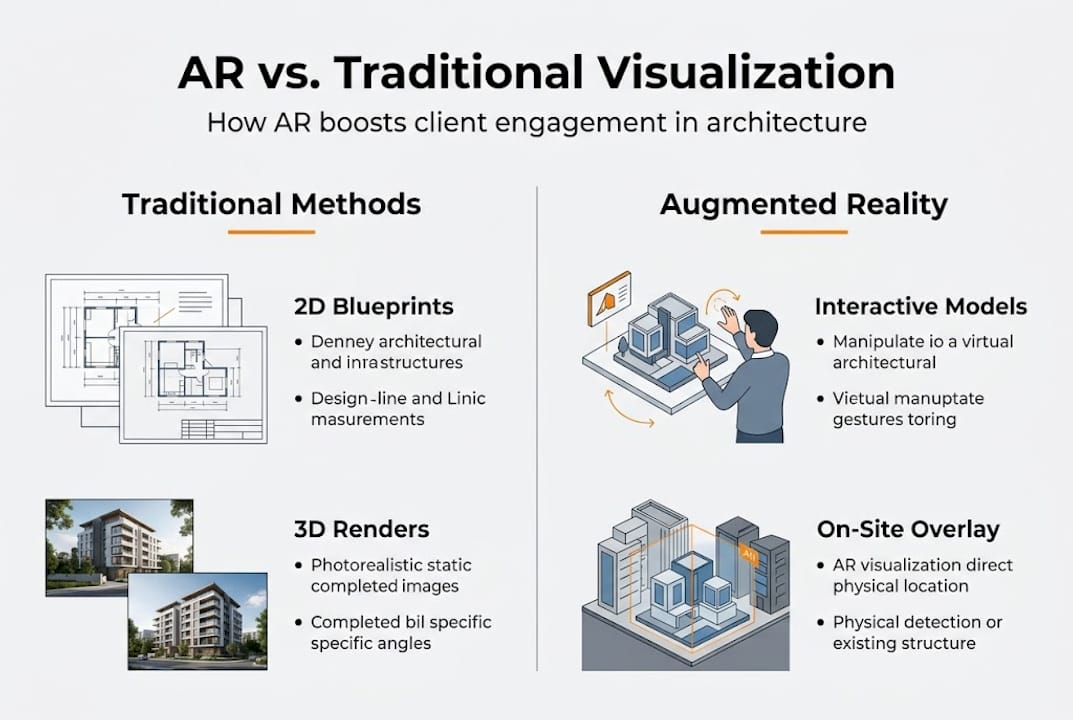
AR is not the same as VR. VR replaces your entire field of view with a simulated environment, which is powerful for immersion but cuts the user off from the real world. Traditional 3D renders are static images or videos, impressive to look at but impossible to interact with. AR keeps you grounded in the actual site or room while adding the design on top. That context is exactly what makes it so persuasive for client presentations and on-site coordination.
Practical examples include overlaying a proposed building onto its actual lot during a client site visit, or letting a homebuyer walk through a not-yet-built interior using a tablet in the sales office. Both scenarios give stakeholders an immediate, visceral understanding that no PDF or flythrough video can match.
Pro Tip: Prioritize AR platforms with robust markerless SDKs. Marker-based systems require printed targets placed on-site, which adds friction and limits where and how you can present. Markerless platforms give you the flexibility to present anywhere, from a client boardroom to the actual construction site.
Major benefits of AR in the architectural workflow
AR delivers measurable gains that show up in both the numbers and the day-to-day experience of running a project. The data is clear: AR-BIM integration cuts project time by 40% and pushes client design understanding to 85%, compared to just 75% for 2D methods. That 10-point gap translates directly into fewer revision cycles, faster approvals, and less money spent re-explaining what a space will actually feel like.
Usability research backs this up. The ARchitect framework scored 89.2 out of 100 in usability testing, outperforming traditional CAD tools. High usability scores matter because they confirm that AR is genuinely accessible to non-technical clients, not just something your IT team finds impressive.
| Benefit | AR | Traditional 2D/3D |
|---|---|---|
| Client design understanding | 85% | 75% |
| Project time reduction | Up to 40% | Minimal |
| Real-world context | Yes | No |
| Real-time edits during review | Yes | Limited |
| Usability score (ARchitect) | 89.2/100 | Below benchmark |
The downstream advantages stack up quickly:
- Reduced revisions: When clients can see and react to a real-scale design in context, they catch issues early instead of after construction begins.
- Stronger stakeholder buy-in: Investors and planning boards respond far more decisively to an AR walkthrough than to a static rendering.
- Faster field coordination: Site teams can compare the as-built environment to the design model in real time, catching clashes before they become expensive.
- Market differentiation: Firms using AR signal technological confidence, which matters in competitive pitches.
For perspective on how visualization quality shapes project outcomes across all formats, the 3D visualization benefits for architects are well documented in practice. The AR layer adds interactivity and real-world anchoring on top of those already-proven visualization advantages.
Comparing AR to VR and traditional visualization methods
Choosing the right visualization tool is a strategic decision, not just a tech preference. Each format has a specific zone where it excels, and using the wrong one for the wrong context costs you time and client confidence.
AR excels in context-aware engagement because it keeps the real world visible while adding the design on top. VR offers full spatial immersion but removes the physical context entirely. Traditional methods, 2D drawings and static 3D renders, offer essentially no interactivity and no real-world grounding.
“The fundamental difference is context. AR asks ‘how does this design fit into the real world?’ VR asks ‘what does this world feel like on its own?’ Neither question is wrong. They just belong to different moments in the project lifecycle.”
| Tool | Real-world context | Interactivity | Immersion level | Best for |
|---|---|---|---|---|
| AR | High | High | Medium | On-site reviews, client approvals |
| VR | None | High | Very high | Spatial experience, full design walkthroughs |
| Traditional 3D | None | None | Low | Permits, documentation, early concepts |
| 2D drawings | None | None | Very low | Technical specs, regulatory submissions |
When to choose each format:
- Use AR when presenting on-site, securing fast client approvals, or making live adjustments during a review meeting.
- Use VR when the goal is full spatial immersion, such as evaluating scale, acoustics, or atmosphere in a completed interior design. A solid VR architectural workflow integrates naturally alongside AR without redundancy.
- Use traditional methods for documentation, permitting, and early concept sketches where interaction is not the goal.
The smartest firms do not pick one tool and ignore the rest. They map each tool to the right project phase. Understanding the full range of VR in design applications helps clarify where AR fits and where immersive VR picks up.
Real-world applications of AR in architecture and development
Theory is useful. Watching AR work on a real project is something else entirely. Across design review, stakeholder engagement, and field coordination, AR is already delivering results for firms that have committed to using it properly.
Architects use AR for three primary workflows. First, design review: team members can flag spatial conflicts by walking through an AR model overlaid on the actual floor plate, spotting issues that a 2D coordination drawing would never reveal. Second, stakeholder presentations: rather than projecting a static render on a boardroom screen, the project team places the AR model in the room, lets investors physically move around it, and collects live reactions. Third, field coordination: site supervisors compare the live construction against the approved design model in real time, reducing errors and change orders.

Mobile AR for interactive presentations streamlines design revisions and increases client engagement measurably, particularly when teams use it to collect structured feedback at each review session. The mobile format matters because it eliminates the need for specialized hardware in most client-facing situations.
If your firm is ready to start, follow these steps:
- Audit your existing models. Make sure your BIM or 3D assets are clean and optimized for real-time rendering before importing them into an AR platform.
- Choose a platform that fits your workflow. Options range from enterprise-level tools with deep Revit integration to mobile-first apps suited to quick client demos.
- Pilot with a single project. Pick a low-stakes presentation and run it in AR. Measure client reaction and revision rate before scaling up.
- Collect structured feedback. Ask clients specific questions during and after the AR session to capture insights you can act on.
- Scale what works. Once you have a repeatable process, roll it out to your broader project portfolio.
For a full picture of how AR fits into a broader immersive workflow, what we do in AR/VR shows the range of tools and approaches available to architecture and development teams today.
Pro Tip: Establish a clear feedback protocol before each AR session. Decide in advance which design decisions are open for input and which are fixed. This keeps the conversation productive and prevents clients from requesting changes that are already past the point of practical adjustment.
Why most architects overcomplicate AR—and what actually works
Here is an observation from years of working with architecture and development teams on immersive visualization: the firms that struggle with AR adoption are almost never struggling because the technology is too limited. They struggle because they set out to build something custom when they should have started with something proven.
Building a bespoke AR platform without in-house expertise burns budget and months of development time. The result is usually a fragile demo that impresses no one. Meanwhile, firms that pick an established platform, start with one project type, and prioritize the client experience over technical novelty close deals faster and generate better feedback.
Post-2018 AR adoption has slowed in many markets due to cost overruns, skills gaps, and uncertain ROI, especially for firms that tried to go it alone. The smarter move is to outsource the visualization and AR production to specialists, focus your internal team on design and client relationship management, and let the technology work for you rather than demanding that you become experts in it.
User experience always beats feature count. A clean, responsive AR presentation that runs smoothly on a client’s own phone will outperform a technically sophisticated demo that requires a briefing to operate. Simplicity is a competitive advantage, not a compromise.
Bring your architecture to life with AR and 3D visualization
You now have a solid understanding of what AR delivers, where it outperforms traditional methods, and how to start integrating it into your practice. The next step is connecting with a team that can actually produce it at the level your clients expect.

Rendimension brings together photorealistic 3D rendering services and immersive architectural visualization solutions purpose-built for architects and developers who need to present with confidence. From high-quality renders to fully interactive VR and AR for real estate, we handle the technical production so your team can stay focused on design and client relationships. With over 1,000 projects completed globally, we understand what it takes to make complex projects legible, compelling, and approval-ready. Reach out to explore what a tailored AR or visualization solution looks like for your next project.
Frequently asked questions
How is augmented reality actually used in architecture projects?
AR is used to overlay 3D building models onto real spaces via mobile devices, making on-site presentations interactive and immersive. Architects use real-scale walkthroughs and live overlays for both field coordination and direct client engagement.
What are the main challenges architects face with AR adoption?
Challenges include high costs, a skills gap, and uncertainty about return on investment, leading many firms to outsource to specialists. Post-2018 adoption has shifted significantly due to these pressures, with outsourcing becoming a common and effective response.
Is AR more effective than traditional 3D visualization for client approvals?
Yes, studies show AR improves design understanding and speeds up client approvals compared to 2D and traditional 3D methods. AR achieves 85% design understanding versus 75% for 2D, directly reducing costly revision cycles.
What software or platforms support AR in architecture?
Leading AR frameworks use markerless tracking and BIM/Revit integration for flexible, real-world modeling on site. Markerless SDKs with BIM integration offer the greatest flexibility across both office and field environments.
Recommended
- Present 3D Renderings To Clients: Boost Engagement 45%
- Why Visualization Matters In Architecture: Enhance Engagement
- Immersive Visual Experiences In Architecture: Key Benefits
- How 3D Visualization Transforms Luxury Outdoor Construction in Phoenix

